Moving a SUSE system to the next supported release closes lifecycle gaps, pulls in newer kernels and core tooling, and keeps package maintenance anchored to repositories that still receive fixes. Planned distribution upgrades also reduce the risk of scrambling through broken mirrors, expired signing keys, or unsupported package mixes after a release ages out.
Both openSUSE Leap and SLES upgrade by changing the repositories that define the target release and then letting zypper reconcile the installed system against that new package set. On openSUSE Leap, that usually means auditing versioned repository URLs and running a full distribution upgrade. On registered SLES systems, zypper migration asks the registration server for valid service-pack targets and switches the product channels automatically.
This page is intentionally scoped to versioned openSUSE Leap releases and SLES service-pack migrations on regular mutable systems. openSUSE Tumbleweed is a rolling release and does not use this workflow, major SLES release upgrades remain an offline task, and third-party repositories or application stacks with their own database migrations should be reviewed before the package transaction starts.
Related: How to update packages in openSUSE and SLES
Related: How to manage zypper repositories in openSUSE and SLES
Related: How to clean up disk space in openSUSE and SLES
Methods to upgrade openSUSE Leap or SLES to a new version:
Steps to upgrade openSUSE Leap or SLES to a new version:
Upgrade openSUSE Leap to a new release
Upgrading openSUSE Leap to the next supported release is a repository-driven distribution change rather than a normal package update. The system needs to be current on the installed release first, then every enabled versioned repository must point at the same target release before zypper dup is allowed to replace packages across the distribution boundary.
The most common breakage comes from old third-party aliases that still hard-code a previous Leap version or no longer publish the next one. The workflow below keeps the manual repo audit explicit, which makes it easier to spot unsupported add-ons before the upgrade transaction begins.
- Back up the system and confirm there is enough free space for downloaded packages and any Btrfs snapshots that will be created during the migration.
$ df -hPT / /var /home 2>/dev/null
A distribution upgrade can remove packages, replace boot components, and expand snapshot usage on Btrfs roots, so keep a restorable backup before changing repository targets.
- Bring the current openSUSE Leap installation fully up to date before changing release targets.
$ sudo zypper refresh
$ sudo zypper update
Fix repository trust prompts, failed mirrors, or pending package conflicts on the current release first; carrying them into a distribution upgrade makes the later conflict summary harder to trust.
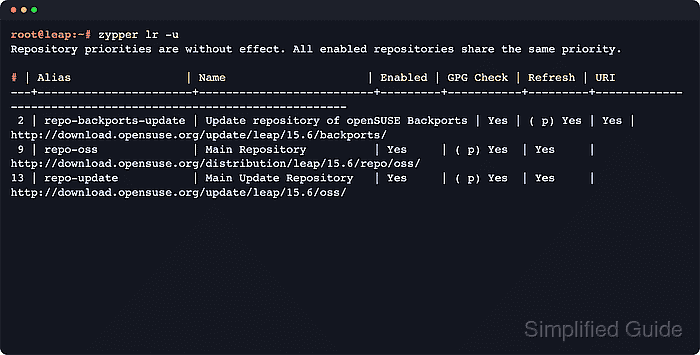
- List the enabled repositories with their URIs and identify every alias that still points at the current Leap version or an unverified third-party vendor.
$ zypper lr -u
#  | Alias                 | Name                     | Enabled | GPG Check | Refresh | URI
---+-----------------------+--------------------------+---------+-----------+---------+---------------------------------------------------------------
 2 | repo-backports-update | Update repository of openSUSE Backports | Yes | ( p) Yes | Yes | http://download.opensuse.org/update/leap/15.6/backports/
 9 | repo-oss              | Main Repository          | Yes     | ( p) Yes  | Yes     | http://download.opensuse.org/distribution/leap/15.6/repo/oss/
13 | repo-update           | Main Update Repository   | Yes     | ( p) Yes  | Yes     | http://download.opensuse.org/update/leap/15.6/oss/
On openSUSE Leap 15.6, the official openSUSE migration tool can preview repository changes with opensuse-migration-tool --dry-run before the full upgrade. The tool is included in 15.6, but its upstream README still labels it experimental, so review the plan before proceeding.
- Replace hard-coded release strings with $releasever or disable repositories that do not yet publish the target Leap release.
$ grep baseurl /etc/zypp/repos.d/*.repo
/etc/zypp/repos.d/repo-oss.repo:baseurl=http://download.opensuse.org/distribution/leap/15.6/repo/oss/
/etc/zypp/repos.d/repo-update.repo:baseurl=http://download.opensuse.org/update/leap/15.6/oss/

$ sudo sed -i 's/15.6/${releasever}/g' /etc/zypp/repos.d/*.repo
Repeat the replacement for any older hard-coded version still present, or disable that repository until a matching target-release URI exists.
Do not leave a mix of current-release and target-release repositories enabled; mixed versioned repos are a common source of dependency loops and vendor conflicts during dup.
- Refresh the target release repositories explicitly and stop on any invalid alias before starting the full upgrade.
$ sudo zypper --releasever=16.0 refresh
Warning: Enforced setting: $releasever=16.0
Retrieving repository 'Update repository of openSUSE Backports' metadata [.error]
Repository 'Update repository of openSUSE Backports' is invalid.
[repo-backports-update|http://download.opensuse.org/update/leap/16.0/backports/] Failed to retrieve new repository metadata.
Use the current supported Leap target for the installed system in place of 16.0. The explicit --releasever keeps the refresh tied to the intended destination until the upgrade completes.
If a repository fails here, correct the URL or disable the alias before continuing. A broken third-party or backports repository is a stop condition, not a warning to ignore.
- Run the distribution upgrade from a text console or stable remote shell after every enabled repository matches the target release.
$ sudo zypper --releasever=16.0 dup --download-in-advance
The --download-in-advance mode downloads the transaction before the replacement phase starts, which is safer on links that may drop mid-upgrade.
Running the upgrade inside the local graphical session is not recommended because a crashed desktop session can interrupt the package transaction.
- Reboot into the upgraded openSUSE Leap environment after zypper dup finishes successfully.
$ sudo reboot
- Verify that the system release and enabled repositories now show the new target version.
$ grep '^PRETTY_NAME=' /etc/os-release
$ zypper lr -u
The upgrade is complete when /etc/os-release reports the new Leap release and the enabled versioned repository URIs all reference that same target version.
Upgrade SLES to a new service pack
Registered SLES systems should use zypper migration for service-pack upgrades. That workflow asks SUSE Customer Center or an RMT server for valid migration targets, enables the matching product channels, and then performs the service-pack transaction with the correct repository set for the installed base product and extensions.
Online migration is deliberately narrower than a generic distribution switch. It is supported only between service packs of the same major SLES release, and machines managed by SUSE Multi-Linux Manager or targeting a new major release need a different workflow.
- Confirm the current SLES release is on a supported migration path and that all installed products are registered.
$ grep '^PRETTY_NAME=' /etc/os-release
$ sudo SUSEConnect --status
Online migration is supported between service packs of the same major release only. For SLES 15, SUSE supports skipping at most two service packs, and the source system must still be on a supported tier before the migration begins.
- Install all pending maintenance patches on the current service pack before migrating.
$ sudo zypper patch
Updating first reduces upgrade-tool drift and keeps the migration target calculation aligned with the current supported package stack.
- Move to a text console or stable remote shell and start the service-pack migration.
$ sudo zypper migration
If more than one migration target is offered, select the next supported service pack for the installed products and extensions.
This command is for registered SLES systems. If the host is unregistered, air-gapped, or managed by SUSE Multi-Linux Manager, use the documented alternative workflow for that environment instead of forcing zypper migration.
- Review the package summary carefully and confirm only after the removals, downgrades, and architecture changes match expectations.
266 packages to upgrade, 54 to downgrade, 17 new, 8 to reinstall, 5 to remove, 1 to change arch.
Overall download size: 285.1 MiB. Already cached: 0 B  After the operation, additional 139.8 MiB will be used.
Continue? [y/n/? shows all options] (y):
zypper migration keeps --no-allow-vendor-change on by default, which helps prevent third-party packages from silently replacing SUSE packages during the service-pack transaction.
- Reboot the server after the migration finishes successfully.
$ sudo reboot
- Verify the new service pack and registration state after the first boot.
$ grep '^PRETTY_NAME=' /etc/os-release
$ sudo SUSEConnect --status
$ zypper patch-check
The migration is complete when /etc/os-release shows the new service pack, all installed products report as registered, and zypper patch-check no longer reports pending maintenance patches.
If the migration fails after package replacement has started on a Btrfs root, return to the pre-migration snapshot first and only then use sudo SUSEConnect --rollback if the registration state also needs to be reverted.

Mohd Shakir Zakaria is a cloud architect with deep roots in software development and open-source advocacy. Certified in AWS, Red Hat, VMware, ITIL, and Linux, he specializes in designing and managing robust cloud and on-premises infrastructures.


