Managing zypper repositories on openSUSE or SLES controls where packages, patches, and dependency updates come from, so a clean repository list is part of keeping package selection predictable. Auditing the enabled sources before adding or changing anything helps avoid pulling software from the wrong vendor, mirror, or release stream.
Repository definitions are stored as .repo files under /etc/zypp/repos.d/, while zypper uses each repository alias as the stable handle for listing, refreshing, enabling, disabling, reprioritizing, and renaming a source. The quickest operator view is a URI-aware listing, because it shows both the alias you will manage later and the exact location backing that alias.
Keep every repository aligned with the system you are actually running. On SLES, most supported repositories come from SCC, RMT, or an approved internal mirror, so adding public openSUSE repositories is usually the wrong choice unless you intentionally use a compatible vendor channel. The first refresh of a newly added repository can also prompt you to trust its signing key, so verify the source before accepting the key import.
Steps to manage zypper repositories in openSUSE and SLES:
- List the current repositories with their source URIs before making changes.
$ zypper lr -u
Repository priorities are without effect. All enabled repositories share the same priority.

#  | Alias       | Name                   | Enabled | GPG Check | Refresh | URI
---+-------------+------------------------+---------+-----------+---------+---------------------------------------------------------------
 1 | repo-oss    | Main Repository        | Yes     | ( p) Yes  | Yes     | http://download.opensuse.org/distribution/leap/15.6/repo/oss/
 2 | repo-update | Main Update Repository | Yes     | ( p) Yes  | Yes     | http://download.opensuse.org/update/leap/15.6/oss/
The lr form is shorthand for zypper repos, and the alias column is the durable identifier to use in later commands because repository numbers can change after edits.
- Add the new repository with a unique alias and enable auto-refresh if you want metadata refreshed automatically.
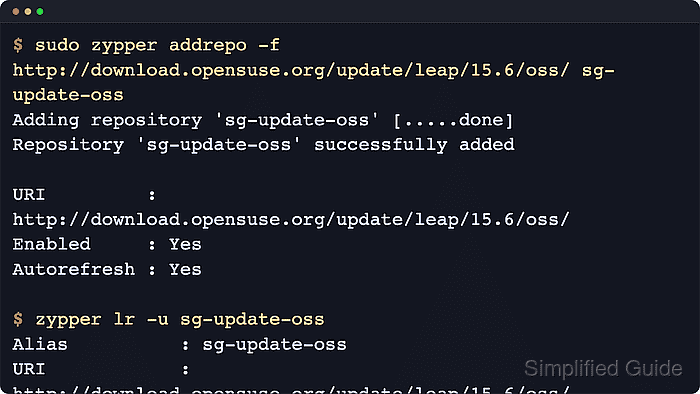
$ sudo zypper addrepo -f http://download.opensuse.org/update/leap/15.6/oss/ sg-update-oss
Adding repository 'sg-update-oss' [.....done]
Repository 'sg-update-oss' successfully added

URI         : http://download.opensuse.org/update/leap/15.6/oss/
Enabled     : Yes
GPG Check   : Yes
Autorefresh : Yes
Priority    : 99 (default priority)
The example uses a public openSUSE Leap update repository because it is reachable without registration. On SLES, replace that URI with the matching SCC, RMT, or approved internal repository for the exact service pack you run.
- Refresh the repository metadata for the alias you just added or any existing alias after a URL or property change.
$ sudo zypper refresh sg-update-oss
On the first refresh of a newly added source, zypper can prompt you to inspect or import the repository signing key. Continue only when the source and fingerprint match what you expect.
- Set a readable repository name and adjust priority when you need a clearer label or deterministic package preference.
$ sudo zypper modifyrepo -n "SG Update OSS" -p 90 sg-update-oss
Repository 'sg-update-oss' priority has been set to 90.
Name of repository 'sg-update-oss' has been set to 'SG Update OSS'.
A lower number means a higher priority. Leave the default unless you intentionally want this repository to outrank competing package sources.
- Disable a repository temporarily when you need to keep its definition but stop zypper from using it.
$ sudo zypper modifyrepo -d sg-update-oss
Repository 'sg-update-oss' has been successfully disabled.
Disabling a repository is safer than deleting it when you only need to pause access during testing, troubleshooting, or mirror maintenance.
- Re-enable a disabled repository when it should participate in metadata refreshes and package resolution again.
$ sudo zypper modifyrepo -e sg-update-oss
Repository 'sg-update-oss' has been successfully enabled.
Add -r if you also want auto-refresh enabled, or -R if the repository should stay enabled but skip automatic refreshes.
- Rename the repository alias when the original short name is no longer descriptive enough for daily administration.
$ sudo zypper renamerepo sg-update-oss sg-update-temp
Repository 'sg-update-oss' renamed to 'sg-update-temp'.
Use aliases that describe the repository role or environment, such as leap-extra-testing or sle15-sp6-tools, so later refresh and troubleshooting commands stay readable.
- Verify the final repository settings after the change so the alias, URI, enabled state, and priority all match your intent.
$ zypper lr -u sg-update-temp
Alias          : sg-update-temp
Name           : SG Update OSS
URI            : http://download.opensuse.org/update/leap/15.6/oss/
Enabled        : Yes
GPG Check      : ( p) Yes
Priority       : 90 (raised priority)
Autorefresh    : On
Keep Packages  : Off
Type           : N/A
Repo Info Path : /etc/zypp/repos.d/sg-update-oss.repo
The alias changes immediately, but the underlying .repo filename can keep its original name. Manage repositories by alias instead of assuming the on-disk filename will be renamed too.

Mohd Shakir Zakaria is a cloud architect with deep roots in software development and open-source advocacy. Certified in AWS, Red Hat, VMware, ITIL, and Linux, he specializes in designing and managing robust cloud and on-premises infrastructures.


