Suricata can read packets directly from a Linux network interface when a sensor needs a short foreground IDS check. A live run against one selected interface shows whether the interface receives traffic before a permanent service, span port, tap, or lab feed is trusted.
The -i option selects the capture interface for the run, and -l writes the generated logs to a separate directory. Keeping live-test logs under a dedicated path avoids mixing one-off validation with the packaged service logs under /var/log/suricata.
A host needs Suricata, a loaded ruleset, and enough privilege to open packet capture on the selected interface. Refreshing rules before the run prevents a clean startup with no signatures, and stopping the foreground process after the test keeps stats.log, fast.log, and eve.json in the dedicated log directory.
Related: How to install Suricata on Ubuntu
Related: How to run Suricata against a packet capture
Related: How to read Suricata stats logs
Steps to monitor a live interface with Suricata:
- List network interfaces and choose the monitored interface.
$ ip -brief link
lo               UNKNOWN        00:00:00:00:00:00 <LOOPBACK,UP,LOWER_UP>
enp1s0           UP             00:11:22:33:44:55 <BROADCAST,MULTICAST,UP,LOWER_UP>
enp2s0           DOWN           00:11:22:33:44:66 <BROADCAST,MULTICAST>
Use an interface that receives the traffic Suricata should inspect. On a sensor host, that is often a tap, span, or mirror-port interface rather than the management interface.
- Refresh Suricata rules before the live run.
$ sudo suricata-update
25/6/2026 -- 07:34:24 - <Info> -- No sources configured, will use Emerging Threats Open
25/6/2026 -- 07:34:30 - <Info> -- Loaded 66793 rules.
25/6/2026 -- 07:34:30 - <Info> -- Writing rules to /var/lib/suricata/rules/suricata.rules: total: 66793; enabled: 50866; added: 66793; removed 0; modified: 0
25/6/2026 -- 07:34:31 - <Info> -- Testing with suricata -T.
25/6/2026 -- 07:34:37 - <Info> -- Done.
Rule counts vary by ruleset and Suricata version. A host that already receives managed rules can use its normal rule-update process instead.
Related: How to update Suricata rules - Create a dedicated log directory for the foreground run.
$ sudo mkdir -p /var/log/suricata/live-enp1s0
- Test Suricata with the selected interface and log directory.
$ sudo suricata -T -c /etc/suricata/suricata.yaml -i enp1s0 -l /var/log/suricata/live-enp1s0 -v
Notice: suricata: This is Suricata version 8.0.3 RELEASE running in SYSTEM mode
Info: logopenfile: fast output device (regular) initialized: fast.log
Info: logopenfile: eve-log output device (regular) initialized: eve.json
Info: logopenfile: stats output device (regular) initialized: stats.log
Info: detect: 1 rule files processed. 50866 rules successfully loaded, 0 rules failed, 0 rules skipped
Notice: suricata: Configuration provided was successfully loaded. Exiting.
Notice: device: enp1s0: packets: 0, drops: 0 (0.00%), invalid chksum: 0
-T checks startup, rule loading, and log output initialization without entering packet-processing mode.
Related: How to test Suricata configuration - Start Suricata in the foreground on the selected interface.
$ sudo suricata -c /etc/suricata/suricata.yaml -i enp1s0 -l /var/log/suricata/live-enp1s0
i: suricata: This is Suricata version 8.0.3 RELEASE running in SYSTEM mode
i: threads: Threads created -> W: 8 FM: 1 FR: 1   Engine started.
Leave the terminal open while traffic passes. The command keeps running until interrupted.
- Generate harmless test traffic from another terminal.
$ curl --silent http://testmynids.org/uid/index.html
uid=0(root) gid=0(root) groups=0(root)
The ET Open ruleset includes a test signature for this response. Use an approved internal test URL or known-safe packet source instead when external HTTP requests are not allowed.
- Stop the foreground Suricata run after a stats interval.
^C
i: suricata: Signal Received.  Stopping engine.
Upstream defaults write stats records every 8 seconds, so wait for at least one interval after traffic passes before stopping a short test run.
- Read the stats log from the live run.
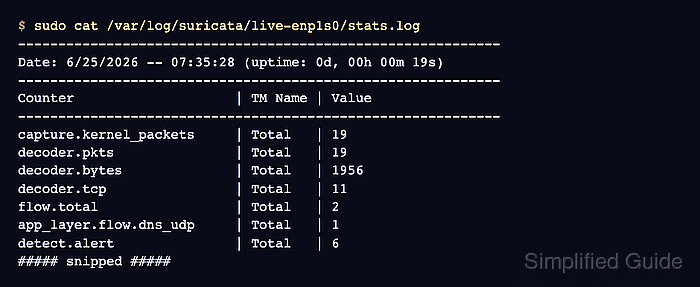
$ sudo cat /var/log/suricata/live-enp1s0/stats.log
---------------------------------------------------------------------------------------------------
Date: 6/25/2026 -- 07:35:28 (uptime: 0d, 00h 00m 19s)
---------------------------------------------------------------------------------------------------
Counter                    | TM Name | Value
---------------------------------------------------------------------------------------------------
capture.kernel_packets     | Total   | 19
decoder.pkts               | Total   | 19
decoder.bytes              | Total   | 1956
decoder.tcp                | Total   | 11
flow.total                 | Total   | 2
app_layer.flow.dns_udp     | Total   | 1
detect.alert               | Total   | 6
##### snipped #####
capture.kernel_packets and decoder.pkts confirm packet capture and decoding. flow.total and app_layer.flow.* counters confirm Suricata built flow and protocol state from the captured traffic. Column spacing is shortened in the excerpt for readability.
- Confirm the test alert in fast.log.
$ sudo cat /var/log/suricata/live-enp1s0/fast.log
06/25/2026-07:35:17.183740  [**] [1:2100498:7] GPL ATTACK_RESPONSE id check returned root [**] [Classification: Potentially Bad Traffic] [Priority: 2] {TCP} 203.0.113.25:80 -> 192.0.2.10:53362
The line should show the ET Open test signature and the monitored destination address. If counters rise but the expected alert is missing, check rule loading, HOME_NET, and alert outputs.
Related: How to troubleshoot missing Suricata alerts
Related: How to configure Suricata HOME_NET

Mohd Shakir Zakaria is a cloud architect with deep roots in software development and open-source advocacy. Certified in AWS, Red Hat, VMware, ITIL, and Linux, he specializes in designing and managing robust cloud and on-premises infrastructures.


