Suricata inspects network traffic with an IDS and IPS engine that depends on packaged binaries, a YAML configuration file, and rule files being installed in the expected locations. On Ubuntu, the OISF stable PPA provides current upstream stable packages when the distribution archive trails the Suricata release line.
The OISF package installs the engine, the default configuration, the systemd unit, and the bundled suricata-update helper. Installing jq at the same time prepares the host for later EVE JSON log checks without changing the base Suricata configuration.
A completed install should report a Suricata version, fetch the default Emerging Threats Open rules, and pass a test-mode configuration load. Starting live packet capture is a follow-up task because the monitored interface and HOME_NET values need to match the host before the service is useful.
Related: How to configure Suricata HOME_NET
Related: How to manage the Suricata service
Steps to install Suricata on Ubuntu:
- Open a terminal with sudo privileges.
- Refresh the package index.
$ sudo apt-get update
Hit:1 http://ports.ubuntu.com/ubuntu-ports resolute InRelease
Hit:2 http://ports.ubuntu.com/ubuntu-ports resolute-updates InRelease
Hit:3 http://ports.ubuntu.com/ubuntu-ports resolute-backports InRelease
Hit:4 http://ports.ubuntu.com/ubuntu-ports resolute-security InRelease
Reading package lists...
- Install the repository helper package.
$ sudo apt-get install --assume-yes software-properties-common ca-certificates
Reading package lists...
Building dependency tree...
Reading state information...
ca-certificates is already the newest version (20260601~26.04.1).
##### snipped #####
Setting up software-properties-common (0.120) ...
software-properties-common provides add-apt-repository. ca-certificates lets APT validate the Launchpad HTTPS repository on minimal Ubuntu systems.
- Add the OISF stable Suricata repository.
$ sudo add-apt-repository --yes ppa:oisf/suricata-stable
Repository: 'Types: deb
URIs: https://ppa.launchpadcontent.net/oisf/suricata-stable/ubuntu/
Suites: resolute
Components: main
'
##### snipped #####
Adding repository.
- Refresh the package index from the new repository.
$ sudo apt-get update
Hit:1 http://ports.ubuntu.com/ubuntu-ports resolute InRelease
Hit:2 https://ppa.launchpadcontent.net/oisf/suricata-stable/ubuntu resolute InRelease
Hit:3 http://ports.ubuntu.com/ubuntu-ports resolute-updates InRelease
Hit:4 http://ports.ubuntu.com/ubuntu-ports resolute-backports InRelease
Hit:5 http://ports.ubuntu.com/ubuntu-ports resolute-security InRelease
Reading package lists...
- Install Suricata and jq.
$ sudo apt-get install --assume-yes suricata jq
Reading package lists...
Building dependency tree...
Reading state information...
The following NEW packages will be installed:
  jq
  suricata
##### snipped #####
Setting up suricata (1:8.0.5-0ubuntu6) ...
Created symlink '/etc/systemd/system/multi-user.target.wants/suricata.service' -> '/usr/lib/systemd/system/suricata.service'.
With the OISF PPA package, do not add the separate Ubuntu suricata-update package to this command. The PPA suricata package already installs /usr/bin/suricata-update, and installing both packages can create a file conflict.
- Confirm that the installed engine reports a Suricata version.
$ suricata -V
This is Suricata version 8.0.5 RELEASE
Use suricata -V for this check. Some package builds do not accept --version as a synonym.
- Confirm that the bundled rule updater is available.
$ suricata-update --version
suricata-update version 1.3.7
- Download the default ruleset.
$ sudo suricata-update
25/6/2026 -- 07:35:39 - <Info> -- Found Suricata version 8.0.5 at /usr/bin/suricata.
25/6/2026 -- 07:35:39 - <Info> -- No sources configured, will use Emerging Threats Open
25/6/2026 -- 07:35:39 - <Info> -- Fetching https://rules.emergingthreats.net/open/suricata-8.0.5/emerging.rules.tar.gz.
##### snipped #####
25/6/2026 -- 07:35:46 - <Info> -- Loaded 66796 rules.
25/6/2026 -- 07:35:46 - <Info> -- Writing rules to /var/lib/suricata/rules/suricata.rules: total: 66796; enabled: 50867; added: 66796; removed 0; modified: 0
25/6/2026 -- 07:35:47 - <Info> -- Testing with suricata -T.
25/6/2026 -- 07:35:48 - <Info> -- Done.
The default run fetches Emerging Threats Open rules and writes /var/lib/suricata/rules/suricata.rules.
Related: How to update Suricata rules - Test the installed configuration and rules.
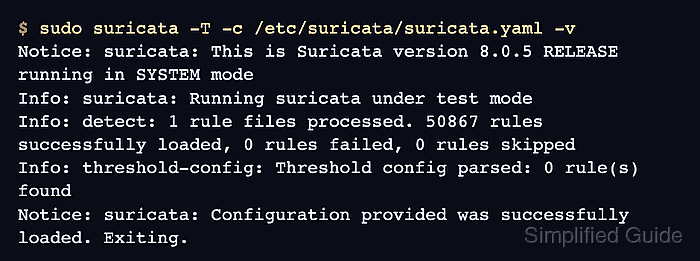
$ sudo suricata -T -c /etc/suricata/suricata.yaml -v
Notice: suricata: This is Suricata version 8.0.5 RELEASE running in SYSTEM mode
Info: suricata: Running suricata under test mode
Info: detect: 1 rule files processed. 50867 rules successfully loaded, 0 rules failed, 0 rules skipped
Info: threshold-config: Threshold config parsed: 0 rule(s) found
Notice: suricata: Configuration provided was successfully loaded. Exiting.
-T checks the configuration and rule files without starting packet capture. Configure HOME_NET and the monitored interface before relying on the service for live traffic.
Related: How to test Suricata configuration
Related: How to configure Suricata HOME_NET
Related: How to manage the Suricata service

Mohd Shakir Zakaria is a cloud architect with deep roots in software development and open-source advocacy. Certified in AWS, Red Hat, VMware, ITIL, and Linux, he specializes in designing and managing robust cloud and on-premises infrastructures.


