Overlapping sudoers rules can leave a user with an unexpected password prompt, a broader command grant than intended, or a denial that seems to contradict a nearby line. Checking rule order shows which entry wins before changing security policy.
sudo reads /etc/sudoers and any included drop-in files as one policy. When more than one user specification matches the same user and command, matching entries are applied in order and the last match controls the final tag or permission.
Drop-in files under /etc/sudoers.d/ are parsed in sorted lexical order, not numeric order. A file named 90-appsvc-override is read after 10-appsvc, while a name such as 1-local can sort after 10-local; use the checked order and the target user's effective listing before deciding which file to edit.
Steps to check sudoers rule order:
- Open a terminal with an account that can inspect sudoers as root.
Keep an existing root session, console session, or recovery path open while reviewing sudoers. A bad sudoers edit can block future sudo access.
- Check that the loaded sudoers policy parses successfully.
$ sudo visudo -c
/etc/sudoers: parsed OK
visudo -c checks /etc/sudoers and included files for syntax errors. Some platforms print each included file; a clean result still means the policy parsed successfully.
- List the drop-in files in the order used for lexical sorting.
$ sudo ls -1 /etc/sudoers.d/
10-appsvc
90-appsvc-override
README
sudoers skips drop-in names that end in ~ or contain a period. Use consistent leading zeroes so lexical order matches the intended override order.
- Read the earlier matching sudoers rule.
$ sudo cat /etc/sudoers.d/10-appsvc
appsvc ALL=(root) NOPASSWD: /usr/bin/id
- Read the later matching sudoers rule.
$ sudo cat /etc/sudoers.d/90-appsvc-override
appsvc ALL=(root) PASSWD: /usr/bin/id
The later matching entry controls the password tag for this exact command, even when the earlier entry looks more permissive.
- List the target user's effective sudo privileges.
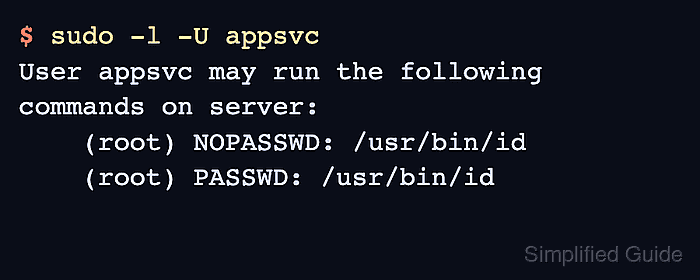
$ sudo -l -U appsvc
User appsvc may run the following commands on server:
    (root) NOPASSWD: /usr/bin/id
    (root) PASSWD: /usr/bin/id
Replace appsvc with the affected user. The list can show more than one matching entry, so compare it with the file order instead of assuming the most specific-looking line wins.
- Test the affected command without an interactive password prompt when the problem is a NOPASSWD or PASSWD conflict.
$ sudo -u appsvc sudo -n /usr/bin/id
sudo: interactive authentication is required
sudo -n fails instead of prompting. In this example, the later PASSWD match controls the tested command.
- Record the last matching file and line as the controlling sudoers rule before making any correction.
Use visudo or visudo -f /etc/sudoers.d/name for any later edit, then repeat the syntax check and the target user's privilege listing.

Mohd Shakir Zakaria is a cloud architect with deep roots in software development and open-source advocacy. Certified in AWS, Red Hat, VMware, ITIL, and Linux, he specializes in designing and managing robust cloud and on-premises infrastructures.


