A sudoers rule can parse successfully and still fail when the user, group, host, run-as target, command path, command arguments, or a later matching rule does not match the command being tested. The visible symptom is usually a denied sudo command, an unexpected password prompt, or a privilege list that shows a different command than the rule was meant to allow.
Sudoers policy is checked against the invoking user, the current host, the requested run-as user or group, and the exact command path and arguments. sudo -l -U <user> shows the effective privileges for another user when run by root or by an account allowed to list that user's privileges, while sudo -n <command> tests the original command without waiting for an interactive password prompt.
The safest repair path is to confirm that the file still parses, compare the effective privilege list with the command that fails, fix the narrow rule with visudo, and retest the same command. Avoid broadening the rule to ALL just to make the symptom disappear; sudoers uses ordered matching, and a later matching entry can be the reason the observed result differs from the rule you expected to apply.
Related: How to check sudoers syntax with visudo
Related: How to list sudo privileges for a user
Related: How to check sudoers rule order
Steps to fix a sudoers rule that does not work:
- Reproduce the failing sudo command as the affected user.
$ sudo -n /usr/bin/id
sudo: I'm sorry deploy. I'm afraid I can't do that
Use the exact command path and arguments from the failed workflow. The -n option avoids an interactive prompt, so a password requirement or policy denial appears as command output instead of a hanging terminal.
- List the user's effective sudo privileges from a root shell or another account allowed to inspect that user.
# sudo -l -U deploy
User deploy may run the following commands on host.example.net:
    (root) NOPASSWD: /usr/bin/whoami
If sudo -l -U deploy shows a different command, missing NOPASSWD tag, wrong run-as target, or no matching entry, fix that policy mismatch before testing the application again.
- Validate sudoers syntax before changing the rule so a separate parse error is not mixed into the policy problem.
# visudo -c
/etc/sudoers: parsed OK
visudo -c checks /etc/sudoers and included files together. A clean parse does not prove that the rule matches the intended user or command.
- Open the sudoers file or drop-in that owns the rule with visudo.
# visudo -f /etc/sudoers.d/90-deploy
Do not edit sudoers policy with a normal text editor unless emergency recovery is already in progress. visudo locks the file and checks syntax before saving.
Drop-in files under /etc/sudoers.d are parsed in sorted lexical order. Files with names that contain a dot or end in ~ are skipped by sudo, so names such as deploy.conf or 90-deploy.bak can explain why a rule appears to be present but has no effect.
Related: How to create a sudoers drop-in file
- Correct the narrow match instead of replacing the rule with a broad allowance.
- /etc/sudoers.d/90-deploy
deploy ALL=(root) NOPASSWD: /usr/bin/id
Check the left side for the correct user or group, the host field for the current host, the run-as field for the requested target user or group, and the command field for the absolute path and required arguments. Use command -v <name> as the affected user when the path is uncertain.
- Recheck sudoers syntax after saving the corrected rule.
# visudo -c
/etc/sudoers: parsed OK
If visudo reports a file and line number, fix that syntax error before opening a new sudo session or closing the current administrative shell.
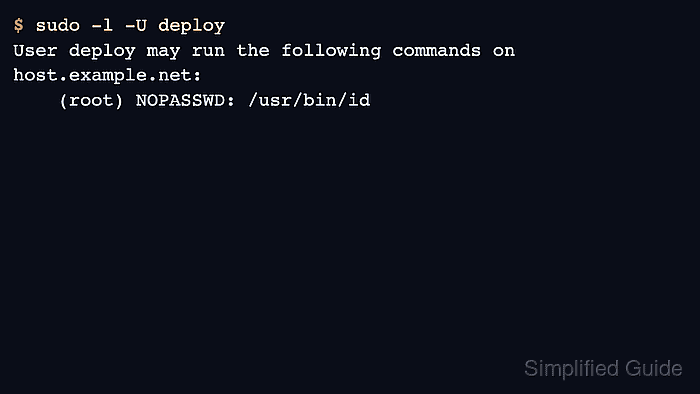
- Confirm that the effective privilege list now includes the command that failed.
# sudo -l -U deploy
User deploy may run the following commands on host.example.net:
    (root) NOPASSWD: /usr/bin/id
If the list still shows the old result, check rule order with the main sudoers file and the sorted drop-in names. With multiple matching entries, the later match can control the observed tag or command behavior.
Related: How to check sudoers rule order
- Retest the original sudo command as the affected user.
$ sudo -n /usr/bin/id
uid=0(root) gid=0(root) groups=0(root)
The rule is fixed when the same command that failed now runs with the intended run-as identity and without the unexpected password prompt or denial.

Mohd Shakir Zakaria is a cloud architect with deep roots in software development and open-source advocacy. Certified in AWS, Red Hat, VMware, ITIL, and Linux, he specializes in designing and managing robust cloud and on-premises infrastructures.


