A delegated pager, editor, or status tool can become a root shell when the program accepts a shell escape such as !id or :!sh. Add the sudoers NOEXEC tag when the user still needs the program, but child commands launched from inside that program should fail.
NOEXEC is a sudoers command tag. It applies to the command that follows it and continues across the command list until the opposite EXEC tag changes that behavior. On supporting Linux builds, sudo blocks child execution with a seccomp filter; on other systems support depends on how sudo was built and what the operating system can enforce.
Use NOEXEC as a containment check, not as a way to make broad commands safe. A root-run editor can still write files the user should not control, and sudoedit is usually a better fit for root-owned file edits. Validate the sudoers policy, list the effective rule, then test a shell escape from the allowed program before handing the rule to the delegated user.
Related: Allow a specific program for a user or group in sudo
Related: Create a sudoers drop-in file
Related: Check sudoers syntax with visudo
Steps to restrict shell escapes with sudo NOEXEC:
- Choose the exact delegated command that needs shell escapes blocked.
Pagers and review tools are common candidates because they may expose !command escapes while the user reads privileged output. Do not use NOEXEC to justify broad grants such as ALL, shells, interpreters, package managers, or file-copy tools.
- Confirm the command path and the file or arguments the user should run.
$ command -v less
/usr/bin/less
A sudoers entry that names only /usr/bin/less allows that program with any arguments. Add the exact file path or arguments when the delegated command should stay narrow.
- Open a dedicated sudoers drop-in file with visudo.
$ sudo visudo -f \
    /etc/sudoers.d/noexec
Use a drop-in name without dots or backup suffixes so sudo reads the file from /etc/sudoers.d.
Related: How to create a sudoers drop-in file
- Add the NOEXEC rule for the delegated command.
- /etc/sudoers.d/noexec
ops ALL=(root) NOPASSWD: \
    NOEXEC: /usr/bin/less /a
- ops is the local user that receives the delegated command. Prefix group names with a literal percent sign, such as %logreaders.
- ALL is the host list, and (root) is the run-as target.
- NOPASSWD: allows the verification command to use sudo -n without prompting. Remove it when the user should authenticate.
- NOEXEC: blocks child commands launched from the allowed program when sudo and the operating system support noexec.
- /usr/bin/less /a is the command path plus the only argument allowed by this rule. Replace /a with the real privileged file or log path.
If the same command list continues with a command that must be able to run child programs, place EXEC: before that command or put it in a separate sudoers rule.
- Save the file and parse the complete sudoers policy.
$ sudo visudo -c
/etc/sudoers: parsed OK
Do not rely only on checking the one drop-in file. The full policy parse is the safety gate that matches what sudo will load.
- List the target user's effective sudo privileges for the command.
$ sudo -l -U ops less /a
/usr/bin/less /a
Use sudo -l -U ops for the full privilege list when reviewing tags. The full list should show NOEXEC for the same command and should not show a broader matching rule for the same user.
Related: List sudo privileges for a user
- Start a shell as the delegated user.
$ sudo -iu ops
- Confirm the allowed command still runs.
$ LESS=-F sudo -n less /a
application log line
The LESS=-F environment value makes this short verification file print and exit instead of opening a full-screen pager. For a real log file, run the command normally and quit less with q.
- Test a shell escape from the allowed program.
$ sudo -n less /a
Type !/usr/bin/id inside less, then press Enter. The escape should fail or return to less without printing uid=0(root).
If the escape prints a root identity or starts a shell, NOEXEC is not blocking that program on this system. Remove or narrow the delegated command before relying on the rule.
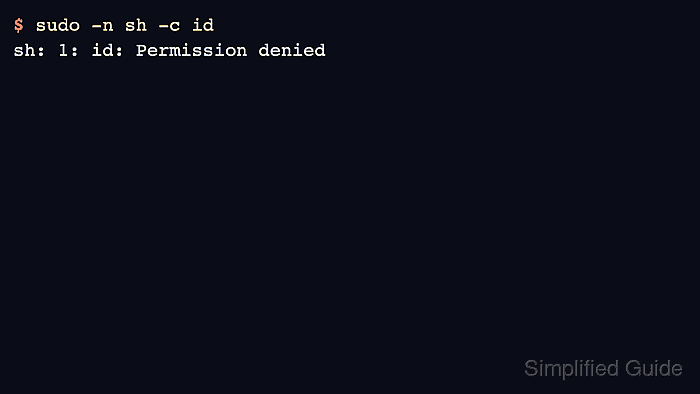
- Use a disposable noexec probe when an interactive program does not give a clear failure message. In a container or throwaway host, add a temporary probe rule.
- /etc/sudoers.d/noexec-probe
ops ALL=(root) NOPASSWD: \
    NOEXEC: /bin/sh
Then run a child-command test as the delegated user.
$ sudo -n sh -c id
sh: 1: id: Permission denied
The shell rule is only a controlled smoke test in a disposable environment. Do not grant shells in production sudoers policy just to test NOEXEC.

Mohd Shakir Zakaria is a cloud architect with deep roots in software development and open-source advocacy. Certified in AWS, Red Hat, VMware, ITIL, and Linux, he specializes in designing and managing robust cloud and on-premises infrastructures.


