Internet-facing SSH servers see probes that never reach a real login, including password guesses, invalid account names, clients that disconnect after the banner, and sessions that sit until LoginGraceTime expires. OpenSSH PerSourcePenalties makes the daemon remember abusive pre-authentication behavior by source address, so repeated probes can be refused before heavier tools such as Fail2Ban or firewall bans become involved.
The setting lives in the sshd_config tree and applies before authentication completes. sshd adds penalty time for configured classes such as authfail, noauth, and grace-exceeded; when the accrued time reaches min, the source address or network block selected by PerSourceNetBlockSize is refused until the penalty expires.
Penalty tuning needs a wider safety margin than a per-connection attempt limit because many users can share one public address behind a VPN, NAT gateway, bastion, or monitoring service. Put stable management addresses in PerSourcePenaltyExemptList, keep an existing admin session open while reloading, and use sshd -T plus service logs to prove the effective policy.
Steps to configure OpenSSH PerSourcePenalties:
- Open a terminal on the SSH server with an account that can use sudo.
Keep an existing SSH session, console, or out-of-band path open until a new login succeeds after the reload.
- Check the installed OpenSSH server version.
$ sshd -V
OpenSSH_10.2p1 Ubuntu-2ubuntu3.2, OpenSSL 3.5.5 27 Jan 2026
PerSourcePenalties was introduced in OpenSSH 9.8. If the command prints an older version, use firewall rules or Fail2Ban instead of adding unsupported sshd_config directives.
- Check whether the main daemon file loads drop-in files.
$ sudo cat /etc/ssh/sshd_config
# This is the sshd server system-wide configuration file.
##### snipped #####
Include /etc/ssh/sshd_config.d/*.conf
##### snipped #####
If no Include line loads /etc/ssh/sshd_config.d/*.conf, add the same policy in the global section of /etc/ssh/sshd_config instead.
- Open a local PerSourcePenalties drop-in file.
$ sudoedit /etc/ssh/sshd_config.d/90-persource-penalties.conf
- Add the native pre-authentication penalty policy.
# Native OpenSSH pre-authentication penalties
PerSourcePenalties authfail:10s noauth:2s grace-exceeded:30s min:15s max:5m overflow:permissive
PerSourceNetBlockSize 32:64
PerSourcePenaltyExemptList 192.0.2.10,2001:db8:100::/64
The example keeps IPv4 penalties per address and groups IPv6 sources by 64 bits. Replace the exempt addresses with stable management hosts, bastions, or monitoring networks that must not be penalized.
Tool: What Is My Internet Protocol (IP) Address?Each PerSourcePenaltyExemptList entry must be a valid address, wildcard, or CIDR range. sshd -t rejects masks that are too long or ranges where host bits are set.
overflow:permissive allows new sources when the tracked-source table fills by expiring older penalties early. Use deny-all only after the exemption list is reviewed because it can refuse all non-exempt new connections until a penalty expires.
- Test the sshd configuration.
$ sudo sshd -t
No output means the daemon parsed the configuration and the configured host-key files passed validation.
Related: How to test SSH server configuration - Reload the SSH service.
$ sudo systemctl reload ssh
Use sudo systemctl reload sshd on distributions where the server unit is named sshd. If reload is not supported, restart only while the recovery session remains open.
Related: How to manage the SSH server service with systemctl - Confirm the effective PerSource policy after the reload.
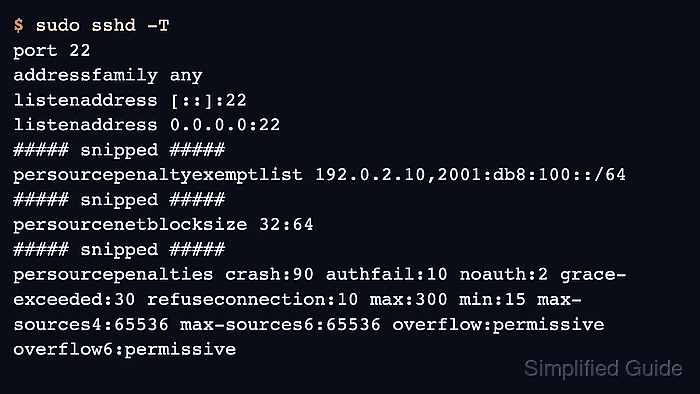
$ sudo sshd -T
port 22
addressfamily any
listenaddress [::]:22
listenaddress 0.0.0.0:22
##### snipped #####
persourcepenaltyexemptlist 192.0.2.10,2001:db8:100::/64
##### snipped #####
persourcenetblocksize 32:64
##### snipped #####
persourcepenalties crash:90 authfail:10 noauth:2 grace-exceeded:30 refuseconnection:10 max:300 min:15 max-sources4:65536 max-sources6:65536 overflow:permissive overflow6:permissive
sshd -T prints lower-case effective settings, normalizes 5m to 300 seconds, and may show built-in penalty classes that were not written in the drop-in file.
Related: How to view SSH server configuration - Review recent SSH service logs after a controlled test window.
$ sudo journalctl --unit=ssh --no-pager --since "15 minutes ago"
Jun 13 10:42:18 host sshd[2241]: srclimit_penalise: 203.0.113.24/32: activating ipv4 penalty of 2 seconds for penalty: connections without attempting authentication
Jun 13 10:42:31 host sshd[2260]: drop connection #0 from [203.0.113.24]:51634 on [192.0.2.20]:22 penalty: connections without attempting authentication
Use journalctl --unit=sshd when the service unit is sshd. Avoid noisy forced-failure tests on production addresses; confirm log wording from a controlled source and a short maintenance window.
- Confirm that a new administrative login still works from a trusted client.
$ ssh admin@host.example.net 'echo PerSourcePenalties loaded'
PerSourcePenalties loaded
A successful new login confirms that the daemon accepted the policy without blocking the normal access path.

Mohd Shakir Zakaria is a cloud architect with deep roots in software development and open-source advocacy. Certified in AWS, Red Hat, VMware, ITIL, and Linux, he specializes in designing and managing robust cloud and on-premises infrastructures.


