Exposing an SSH server to the internet attracts automated bots that constantly attempt password guesses and key-based logins. Persistent brute force activity wastes resources, floods logs, and increases the chance of a compromised account if credentials are weak. Automatically detecting and blocking abusive sources keeps remote administration available while reducing noise.
On Linux, tools like fail2ban monitor authentication logs from sshd and translate suspicious patterns into firewall rules. When a source exceeds a defined number of failures within a time window, its IP address is added to a temporary ban list via iptables, nftables, or the distribution firewall backend. Thresholds for retries, ban duration, and matching patterns are controlled per jail section such as the built-in sshd jail.
Deploying automatic bans demands careful tuning to avoid blocking valid administrators, especially when working behind NAT gateways, load balancers, or jump hosts that share a single public address. Configuration should live in /etc/fail2ban/jail.local to survive package upgrades, and changes must be validated before relying on them in production. Testing from a secondary session prevents accidental lockouts while new rules are being applied.
Steps to automatically block SSH brute force attacks:
- Open a terminal on the Linux server with access to sudo privileges.
$ whoami admin $ sudo -l ##### snipped #####
- Install fail2ban from the distribution package repository so that SSH login attempts can be monitored and banned.
$ sudo apt update && sudo apt install --assume-yes fail2ban Get:1 http://archive.ubuntu.com/ubuntu jammy InRelease [270 kB] ##### snipped #####
On RHEL and CentOS use sudo dnf install --assume-yes fail2ban, and on openSUSE use sudo zypper install --no-confirm fail2ban.
- Enable the fail2ban service so bans persist across reboots and take effect immediately.
$ sudo systemctl enable --now fail2ban $ sudo systemctl status fail2ban ● fail2ban.service - Fail2Ban Service Loaded: loaded (/lib/systemd/system/fail2ban.service; enabled; vendor preset: enabled) Active: active (running) since Mon 2024-05-13 10:20:01 UTC; 5s ago ##### snipped ##### - Copy the default /etc/fail2ban/jail.conf configuration to /etc/fail2ban/jail.local so custom settings survive package upgrades.
$ sudo cp /etc/fail2ban/jail.conf /etc/fail2ban/jail.local
The .local file overrides matching sections from the default configuration while remaining untouched by package updates.
- Edit the /etc/fail2ban/jail.local file to enable and tune the sshd jail for blocking repeated authentication failures.
/etc/fail2ban/jail.local [sshd] enabled = true port = ssh filter = sshd logpath = /var/log/auth.log maxretry = 5 findtime = 600 bantime = 3600
Setting maxretry too low or bantime excessively high can block legitimate administrators, especially when many logins pass through a shared NAT address.
- Restart the fail2ban service to load the new configuration and activate the updated sshd jail.
$ sudo systemctl restart fail2ban
Restarting fail2ban while relying solely on remote SSH access can briefly remove existing bans and apply new ones, so maintain an alternative access path when changing production settings.
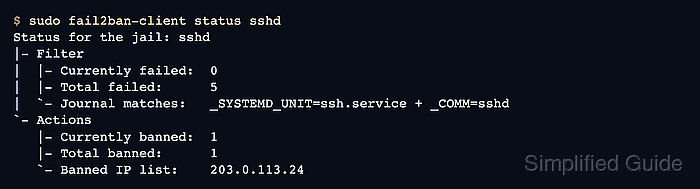
- Check the status of the sshd jail to confirm that log files are being read and that ban counters are tracked.
$ sudo fail2ban-client status sshd Status for the jail: sshd |- Filter | |- Currently failed: 0 | |- Total failed: 0 | `- File list: /var/log/auth.log `- Actions |- Currently banned: 0 |- Total banned: 0 `- Banned IP list:
A non-zero value for Currently failed or Total banned indicates that fail2ban is actively monitoring and acting on failed logins.
- Display the fail2ban-client built-in help for an overview of available management commands.
$ sudo fail2ban-client --help Usage: fail2ban-client [OPTIONS] <COMMAND> Fail2Ban v0.11.1 reads log file that contains password failure report and bans the corresponding IP addresses using firewall rules. Options: -c <DIR> configuration directory -s <FILE> socket path -p <FILE> pidfile path --loglevel <LEVEL> logging level --logtarget <TARGET> logging target, use file-name or stdout, stderr, syslog or sysout. --syslogsocket auto|<FILE> -d dump configuration. For debugging --dp, --dump-pretty dump the configuration using more human readable representation -t, --test test configuration (can be also specified with start parameters) -i interactive mode -v increase verbosity -q decrease verbosity -x force execution of the server (remove socket file) -b start server in background (default) -f start server in foreground --async start server in async mode (for internal usage only, don't read configuration) --timeout timeout to wait for the server (for internal usage only, don't read configuration) --str2sec <STRING> convert time abbreviation format to seconds -h, --help display this help message -V, --version print the version (-V returns machine-readable short format) Command: BASIC start starts the server and the jails restart restarts the server restart [--unban] [--if-exists] <JAIL> restarts the jail <JAIL> (alias for 'reload --restart ... <JAIL>') reload [--restart] [--unban] [--all] reloads the configuration without restarting of the server, the option '--restart' activates completely restarting of affected jails, thereby can unban IP addresses (if option '--unban' specified) reload [--restart] [--unban] [--if-exists] <JAIL> reloads the jail <JAIL>, or restarts it (if option '--restart' specified) stop stops all jails and terminate the server unban --all unbans all IP addresses (in all jails and database) unban <IP> ... <IP> unbans <IP> (in all jails and database) status gets the current status of the server ping tests if the server is alive echo for internal usage, returns back and outputs a given string help return this output version return the server version LOGGING set loglevel <LEVEL> sets logging level to <LEVEL>. Levels: CRITICAL, ERROR, WARNING, NOTICE, INFO, DEBUG, TRACEDEBUG, HEAVYDEBUG or corresponding numeric value (50-5) get loglevel gets the logging level set logtarget <TARGET> sets logging target to <TARGET>. Can be STDOUT, STDERR, SYSLOG or a file get logtarget gets logging target set syslogsocket auto|<SOCKET> sets the syslog socket path to auto or <SOCKET>. Only used if logtarget is SYSLOG get syslogsocket gets syslog socket path flushlogs flushes the logtarget if a file and reopens it. For log rotation. DATABASE set dbfile <FILE> set the location of fail2ban persistent datastore. Set to "None" to disable get dbfile get the location of fail2ban persistent datastore set dbmaxmatches <INT> sets the max number of matches stored in database per ticket get dbmaxmatches gets the max number of matches stored in database per ticket set dbpurgeage <SECONDS> sets the max age in <SECONDS> that history of bans will be kept get dbpurgeage gets the max age in seconds that history of bans will be kept JAIL CONTROL add <JAIL> <BACKEND> creates <JAIL> using <BACKEND> start <JAIL> starts the jail <JAIL> stop <JAIL> stops the jail <JAIL>. The jail is removed status <JAIL> [FLAVOR] gets the current status of <JAIL>, with optional flavor or extended info JAIL CONFIGURATION set <JAIL> idle on|off sets the idle state of <JAIL> set <JAIL> ignoreself true|false allows the ignoring of own IP addresses set <JAIL> addignoreip <IP> adds <IP> to the ignore list of <JAIL> set <JAIL> delignoreip <IP> removes <IP> from the ignore list of <JAIL> set <JAIL> ignorecommand <VALUE> sets ignorecommand of <JAIL> set <JAIL> ignorecache <VALUE> sets ignorecache of <JAIL> set <JAIL> addlogpath <FILE> ['tail'] adds <FILE> to the monitoring list of <JAIL>, optionally starting at the 'tail' of the file (default 'head'). set <JAIL> dellogpath <FILE> removes <FILE> from the monitoring list of <JAIL> set <JAIL> logencoding <ENCODING> sets the <ENCODING> of the log files for <JAIL> set <JAIL> addjournalmatch <MATCH> adds <MATCH> to the journal filter of <JAIL> set <JAIL> deljournalmatch <MATCH> removes <MATCH> from the journal filter of <JAIL> set <JAIL> addfailregex <REGEX> adds the regular expression <REGEX> which must match failures for <JAIL> set <JAIL> delfailregex <INDEX> removes the regular expression at <INDEX> for failregex set <JAIL> addignoreregex <REGEX> adds the regular expression <REGEX> which should match pattern to exclude for <JAIL> set <JAIL> delignoreregex <INDEX> removes the regular expression at <INDEX> for ignoreregex set <JAIL> findtime <TIME> sets the number of seconds <TIME> for which the filter will look back for <JAIL> set <JAIL> bantime <TIME> sets the number of seconds <TIME> a host will be banned for <JAIL> set <JAIL> datepattern <PATTERN> sets the <PATTERN> used to match date/times for <JAIL> set <JAIL> usedns <VALUE> sets the usedns mode for <JAIL> set <JAIL> attempt <IP> [<failure1> ... <failureN>] manually notify about <IP> failure set <JAIL> banip <IP> ... <IP> manually Ban <IP> for <JAIL> set <JAIL> unbanip [--report-absent] <IP> ... <IP> manually Unban <IP> in <JAIL> set <JAIL> maxretry <RETRY> sets the number of failures <RETRY> before banning the host for <JAIL> set <JAIL> maxmatches <INT> sets the max number of matches stored in memory per ticket in <JAIL> set <JAIL> maxlines <LINES> sets the number of <LINES> to buffer for regex search for <JAIL> set <JAIL> addaction <ACT>[ <PYTHONFILE> <JSONKWARGS>] adds a new action named <ACT> for <JAIL>. Optionally for a Python based action, a <PYTHONFILE> and <JSONKWARGS> can be specified, else will be a Command Action set <JAIL> delaction <ACT> removes the action <ACT> from <JAIL> COMMAND ACTION CONFIGURATION set <JAIL> action <ACT> actionstart <CMD> sets the start command <CMD> of the action <ACT> for <JAIL> set <JAIL> action <ACT> actionstop <CMD> sets the stop command <CMD> of the action <ACT> for <JAIL> set <JAIL> action <ACT> actioncheck <CMD> sets the check command <CMD> of the action <ACT> for <JAIL> set <JAIL> action <ACT> actionban <CMD> sets the ban command <CMD> of the action <ACT> for <JAIL> set <JAIL> action <ACT> actionunban <CMD> sets the unban command <CMD> of the action <ACT> for <JAIL> set <JAIL> action <ACT> timeout <TIMEOUT> sets <TIMEOUT> as the command timeout in seconds for the action <ACT> for <JAIL> GENERAL ACTION CONFIGURATION set <JAIL> action <ACT> <PROPERTY> <VALUE> sets the <VALUE> of <PROPERTY> for the action <ACT> for <JAIL> set <JAIL> action <ACT> <METHOD>[ <JSONKWARGS>] calls the <METHOD> with <JSONKWARGS> for the action <ACT> for <JAIL> JAIL INFORMATION get <JAIL> logpath gets the list of the monitored files for <JAIL> get <JAIL> logencoding gets the encoding of the log files for <JAIL> get <JAIL> journalmatch gets the journal filter match for <JAIL> get <JAIL> ignoreself gets the current value of the ignoring the own IP addresses get <JAIL> ignoreip gets the list of ignored IP addresses for <JAIL> get <JAIL> ignorecommand gets ignorecommand of <JAIL> get <JAIL> failregex gets the list of regular expressions which matches the failures for <JAIL> get <JAIL> ignoreregex gets the list of regular expressions which matches patterns to ignore for <JAIL> get <JAIL> findtime gets the time for which the filter will look back for failures for <JAIL> get <JAIL> bantime gets the time a host is banned for <JAIL> get <JAIL> datepattern gets the patern used to match date/times for <JAIL> get <JAIL> usedns gets the usedns setting for <JAIL> get <JAIL> banip [<SEP>|--with-time] gets the list of of banned IP addresses for <JAIL>. Optionally the separator character ('<SEP>', default is space) or the option ' --with-time' (printing the times of ban) may be specified. The IPs are ordered by end of ban. get <JAIL> maxretry gets the number of failures allowed for <JAIL> get <JAIL> maxmatches gets the max number of matches stored in memory per ticket in <JAIL> get <JAIL> maxlines gets the number of lines to buffer for <JAIL> get <JAIL> actions gets a list of actions for <JAIL> COMMAND ACTION INFORMATION get <JAIL> action <ACT> actionstart gets the start command for the action <ACT> for <JAIL> get <JAIL> action <ACT> actionstop gets the stop command for the action <ACT> for <JAIL> get <JAIL> action <ACT> actioncheck gets the check command <CMD> of the action <ACT> for <JAIL> get <JAIL> action <ACT> actionban gets the ban command <CMD> of the action <ACT> for <JAIL> get <JAIL> action <ACT> actionunban gets the unban command <CMD> of the action <ACT> for <JAIL> get <JAIL> action <ACT> timeout gets the command timeout in seconds for the action <ACT> for <JAIL> GENERAL ACTION INFORMATION get <JAIL> actionproperties <ACT> gets a list of properties for the action <ACT> for <JAIL> get <JAIL> actionmethods <ACT> gets a list of methods for <ACT> for <JAIL> get <JAIL> action <ACT> <PROPERTY> gets the value of <PROPERTY> for the action <ACT> for <JAIL> Report bugs to https://github.com/fail2ban/fail2ban/issues - Confirm that offending hosts are banned after repeated failed logins by rechecking the sshd jail status from another session.
$ sudo fail2ban-client status sshd Status for the jail: sshd ##### snipped ##### |- Currently banned: 1 |- Total banned: 3 `- Banned IP list: 203.0.113.10
Mohd Shakir Zakaria is a cloud architect with deep roots in software development and open-source advocacy. Certified in AWS, Red Hat, VMware, ITIL, and Linux, he specializes in designing and managing robust cloud and on-premises infrastructures.
Comment anonymously. Login not required.