Repeated SSH or Git connections become noisy when every new terminal asks for the same private-key passphrase. Loading the key into ssh-agent lets the local OpenSSH client ask the agent to sign authentication challenges during the current session instead of reopening the private key file each time.
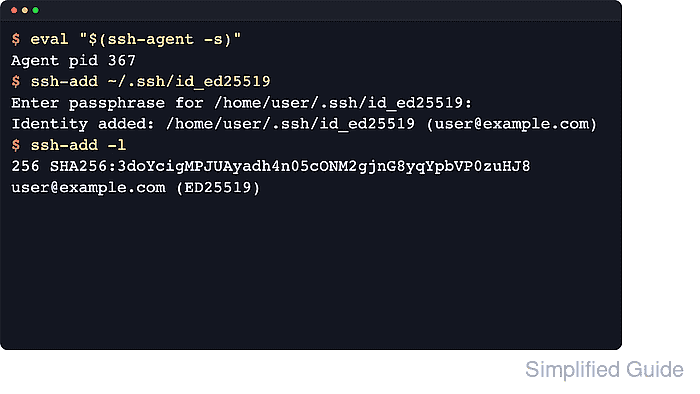
The agent is reached through the Unix socket named by SSH_AUTH_SOCK. ssh-add loads private identities into that reachable agent, lists their fingerprints with -l, and refuses loose private-key permissions because other local users should not be able to read the key material.
The private key still stays on disk, while the decrypted identity stays in memory only inside the reachable agent. Use the same terminal session for setup and later connections, avoid forwarding the agent to untrusted hosts, and remove or expire loaded identities when a shared or long-lived session should no longer use them.
Steps to add an SSH key to ssh-agent:
- Open a terminal in the local account that owns the private key.
Run the remaining steps in the same shell session so any new agent environment variables stay available to later ssh, scp, sftp, or git commands.
- Check whether the current shell can reach an authentication agent.
$ ssh-add -l
Could not open a connection to your authentication agent.
If the output is The agent has no identities., an agent is reachable but empty. If fingerprints appear, the shell is already attached to a running agent.
- Start a new ssh-agent when no agent connection is available.
$ eval "$(ssh-agent -s)"
Agent pid 45
The eval "$(ssh-agent -s)" command exports SSH_AUTH_SOCK and SSH_AGENT_PID into the current shell. Starting the agent in a different terminal does not update this shell.
- Add the private key to the reachable agent.
$ ssh-add ~/.ssh/id_ed25519
Identity added: /home/user/.ssh/id_ed25519 (user@example.com)
Replace ~/.ssh/id_ed25519 with the private key path that should be cached. A passphrase-protected key prompts before the Identity added line, and ssh-add rejects key files that are readable by other users.
Related: How to create an SSH key pair
- List the loaded fingerprints to confirm the expected identity is in the agent.
$ ssh-add -l
256 SHA256:4/TxOPIqabLQ4KnY7HT5z54pyqsZBgIgEN2txpNvdfA user@example.com (ED25519)
Match the key type, comment, and fingerprint against the public key or inventory record before relying on the loaded identity.
Tool: SSH Key Fingerprint Checker - Connect to a host that already trusts the matching public key.
$ ssh user@host.example.net hostname
host
Use the real hostname and account for a server whose /home/user/.ssh/authorized_keys contains the matching public key. A new host-key prompt is a separate trust decision and should be verified before accepting.

Mohd Shakir Zakaria is a cloud architect with deep roots in software development and open-source advocacy. Certified in AWS, Red Hat, VMware, ITIL, and Linux, he specializes in designing and managing robust cloud and on-premises infrastructures.


