Embedding inference can run on a processor or an accelerator, but the fastest hardware in a machine is not necessarily usable by the installed PyTorch runtime. Choosing the runtime deliberately keeps local tests and production jobs on the hardware expected for their workload.
At model construction, SentenceTransformer accepts a device value and exposes the resulting placement through model.device. Checking both the available backends and the loaded model prevents a batch from silently running on CPU after an accelerator was expected.
Backend availability differs by host because CUDA depends on the PyTorch build, NVIDIA driver, and visible GPU, while MPS requires a compatible Apple Silicon system and PyTorch build. An explicit unavailable device should stop before inference begins, with CPU retained as the portable fallback.
Steps to select a Sentence Transformers inference device:
- Create select_inference_device.py with the device discovery and selection functions.
- select_inference_device.py
import argparse

import torch
from sentence_transformers import SentenceTransformer


def available_devices():
    devices = []

    if torch.cuda.is_available():
        devices.extend(f"cuda:{index}" for index in range(torch.cuda.device_count()))

    if torch.backends.mps.is_available():
        devices.append("mps")

    devices.append("cpu")
    return devices


def select_device(requested, devices):
    if requested == "auto":
        return devices[0]

    if requested not in devices:
        raise SystemExit(
            f"{requested} is not available; choose from {', '.join(devices)}"
        )

    return requested
- Append the device argument and selection call after the selection functions.
- select_inference_device.py
parser = argparse.ArgumentParser()
parser.add_argument("--device", default="auto")
args = parser.parse_args()

devices = available_devices()
selected_device = select_device(args.device, devices)
The auto value chooses the first available CUDA device, then MPS, then CPU. An unavailable explicit value exits before the model loads.
- Append the model load and encoding call after the selected device assignment.
- select_inference_device.py
model = SentenceTransformer(
    "sentence-transformers/all-MiniLM-L6-v2",
    device=selected_device,
)
embeddings = model.encode(
    [
        "Route inference to the selected device.",
        "Stop when the requested accelerator is unavailable.",
    ],
    show_progress_bar=False,
)
A device_map supplied through model_kwargs controls placement instead of the top-level device argument.
- Append the device assertions and result summary after the encoding call.
- select_inference_device.py
assert str(model.device) == selected_device
assert embeddings.shape == (2, model.get_embedding_dimension())

print(f"available devices: {', '.join(devices)}")
print(f"selected device: {model.device}")
print(f"embedding shape: {embeddings.shape}")
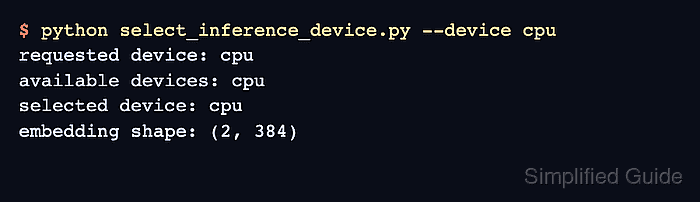
- Verify the selected runtime with the completed script and the device intended for the current host.
$ python select_inference_device.py --device cpu
available devices: cpu
selected device: cpu
embedding shape: (2, 384)
The assertions fail if the loaded model is not on the selected device or if both texts do not produce complete embeddings. The first run downloads the model when it is not already cached.

Mohd Shakir Zakaria is a cloud architect with deep roots in software development and open-source advocacy. Certified in AWS, Red Hat, VMware, ITIL, and Linux, he specializes in designing and managing robust cloud and on-premises infrastructures.


