A remote Selenium WebDriver connection sends test commands from the client process to a browser running on Selenium Grid or another WebDriver endpoint. Use it when the browser must run on a CI worker, a Grid node, or a separate test host instead of the same machine that runs the test code. A short smoke test confirms that the client can reach the Grid, create a browser session, load a page, and close the session.
Selenium 4 clients connect through webdriver.Remote with a browser options object and the Grid router URL. For a standard Selenium Grid 4 router, the WebDriver endpoint is usually the root URL on port 4444, such as http://selenium-grid.example.net:4444, while older hubs or some hosted providers may still require a /wd/hub path.
Use the address that is reachable from the machine or container running the test code, not the address that is convenient from the browser node. Avoid hard-coding private hostnames or credentials in the script; pass the remote URL through an environment variable or the project test configuration so the same smoke test can run in local, CI, and shared Grid environments.
Steps to connect to a remote Selenium WebDriver:
- Set the Grid endpoint that the Selenium client can reach.
Remote URL: http://selenium-grid.example.net:4444
Requested browser: Chrome
localhost works only when the test process and the Grid router run in the same network namespace. Use the Grid host name, service name, or published address when the test runs from another container or CI worker.
- Check the Grid status endpoint from the client host.
$ curl --silent http://selenium-grid.example.net:4444/status
{
  "value": {
    "message": "Selenium Grid ready.",
    "ready": true,
    "nodes": [
##### snipped #####
    ]
  }
}
ready must be true before the client can create a browser session.
- Create a remote WebDriver smoke-test script.
$ cat > remote-webdriver-smoke.py <<'PY'
import os

from selenium import webdriver
from selenium.webdriver.common.by import By
from selenium.webdriver.support import expected_conditions as EC
from selenium.webdriver.support.ui import WebDriverWait


remote_url = os.environ["SELENIUM_REMOTE_URL"]

options = webdriver.ChromeOptions()
driver = webdriver.Remote(command_executor=remote_url, options=options)

try:
    driver.get("https://example.com/")
    WebDriverWait(driver, 10).until(
        EC.presence_of_element_located((By.TAG_NAME, "h1"))
    )
    print(f"remote_url={remote_url}")
    print(f"browser={driver.capabilities.get('browserName')}")
    print(f"title={driver.title}")
finally:
    driver.quit()
PY
The script keeps the Grid URL outside the source file and quits the session even when the page load or wait fails.
- Run the smoke test against the remote endpoint.
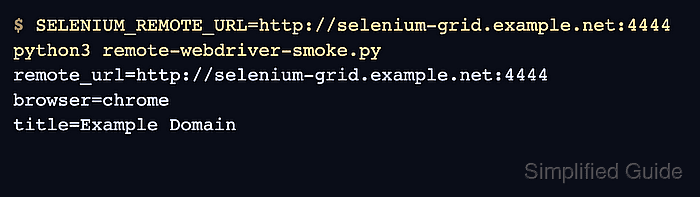
$ SELENIUM_REMOTE_URL=http://selenium-grid.example.net:4444 python3 remote-webdriver-smoke.py
remote_url=http://selenium-grid.example.net:4444
browser=chrome
title=Example Domain
The browser line comes from the remote session capabilities, and title comes from the page loaded by that session.
- Remove the temporary smoke-test script after the project test configuration has the working remote URL.
$ rm remote-webdriver-smoke.py

Mohd Shakir Zakaria is a cloud architect with deep roots in software development and open-source advocacy. Certified in AWS, Red Hat, VMware, ITIL, and Linux, he specializes in designing and managing robust cloud and on-premises infrastructures.


