Firefox tests fail before the first page load when Selenium cannot find GeckoDriver or when the driver starts a different Firefox binary than the one approved for the test environment. Passing an explicit driver path into the Firefox service object keeps local and CI runs pointed at the expected WebDriver executable.
Modern Selenium releases can use Selenium Manager to resolve drivers when no path is supplied. Explicit GeckoDriver configuration still matters for offline runners, pinned Firefox ESR bundles, controlled build images, and networks where browser-driver downloads are blocked or reviewed separately.
In Python, FirefoxService owns the local GeckoDriver process, while Firefox Options can point at a specific browser binary. The commands use Linux paths such as /usr/bin/geckodriver and /usr/bin/firefox; use the equivalent project-approved paths on macOS or Windows when the test suite runs there.
Steps to configure GeckoDriver for Selenium:
- Locate the GeckoDriver executable that Selenium should use.
$ command -v geckodriver
/usr/bin/geckodriver
Use the approved driver binary for the project or CI image. Leave the driver path unset when Selenium Manager should handle driver discovery and download automatically.
- Check the GeckoDriver version before wiring it into the test.
$ geckodriver --version
geckodriver 0.36.0 (a3d508507022 2025-02-24 15:57 +0000)
Compare the driver against the Mozilla support matrix when Firefox ESR, older desktop releases, or a locked browser bundle is pinned for the suite.
- Locate the Firefox binary when the suite should not use default browser discovery.
$ command -v firefox
/usr/bin/firefox
Omit options.binary_location in the script when GeckoDriver should find the normal system Firefox installation.
- Create a smoke-test script that passes the driver path through FirefoxService.
$ cat > check-geckodriver.py <<'PY'
import subprocess

from selenium import webdriver
from selenium.webdriver.firefox.options import Options
from selenium.webdriver.firefox.service import Service as FirefoxService

geckodriver_path = "/usr/bin/geckodriver"
firefox_path = "/usr/bin/firefox"

version_line = subprocess.check_output([geckodriver_path, "--version"], text=True).splitlines()[0]
print(version_line)

options = Options()
options.binary_location = firefox_path
options.add_argument("-headless")
service = FirefoxService(executable_path=geckodriver_path)

driver = webdriver.Firefox(service=service, options=options)
try:
    driver.get("data:text/html,<title>Firefox WebDriver smoke test</title><h1>Ready</h1>")
    browser_name = driver.capabilities.get("browserName")
    browser_version = driver.capabilities.get("browserVersion")
    print(driver.title)
    print(f"{browser_name} {browser_version}")
finally:
    driver.quit()
PY
The inline data URL keeps the smoke test independent of external websites. Remove -headless when a visible browser window is required for local debugging.
- Run the smoke test from the project Python environment.
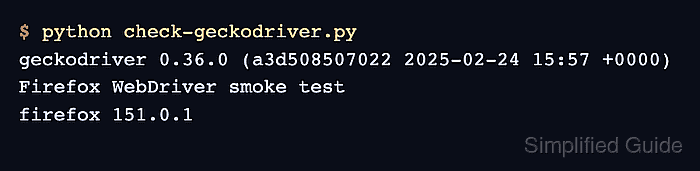
$ python check-geckodriver.py
geckodriver 0.36.0 (a3d508507022 2025-02-24 15:57 +0000)
Firefox WebDriver smoke test
firefox 151.0.1
The title line proves Selenium started Firefox through the configured GeckoDriver and loaded the inline test page.
- Copy the working FirefoxService block into the project WebDriver fixture.
Keep driver and browser paths in one fixture, environment variable, or CI setting instead of repeating them across test files.
- Remove the temporary smoke-test script.
$ rm check-geckodriver.py

Mohd Shakir Zakaria is a cloud architect with deep roots in software development and open-source advocacy. Certified in AWS, Red Hat, VMware, ITIL, and Linux, he specializes in designing and managing robust cloud and on-premises infrastructures.


