Installing Scrapy with pip adds the crawler CLI, project generator, and interactive shell from the current PyPI package instead of waiting for a distro package to catch up. A dedicated virtual environment also keeps crawler dependencies away from unrelated automation and system tools.
The python -m pip install scrapy command installs Scrapy and its runtime dependencies into the active interpreter. In a virtual environment, that keeps the scrapy command, the installed libraries, and later package upgrades tied to one isolated Python environment.
Scrapy currently requires Python 3.10 or later. Installing into a distro-managed or system interpreter can fail under an externally managed environment policy or overwrite OS-owned packages, so creating a virtual environment first remains the safer path. On Windows, upstream documentation still prefers Anaconda or Miniconda over a raw pip install because some dependencies may need Microsoft C++ Build Tools.
Related: How to install Scrapy on Ubuntu or Debian
Related: How to create a Scrapy spider
Steps to install Scrapy using pip:
- Create a dedicated virtual environment for Scrapy.
$ python3 -m venv ~/.venvs/scrapy
Use a Python 3.10+ interpreter for the virtual environment so the install matches current Scrapy support.
- Activate the virtual environment.
$ source ~/.venvs/scrapy/bin/activate
The shell prompt usually changes to show the environment name after activation.
- Install Scrapy from PyPI with the active interpreter.
(scrapy) $ python -m pip install scrapy
Collecting scrapy
  Downloading scrapy-2.15.0-py3-none-any.whl.metadata (4.3 kB)
Collecting cryptography>=37.0.0 (from scrapy)
  Downloading cryptography-46.0.7-...whl.metadata (5.7 kB)
Collecting lxml>=4.6.4 (from scrapy)
  Downloading lxml-6.1.0-...whl.metadata (4.0 kB)
##### snipped #####
Installing collected packages: attrs, automat, certifi, cryptography, cssselect, itemadapter, itemloaders, lxml, parsel, pyopenssl, scrapy, service-identity, tldextract, twisted, w3lib
Successfully installed attrs-26.1.0 automat-25.4.16 certifi-2026.2.25 ##### snipped ##### scrapy-2.15.0 service-identity-24.2.0 tldextract-5.3.1 twisted-25.5.0 w3lib-2.4.1
If pip falls back to building lxml or cryptography locally and fails, install the platform compiler and development headers first, then rerun the same command inside this virtual environment.
- Check the installed Scrapy version.
(scrapy) $ scrapy version
Scrapy 2.15.0
The version follows the current PyPI release at install time, so the number can differ from this example.
- Run the Scrapy CLI outside a project directory to confirm the command is ready.
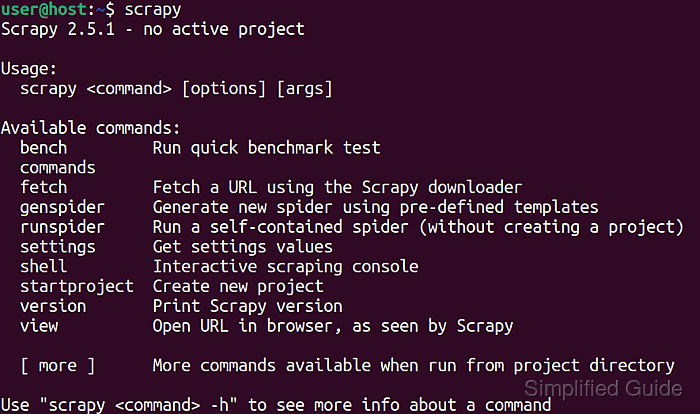
(scrapy) $ scrapy
Scrapy 2.15.0 - no active project

Usage:
   scrapy <command> [options] [args]
 Available commands:

  bench         Run quick benchmark test
  fetch         Fetch a URL using the Scrapy downloader
  genspider     Generate new spider using pre-defined templates
  runspider     Run a self-contained spider (without creating a project)
  settings      Get settings values
  shell         Interactive scraping console
  startproject  Create new project
  version       Print Scrapy version
  view          Open URL in browser, as seen by Scrapy

   [ more ]      More commands available when run from project directory

 Use "scrapy <command> -h" to see more info about a command
The no active project message is expected until the command is run from a Scrapy project directory. Related: How to use Scrapy shell
Related: How to create a Scrapy spider

Mohd Shakir Zakaria is a cloud architect with deep roots in software development and open-source advocacy. Certified in AWS, Red Hat, VMware, ITIL, and Linux, he specializes in designing and managing robust cloud and on-premises infrastructures.


