Following links from a Scrapy response turns the page that was just downloaded into the next set of requests. That is how a spider moves from listing pages to detail pages or keeps stepping through pagination without hard-coding every absolute URL.
response.follow() builds a new Request by using the current response as the base URL, so relative paths resolve automatically and there is no need to call response.urljoin() first. It accepts a relative URL string, a Link object, an <a> selector, or an attribute selector such as response.css("li.next a::attr(href)")[0], and response.follow_all() remains the compact option when many matched links share the same callback.
The usual failures are passing a SelectorList instead of one selector, matching anchors that do not contain the intended href, or copying the whole response.meta dictionary into unrelated follow-up requests. Keep callback-only values in cb_kwargs, and list every expected target host in allowed_domains so OffsiteMiddleware does not quietly drop followed requests.
Related: How to use CSS selectors in Scrapy
Related: How to use request callbacks in Scrapy
Steps to follow links from a response in Scrapy:
- Change to the root of the Scrapy project that will run the spider.
$ cd response_follow_link_demo
- Start scrapy shell against a page that contains both detail links and pagination.
$ scrapy shell --nolog 'http://quotes.toscrape.com/'
[s] Available Scrapy objects:
[s]   request    <GET http://quotes.toscrape.com/>
[s]   response   <200 http://quotes.toscrape.com/>
##### snipped #####
>>>
The shell exposes the fetched page as response, which is the same object a spider callback receives.
- Confirm response.follow() turns both an <a> selector and a relative href selector into absolute request URLs.
>>> response.follow(response.css("div.quote span a")[0]).url
'http://quotes.toscrape.com/author/Albert-Einstein'
>>> response.follow(response.css("li.next a::attr(href)")[0]).url
'http://quotes.toscrape.com/page/2/'
response.follow(response.css("li.next a")) is not valid because response.css() returns a SelectorList. Use one selector with [0], loop over the matches, or switch to response.follow_all().
- Replace response_follow_link_demo/spiders/quotes_follow.py with a spider that follows author links into a second callback and reuses parse() for pagination.
import scrapy


class QuotesFollowSpider(scrapy.Spider):
    name = "quotes_follow"
    allowed_domains = ["quotes.toscrape.com"]
    start_urls = ["http://quotes.toscrape.com/"]

    def parse(self, response):
        for author_link in response.css("div.quote span a"):
            yield response.follow(author_link, callback=self.parse_author)

        next_page = response.css("li.next a::attr(href)").get()
        if next_page:
            yield response.follow(next_page, callback=self.parse)

    def parse_author(self, response):
        yield {
            "name": response.css("h3.author-title::text").get(default="").strip(),
            "birthdate": response.css("span.author-born-date::text").get(default="").strip(),
            "url": response.url,
        }
Passing an <a> selector lets Scrapy read its href automatically. If a callback needs values from the listing page, pass them with cb_kwargs=... instead of copying the whole response.meta dictionary.
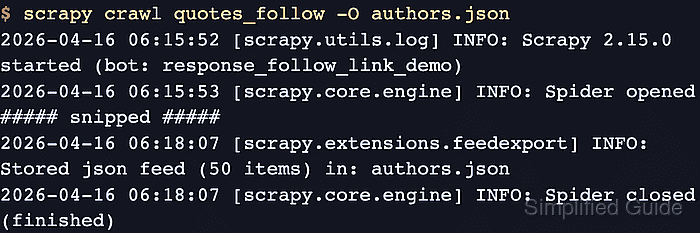
- Run the spider and overwrite the previous export file for the current crawl.
$ scrapy crawl quotes_follow -O authors.json
[scrapy.utils.log] INFO: Scrapy 2.15.0 started (bot: response_follow_link_demo)
[scrapy.core.engine] INFO: Spider opened
##### snipped #####
[scrapy.extensions.feedexport] INFO: Stored json feed (50 items) in: authors.json
[scrapy.core.engine] INFO: Spider closed (finished)
-O overwrites the export file on each run so the saved results stay aligned with the current spider code.
- Open the exported feed and confirm the saved URLs belong to author pages rather than the listing pages.
$ cat authors.json
[
{"name": "André Gide", "birthdate": "November 22, 1869", "url": "http://quotes.toscrape.com/author/Andre-Gide/"},
{"name": "Jane Austen", "birthdate": "December 16, 1775", "url": "http://quotes.toscrape.com/author/Jane-Austen/"},
{"name": "Thomas A. Edison", "birthdate": "February 11, 1847", "url": "http://quotes.toscrape.com/author/Thomas-A-Edison/"},
##### snipped #####
]
The author-page URLs prove that the crawl reached the followed responses and that parse_author() ran on those pages instead of the quote listing.

Mohd Shakir Zakaria is a cloud architect with deep roots in software development and open-source advocacy. Certified in AWS, Red Hat, VMware, ITIL, and Linux, he specializes in designing and managing robust cloud and on-premises infrastructures.


