HTTP caching in Scrapy keeps repeat test crawls fast by reusing earlier responses instead of downloading the same pages on every run. That shortens selector and parser debugging cycles and reduces repeated traffic against the target site while the spider is still being tuned.
HttpCacheMiddleware is the cache layer that stores requests and responses between crawls. Current Scrapy releases still use the filesystem backend by default, and a relative HTTPCACHE_DIR value is created under the project data directory, which puts the default cache at .scrapy/httpcache in a standard project.
Cached responses can hide live page changes, login state, and one-time tokens, so set a finite HTTPCACHE_EXPIRATION_SECS value for normal development and bypass caching on request-specific pages with meta={"dont_cache": True}. Switch to RFC2616Policy only when you need Cache-Control-aware freshness and revalidation instead of the simpler default DummyPolicy replay behavior.
Related: How to use Scrapy shell
Related: How to use CSS selectors in Scrapy
Steps to enable HTTP cache in Scrapy:
- Open the Scrapy project settings file.
$ vi catalog_demo/settings.py
In a default project layout the file is usually <project_name>/settings.py.
- Enable the HTTP cache and set a cache directory plus an expiration window.
HTTPCACHE_ENABLED = True
HTTPCACHE_DIR = "httpcache"
HTTPCACHE_EXPIRATION_SECS = 600
A relative cache directory is stored under .scrapy, so this setting writes the cache to .scrapy/httpcache inside the project.
- Confirm the project now loads HTTP caching.
$ scrapy settings --get HTTPCACHE_ENABLED
True
This check reads the active project setting before the spider runs.
- Run the spider once to download live responses and populate the cache.
$ scrapy crawl catalog
##### snipped #####
2026-04-22 02:28:04 [scrapy.statscollectors] INFO: Dumping Scrapy stats:
{'httpcache/firsthand': 2,
 'httpcache/miss': 2,
 'httpcache/store': 2,
 'item_scraped_count': 1}
##### snipped #####
httpcache/store confirms that the response was written into the cache backend during this crawl.
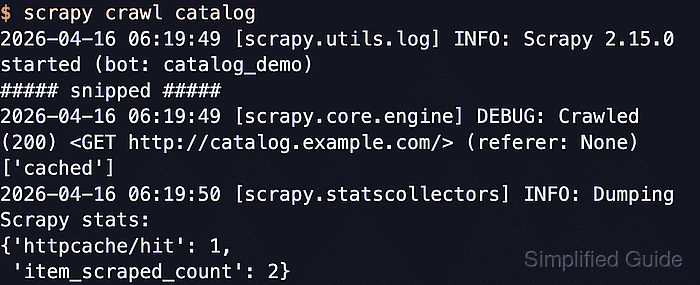
- Run the same spider again to confirm that Scrapy serves the stored response instead of downloading it again.
$ scrapy crawl catalog
##### snipped #####
2026-04-22 02:28:05 [scrapy.statscollectors] INFO: Dumping Scrapy stats:
{'httpcache/hit': 2,
 'item_scraped_count': 1}
##### snipped #####
httpcache/hit confirms that the middleware reused the stored response during the second crawl.
If your project still has ROBOTSTXT_OBEY = True, the hit count can be higher than one because Scrapy may cache both the spider request and robots.txt.
- List the cache root to confirm that Scrapy created a per-spider cache tree on disk.
$ ls .scrapy/httpcache
catalog
Each spider gets its own directory below .scrapy/httpcache, and removing that tree forces the next crawl to fetch fresh responses again.

Mohd Shakir Zakaria is a cloud architect with deep roots in software development and open-source advocacy. Certified in AWS, Red Hat, VMware, ITIL, and Linux, he specializes in designing and managing robust cloud and on-premises infrastructures.


