Nonlinear measurements rarely reveal model parameters directly because observed values combine the underlying response with sampling noise. scipy.optimize.curve_fit() estimates the parameters by minimizing squared residuals between the measurements and a model function.
The model callable receives the independent variable first and the parameters to estimate afterward. For an exponential decay, amplitude, decay rate, and baseline form a compact model that can be constrained to nonnegative values.
The fitting call returns parameter estimates and an approximate covariance matrix. Residual RMSE shows how closely the fitted curve follows the measurements, while standard errors and the covariance condition number expose uncertainty or redundant parameter behavior.
Steps to fit a curve to data with SciPy:
- Create fit_curve.py with the exponential model and floating-point measurements.
- fit_curve.py
import numpy as np
from scipy.optimize import curve_fit


def decay_model(x, amplitude, decay, baseline):
    return amplitude * np.exp(-decay * x) + baseline


x = np.linspace(0.0, 4.0, 9)
y = np.array(
    [2.91, 1.77, 1.15, 0.82, 0.62, 0.51, 0.44, 0.41, 0.39],
    dtype=float,
)
- Append the bounded parameter fit to the end of fit_curve.py.
- fit_curve.py
initial_guess = (2.5, 1.0, 0.3)
bounds = (0.0, [5.0, 5.0, 2.0])

params, covariance = curve_fit(
    decay_model,
    x,
    y,
    p0=initial_guess,
    bounds=bounds,
)
p0 supplies starting values in model-parameter order. The lower bounds allow zero, while the upper bounds cap amplitude and decay at 5.0 and baseline at 2.0.
- Append the residual and covariance diagnostics to fit_curve.py.
- fit_curve.py
standard_errors = np.sqrt(np.diag(covariance))
residuals = y - decay_model(x, *params)
rmse = np.sqrt(np.mean(residuals**2))
condition_number = np.linalg.cond(covariance)
- Add the parameter and diagnostic output lines to fit_curve.py.
- fit_curve.py
print(
    f"parameters: amplitude={params[0]:.3f}, "
    f"decay={params[1]:.3f}, baseline={params[2]:.3f}"
)
print(
    f"standard_errors: amplitude={standard_errors[0]:.3f}, "
    f"decay={standard_errors[1]:.3f}, baseline={standard_errors[2]:.3f}"
)
print(f"rmse: {rmse:.3f}")
print(f"covariance_condition: {condition_number:.1f}")
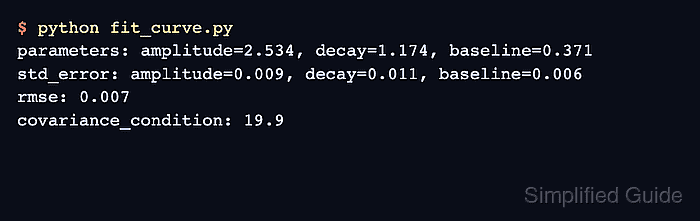
- Run fit_curve.py to confirm the exponential model fits the measurements.
$ python fit_curve.py
parameters: amplitude=2.534, decay=1.174, baseline=0.371
standard_errors: amplitude=0.009, decay=0.011, baseline=0.006
rmse: 0.007
covariance_condition: 19.9
The parameter order matches the model signature after x. RMSE has no universal pass threshold; 0.007 is small against measurements from 0.39 to 2.91. A much larger covariance condition number can signal redundant parameters or poorly scaled estimates.

Mohd Shakir Zakaria is a cloud architect with deep roots in software development and open-source advocacy. Certified in AWS, Red Hat, VMware, ITIL, and Linux, he specializes in designing and managing robust cloud and on-premises infrastructures.


