Built-in scikit-learn transformers cover common preprocessing, but a project rule such as capping response times at a training percentile has no ready-made class. A custom transformer packages that rule as an estimator, so a Pipeline fits it on training rows and applies the same learned values to held-out data.
The choice between a class and a function depends on whether the step learns anything. A unit conversion or a logarithm needs nothing from the training rows, so FunctionTransformer can wrap a plain function. A percentile cut-off has to remember one value per column between fit() and transform(), which calls for a class built on BaseEstimator and TransformerMixin.
Scikit-learn rebuilds estimators from their constructor arguments whenever cross-validation or a parameter search clones a Pipeline. Learned values therefore belong in fit() under names ending in an underscore, which leaves a clone with the same settings and no fitted state.
Steps to create a custom transformer in scikit-learn:
- Install scikit-learn and pandas in your project's virtual environment.
$ python -m pip install scikit-learn pandas
Tested with scikit-learn 1.9.1 and pandas 3.1.1 on Python 3.12 on Linux.
validate_data, used in the class below, is available from scikit-learn 1.6, and scikit-learn 1.9.1 requires Python 3.11 or newer. - Create a file named
custom_transformer.pyin your project directory using your text editor. - Enter the following imports.
- custom_transformer.py
import numpy as np
import pandas as pd
from sklearn.base import (
    BaseEstimator,
    OneToOneFeatureMixin,
    TransformerMixin,
    clone,
)
from sklearn.exceptions import NotFittedError
from sklearn.pipeline import Pipeline
from sklearn.preprocessing import FunctionTransformer
from sklearn.utils.validation import (
    check_is_fitted,
    validate_data,
)
- Add the
PercentileClipperclass and its constructor after a blank line at the end ofcustom_transformer.py.class PercentileClipper( OneToOneFeatureMixin, TransformerMixin, BaseEstimator ): def __init__(self, lower=1.0, upper=99.0): self.lower = lower self.upper = upper
The constructor only stores its arguments under the same names, because
clone()rebuilds the object from those values and raisesRuntimeErrorif one has been changed.BaseEstimatorgoes last in the class list, as the scikit-learn developer guide requires.TransformerMixinaddsfit_transform()andset_output(), andOneToOneFeatureMixinaddsget_feature_names_out()for a transformer that keeps its input columns.
Related: Developing scikit-learn estimators - Add the following
fit()method after a blank line at the end ofcustom_transformer.py.def fit(self, X, y=None): if self.lower >= self.upper: raise ValueError("lower must be below upper") X = validate_data(self, X) self.lower_bounds_, self.upper_bounds_ = np.percentile( X, [self.lower, self.upper], axis=0 ) return self
Parameter checks go here rather than in the constructor.
y=Nonelets a Pipeline pass its target even though this step ignores it, andvalidate_datarecords the column count and names. Names ending in an underscore mark learned values, andclone()copies only constructor arguments, so these bounds stay behind. - Add the following
transform()method after a blank line at the end ofcustom_transformer.py.def transform(self, X): check_is_fitted(self) X = validate_data(self, X, reset=False) return np.clip( X, self.lower_bounds_, self.upper_bounds_ )
check_is_fittedstops an unfitted call withNotFittedError.reset=Falsecompares the input with the columns seen infit(), so a missing or reordered column raisesValueErrorinstead of clipping against the wrong bounds. Missing values also raiseValueError, so place an imputer first in the Pipeline when the data has any.
Related: How to impute missing values with scikit-learn - Add a stateless conversion after a blank line at the end of
custom_transformer.py.def ms_to_seconds(X): return X / 1000 to_seconds = FunctionTransformer( ms_to_seconds, validate=True, feature_names_out="one-to-one", )
This step needs no class because the result depends only on the current row, so
FunctionTransformeris enough.validate=Trueadds the same column check here, because this step would otherwise relabel reordered columns with their fitted names andPercentileClippercould not see the swap. Withoutfeature_names_out, the object has noget_feature_names_out()method and the Pipeline call in a later step raisesAttributeError.
Related: FunctionTransformer - Add the training and held-out rows after a blank line at the end of
custom_transformer.py.train = pd.DataFrame( { "api_time": [ 100, 110, 120, 130, 140, 150, 160, 170, 180, 190, 9000, ], "db_time": [ 20, 24, 28, 32, 36, 40, 44, 48, 52, 56, 700, ], } ) held_out = pd.DataFrame( {"api_time": [105, 150, 5000], "db_time": [30, 60, 10]} )
Times are in milliseconds. With eleven training rows, the 10th and 90th percentiles land exactly on the second-lowest and second-highest values. Feature names come from these DataFrame columns, and a NumPy array would produce
x0andx1instead. - Add the Pipeline definition and its
fit()call after a blank line at the end ofcustom_transformer.py.pipeline = Pipeline( [ ("seconds", to_seconds), ("clip", PercentileClipper(lower=10, upper=90)), ] ) pipeline.set_output(transform="pandas") pipeline.fit(train)
set_output()labels the printed values with the same names thatget_feature_names_out()reports.
Related: How to set scikit-learn transformer output to pandas DataFrames - Add the checks for the learned bounds, held-out values, and feature names after a blank line at the end of
custom_transformer.py.clipper = pipeline.named_steps["clip"] print("Lower bounds:", clipper.lower_bounds_) print("Upper bounds:", clipper.upper_bounds_) print(pipeline.transform(held_out)) names = pipeline.get_feature_names_out() print("Feature names:", names.tolist())
- Add the clone checks after a blank line at the end of
custom_transformer.py.fresh = clone(pipeline) print("Clone settings:", fresh.named_steps["clip"].get_params()) try: fresh.named_steps["clip"].transform(held_out) except NotFittedError as error: print("Clone before fit:", type(error).__name__) fresh.fit(train) matches = fresh.transform(held_out).equals( pipeline.transform(held_out) ) print("Clone after fit matches:", matches)
- Save
custom_transformer.py. - Run the script from your project directory to check the transformed values.
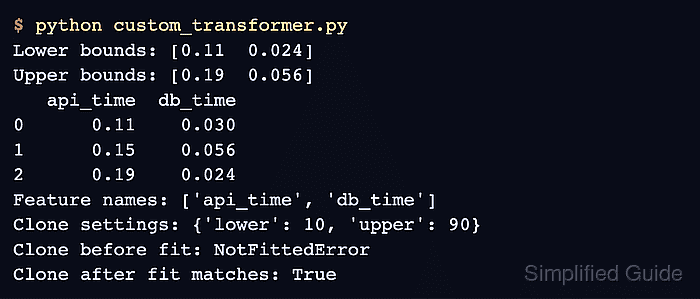
$ python custom_transformer.py
Lower bounds: [0.11  0.024]
Upper bounds: [0.19  0.056]
   api_time  db_time
0      0.11    0.030
1      0.15    0.056
2      0.19    0.024
Feature names: ['api_time', 'db_time']
Clone settings: {'lower': 10, 'upper': 90}
Clone before fit: NotFittedError
Clone after fit matches: True
Held-out values now stay inside bounds learned from the training rows, so
5000ms stops at0.19and105ms rises to0.11, while150ms converts to0.15with no clipping. Fitting on the held-out rows as well would move theapi_timeupper bound away from0.19. The last three lines show that the clone kept its settings, learned nothing until its ownfit(), and then produced the same values.