Feature preprocessing in scikit-learn returns NumPy arrays or sparse matrices by default, so the column names and row labels of an input DataFrame are gone by the time the data reaches the next stage. Setting transformer output to pandas makes transform() and fit_transform() return a DataFrame with named feature columns and the original row index.
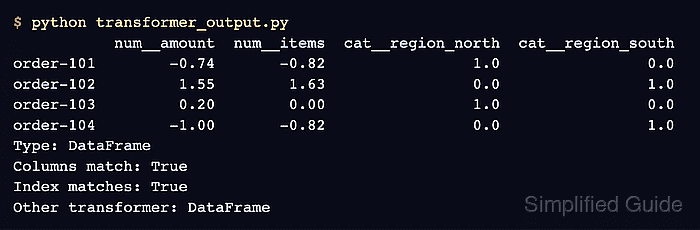
Two settings choose the output container. set_output() applies to one estimator and, on a ColumnTransformer, to every transformer it holds, while sklearn.set_config() changes the default for every transformer that runs in the calling thread. A new thread starts from the default until it makes the same call. An estimator's own set_output() value takes precedence when both are present.
Pandas is an optional dependency of scikit-learn, and pandas output accepts dense data only. An encoder that returns sparse matrices by default has to be switched to dense output first, which stores every category as a full column and costs more memory on high-cardinality features.
Steps to set scikit-learn transformer output to pandas DataFrames:
- Install scikit-learn and pandas in the active Python environment.
$ python -m pip install scikit-learn pandas
##### snipped #####
Successfully installed cloudpickle-3.1.2 joblib-1.6.0 narwhals-2.28.0 numpy-2.5.4 pandas-3.1.1 python-dateutil-4.0.0 scikit-learn-1.9.1 scipy-1.18.1 threadpoolctl-3.8.0 tzdata-2026.6
Pandas output needs scikit-learn 1.2 or newer. Without pandas, the transform stops with ImportError: Setting output container to 'pandas' requires pandas to be installed.
- Create transformer_output.py in your text editor with the imports and an input DataFrame.
- transformer_output.py
import pandas as pd
import sklearn
from sklearn.compose import ColumnTransformer
from sklearn.preprocessing import OneHotEncoder, StandardScaler

orders = pd.DataFrame(
    {
        "amount": [120.0, 340.0, 210.0, 95.0],
        "items": [1, 4, 2, 1],
        "region": ["north", "south", "north", "south"],
    },
    index=["order-101", "order-102", "order-103", "order-104"],
)
The order IDs replace the default integer index, so row labels in the output can only have come from the input. The sklearn import serves the global setting later in the file.
- Append a ColumnTransformer with dense one-hot output at the end of transformer_output.py.
preprocessor = ColumnTransformer(
    [
        ("num", StandardScaler(), ["amount", "items"]),
        ("cat", OneHotEncoder(sparse_output=False), ["region"]),
    ]
)
sparse_output=False is required because OneHotEncoder returns a sparse matrix by default, and pandas output then stops with ValueError: Pandas output does not support sparse data.
- Append the per-estimator pandas setting below the ColumnTransformer definition.
preprocessor.set_output(transform="pandas")
The call reaches both transformers inside preprocessor, and on an already fitted transformer it takes effect at the next transform(). When the ColumnTransformer sits inside a Pipeline, the same call on the outer Pipeline reaches it. For a Polars DataFrame, install polars and pass transform="polars"; a Polars frame has no row index, so row labels do not carry over.
- Append the transformation and its DataFrame checks below the pandas setting.
features = preprocessor.fit_transform(orders)
names = preprocessor.get_feature_names_out()

print(features.round(2))
print("Type:", type(features).__name__)
print("Columns match:", list(features.columns) == list(names))
print("Index matches:", features.index.equals(orders.index))
- Append a separate StandardScaler that has no output setting of its own.
other = StandardScaler().fit_transform(orders[["amount"]])
print("Other transformer:", type(other).__name__)
This second transformer shows how far each setting reaches.
- Save transformer_output.py in your project directory.
- Verify the per-estimator setting by running transformer_output.py.
$ python transformer_output.py
           num__amount  num__items  cat__region_north  cat__region_south
order-101        -0.74       -0.82                1.0                0.0
order-102         1.55        1.63                0.0                1.0
order-103         0.20        0.00                1.0                0.0
order-104        -1.00       -0.82                0.0                1.0
Type: DataFrame
Columns match: True
Index matches: True
Other transformer: ndarray
The num__ and cat__ prefixes come from the transformer names in the ColumnTransformer, and both match lines should read True. Other transformer: ndarray shows the setting stayed on preprocessor. Without the setting, the script stops with AttributeError: 'numpy.ndarray' object has no attribute 'columns'.
- Open transformer_output.py in your text editor.
- Replace the preprocessor.set_output() line with the global setting.
sklearn.set_config(transform_output="pandas")
The global value is read each time a transformer runs, so it also applies to a transformer fitted before the call.
- Save the changed transformer_output.py.
- Verify the global setting by running transformer_output.py again.
$ python transformer_output.py
           num__amount  num__items  cat__region_north  cat__region_south
order-101        -0.74       -0.82                1.0                0.0
order-102         1.55        1.63                0.0                1.0
order-103         0.20        0.00                1.0                0.0
order-104        -1.00       -0.82                0.0                1.0
Type: DataFrame
Columns match: True
Index matches: True
Other transformer: DataFrame
Other transformer: DataFrame shows the global setting reached a transformer that was never configured. It stays in force for the calling thread until the value changes, and a new thread starts from the default until it makes the same call. To limit it to one block, pass the same keyword to sklearn.config_context() in a with statement instead. An individual transformer can stay on NumPy under the global setting by passing transform="default" to its set_output().