Publishing a Rust crate moves a local package into crates.io, where other Rust projects can depend on a named version. A release to the public registry is permanent for that version, so the package needs the right manifest metadata and a clean packaging check before the upload.
Cargo publishes the package selected by the current Cargo.toml manifest. The package archive is rebuilt from the files Cargo includes, not from an arbitrary working directory snapshot, so metadata, README content, included files, and buildability all need to be checked before authentication is used.
A crates.io API token is required for the live upload, but the package can be tested with cargo publish –dry-run before any secret is pasted or stored. Each release needs a new version number because an uploaded version cannot be overwritten; a broken published version must be yanked rather than replaced.
Steps to publish a Rust crate with Cargo:
- Set the final package name, version, and crates.io metadata in Cargo.toml.
- Cargo.toml
[package]
name = "crate-publish-demo"
version = "0.1.0"
edition = "2024"
description = "Small example crate used to demonstrate Cargo publishing checks."
license = "MIT OR Apache-2.0"
repository = "https://github.com/example/crate-publish-demo"
readme = "README.md"
keywords = ["cargo", "publish"]
categories = ["development-tools"]

[dependencies]
crates.io names are first-come, first-served, and a published version cannot be overwritten. Search the registry before setting name, and increment version for each later release.
- Run the crate's test suite from the package root.
$ cargo test
   Compiling crate-publish-demo v0.1.0 (/work/crate-publish-demo)
    Finished `test` profile [unoptimized + debuginfo] target(s) in 0.70s
     Running unittests src/lib.rs (target/debug/deps/crate_publish_demo-e3387b47eab99c0a)

running 1 test
test tests::returns_package_name ... ok

test result: ok. 1 passed; 0 failed; 0 ignored; 0 measured; 0 filtered out; finished in 0.00s

   Doc-tests crate_publish_demo

running 0 tests

test result: ok. 0 passed; 0 failed; 0 ignored; 0 measured; 0 filtered out; finished in 0.00s
Related: How to run Rust tests with Cargo
- List the files that Cargo will include in the crate archive.
$ cargo package --list
Cargo.lock
Cargo.toml
Cargo.toml.orig
README.md
src/lib.rs
Add include or exclude entries in Cargo.toml when generated files, large test data, private notes, or release-only assets appear in this list unexpectedly.
- Run the publish dry run.
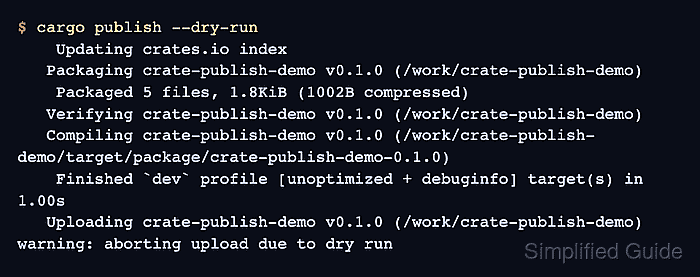
$ cargo publish --dry-run
    Updating crates.io index
   Packaging crate-publish-demo v0.1.0 (/work/crate-publish-demo)
    Packaged 5 files, 1.8KiB (1002B compressed)
   Verifying crate-publish-demo v0.1.0 (/work/crate-publish-demo)
   Compiling crate-publish-demo v0.1.0 (/work/crate-publish-demo/target/package/crate-publish-demo-0.1.0)
    Finished `dev` profile [unoptimized + debuginfo] target(s) in 1.00s
   Uploading crate-publish-demo v0.1.0 (/work/crate-publish-demo)
warning: aborting upload due to dry run
--dry-run performs the package and build checks without uploading the crate. The final warning is expected because Cargo stops before the registry write.
- Save a crates.io API token in Cargo's credential store.
$ cargo login
Paste only an API token from https://crates.io/me. Treat the token as a secret and revoke it if it leaks. Cargo stores it through the configured credential provider; the default token provider writes to credentials.toml under CARGO_HOME.
- Publish the release.
$ cargo publish
    Updating crates.io index
   Packaging crate-publish-demo v0.1.0 (/work/crate-publish-demo)
    Packaged 5 files, 1.8KiB (1002B compressed)
   Verifying crate-publish-demo v0.1.0 (/work/crate-publish-demo)
   Compiling crate-publish-demo v0.1.0 (/work/crate-publish-demo/target/package/crate-publish-demo-0.1.0)
    Finished `dev` profile [unoptimized + debuginfo] target(s) in 1.00s
   Uploading crate-publish-demo v0.1.0 (/work/crate-publish-demo)
    Uploaded crate-publish-demo v0.1.0 to registry `crates-io`
note: waiting for `crate-publish-demo v0.1.0` to be available at registry `crates-io`.
You may press ctrl-c to skip waiting; the crate should be available shortly.
   Published crate-publish-demo v0.1.0 at registry `crates-io`
Run the live publish only after the package name, version, archive file list, and token ownership are correct. Yanking can block new dependency resolution for a bad version, but it does not delete uploaded code.
- Check the published version from the registry.
$ cargo search crate-publish-demo --limit 1
crate-publish-demo = "0.1.0"    # Small example crate used to demonstrate Cargo publishing checks.
Replace crate-publish-demo with the real crate name. If Cargo reports that the upload succeeded but the index is not ready yet, retry the search after the registry catches up.

Mohd Shakir Zakaria is a cloud architect with deep roots in software development and open-source advocacy. Certified in AWS, Red Hat, VMware, ITIL, and Linux, he specializes in designing and managing robust cloud and on-premises infrastructures.


