Progress output shows whether a long rsync copy is still moving without changing which files the transfer selects. For a directory tree, one aggregate counter is usually easier to follow than a stream of updates for each file.
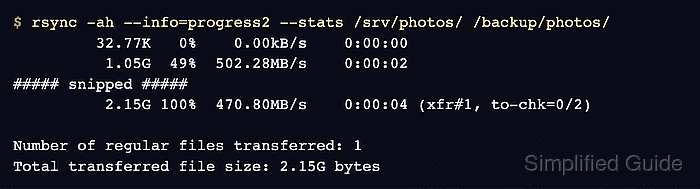
The --info=progress2 flag reports reconstructed bytes across the whole transfer, together with percentage, rate, elapsed time, and file-list counters. It works without --progress, and avoiding -v keeps filename output from scrolling the aggregate display off the terminal.
Use --progress when the current file matters more than the directory total. Do not substitute -P only for a shorter command: -P also enables --partial and can leave an incomplete destination file after an interrupted transfer.
Steps to show rsync transfer progress:
- Run the directory transfer with whole-transfer progress and a final byte summary.
$ rsync -ah --info=progress2 --stats /srv/photos/ /backup/photos/
         32.77K   0%    0.00kB/s    0:00:00
          1.05G  49%  502.28MB/s    0:00:02
##### snipped #####
          2.15G 100%  470.80MB/s    0:00:04 (xfr#1, to-chk=0/2)

##### snipped #####
Number of regular files transferred: 1
Total transferred file size: 2.15G bytes
##### snipped #####
total size is 2.15G  speedup is 1.00
The percentage and byte count cover the transfer as a whole. Here, xfr#1 records one transferred regular file and to-chk=0/2 means no file-list entries remain to be checked.
Use --info=progress2 rather than -P when only progress display is wanted. -P is equivalent to --partial --progress and keeps incomplete destination files after interruption.
- Use per-file progress when one large file is the transfer of interest.
$ rsync -ah --progress /srv/photos/archive.img /backup/photos/
sending incremental file list
archive.img

         32.77K   0%    0.00kB/s    0:00:00
          1.15G  53%  193.82MB/s    0:00:05
##### snipped #####
          2.15G 100%  225.90MB/s    0:00:09 (xfr#1, to-chk=0/1)
The percentage now belongs to archive.img rather than the complete source tree. Use --info=progress2 for an aggregate directory total.
- Repeat the directory command as a dry run to confirm that the completed tree has no pending file transfer.
$ rsync -ah --dry-run --info=progress2 /srv/photos/ /backup/photos/

              0   0%    0.00kB/s    0:00:00 (xfr#0, to-chk=0/2)
The xfr#0 result means the dry run found no regular file to transfer with the same source, destination, and archive options.
Related: How to preview rsync changes before syncing

Mohd Shakir Zakaria is a cloud architect with deep roots in software development and open-source advocacy. Certified in AWS, Red Hat, VMware, ITIL, and Linux, he specializes in designing and managing robust cloud and on-premises infrastructures.


