Project trees, export directories, and backup seeds often need a second local copy that can be refreshed without copying every unchanged file again. A local rsync transfer updates new and changed entries while leaving destination-only files untouched unless a delete option is added.
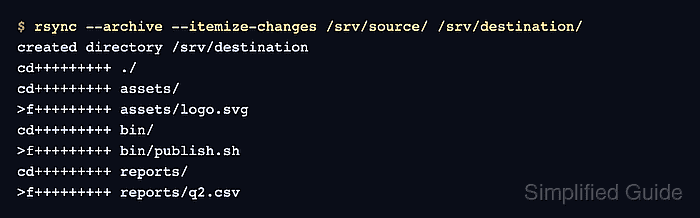
Local-only rsync mode applies when neither path contains remote-host syntax. The trailing slash on /srv/source/ copies its contents directly into /srv/destination/; omitting that slash creates a /source/ directory inside the destination instead.
Archive mode with --archive recurses and preserves symlinks, permissions, modification times, and the owner or group values that the receiving user is allowed to set. A normal user cannot preserve another owner or an unrelated group, and archive mode does not include ACLs, extended attributes, hard-link relationships, or sparse-file layout.
Steps to copy a local directory with rsync:
- Choose the source and destination paths, and keep the source trailing slash when the destination should receive the directory contents. The current user must be able to read /srv/source/ and write to the parent of /srv/destination/.
- Preview the copy with archive mode and itemized changes.
$ rsync --archive --dry-run --itemize-changes /srv/source/ /srv/destination/
created directory /srv/destination
cd+++++++++ ./
cd+++++++++ assets/
>f+++++++++ assets/logo.svg
cd+++++++++ bin/
>f+++++++++ bin/publish.sh
cd+++++++++ reports/
>f+++++++++ reports/q2.csv
Stop if the preview shows the wrong directory level or any path outside the intended tree.
- Copy the directory with the same archive and itemization options.
$ rsync --archive --itemize-changes /srv/source/ /srv/destination/
created directory /srv/destination
cd+++++++++ ./
cd+++++++++ assets/
>f+++++++++ assets/logo.svg
cd+++++++++ bin/
>f+++++++++ bin/publish.sh
cd+++++++++ reports/
>f+++++++++ reports/q2.csv
No delete option is present, so files that exist only under /srv/destination/ remain in place. Use a dedicated mirror procedure when destination-only files must be removed.
Related: How to mirror a directory with rsync and delete extra files - Check the destination layout.
$ find /srv/destination -type f -print
/srv/destination/assets/logo.svg
/srv/destination/bin/publish.sh
/srv/destination/reports/q2.csv
- Compare the source and destination checksums.
$ sha256sum /srv/source/assets/logo.svg /srv/destination/assets/logo.svg \
  /srv/source/bin/publish.sh /srv/destination/bin/publish.sh \
  /srv/source/reports/q2.csv /srv/destination/reports/q2.csv
9a866eca964a2b200c4be8dcf451d2a0f1e41ef10c2a504d535372cde95e162e  /srv/source/assets/logo.svg
9a866eca964a2b200c4be8dcf451d2a0f1e41ef10c2a504d535372cde95e162e  /srv/destination/assets/logo.svg
3e00981c13f454b6d6f00075237bb1f8dcb2d5c2e21846076a450262731b48f0  /srv/source/bin/publish.sh
3e00981c13f454b6d6f00075237bb1f8dcb2d5c2e21846076a450262731b48f0  /srv/destination/bin/publish.sh
b8e9c119b27b3db7758d4b5d29cd50ce107910c96001f33fd5c599a39cca0c61  /srv/source/reports/q2.csv
b8e9c119b27b3db7758d4b5d29cd50ce107910c96001f33fd5c599a39cca0c61  /srv/destination/reports/q2.csv
Each source checksum should match the destination checksum directly below it.
- Confirm that no content or archive-mode metadata remains pending.
$ rsync --archive --checksum --dry-run --itemize-changes /srv/source/ /srv/destination/
No itemized rows means rsync found no file-content or archive-mode metadata differences. --checksum reads file data on both sides, so reserve it for a decisive check rather than every routine refresh.

Mohd Shakir Zakaria is a cloud architect with deep roots in software development and open-source advocacy. Certified in AWS, Red Hat, VMware, ITIL, and Linux, he specializes in designing and managing robust cloud and on-premises infrastructures.


