Pretrained image models can carry useful visual features into a smaller classification project without relearning every convolutional filter. A fixed-feature-extractor pass keeps those learned features intact while a new classifier head adapts ResNet18 to the classes in a project dataset.
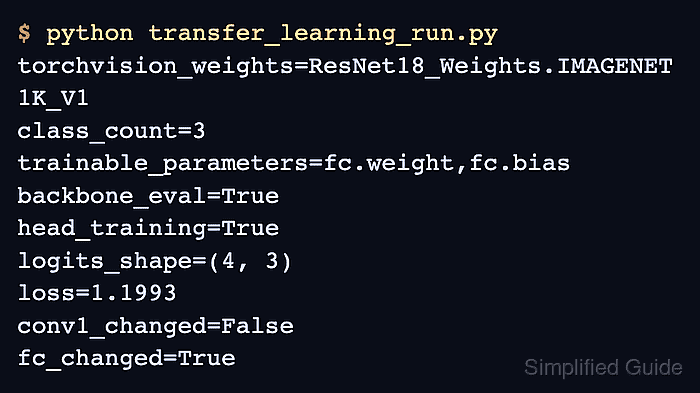
The ResNet18_Weights.DEFAULT enum identifies the pretrained weights and supplies their matching resize, crop, and normalization transform. The frozen feature extractor stays in evaluation mode so BatchNorm running statistics remain unchanged, while the replacement fc layer stays in training mode.
Project class labels come from the training directory names that ImageFolder discovers, so the saved class order must travel with the model state. The completed run reports the trainable parameter names, epoch metrics, output shape, frozen-backbone check, classifier-head change, and checkpoint path.
Related: How to install PyTorch with pip
Steps to run PyTorch transfer learning:
- Arrange the training images under one directory per class in data/document-images/train.
data/
└── document-images/
    └── train/
        ├── invoice/
        │   ├── invoice-01.png
        │   ├── invoice-02.png
        │   ├── invoice-03.png
        │   └── invoice-04.png
        ├── receipt/
        │   ├── receipt-01.png
        │   ├── receipt-02.png
        │   ├── receipt-03.png
        │   └── receipt-04.png
        └── statement/
            ├── statement-01.png
            ├── statement-02.png
            ├── statement-03.png
            └── statement-04.png
Each immediate subdirectory becomes one class name, and every class needs enough representative images for training.
Related: How to create a custom Dataset in PyTorch - Create the data-loading section in transfer_learning_run.py.
- transfer_learning_run.py
import torch
from torch import nn
from torch.utils.data import DataLoader
from torchvision.datasets import ImageFolder
from torchvision.models import ResNet18_Weights, resnet18


torch.manual_seed(29)

weights = ResNet18_Weights.DEFAULT
train_data = ImageFolder(
    "data/document-images/train",
    transform=weights.transforms(),
)
train_loader = DataLoader(train_data, batch_size=4, shuffle=True)
class_names = train_data.classes
The weight-bound transform keeps image size and normalization aligned with the pretrained ResNet18 weights.
- Append the frozen ResNet18 backbone and project classifier head to transfer_learning_run.py.
model = resnet18(weights=weights)
for parameter in model.parameters():
    parameter.requires_grad = False

model.fc = nn.Linear(model.fc.in_features, len(class_names))
optimizer = torch.optim.SGD(model.fc.parameters(), lr=0.01, momentum=0.9)
loss_fn = nn.CrossEntropyLoss()
New Linear parameters remain trainable by default, and passing only model.fc.parameters() keeps the optimizer scoped to the replacement head.
Related: How to freeze model layers in PyTorch - Add the before-training probes and module modes to transfer_learning_run.py.
backbone_before = model.conv1.weight.detach().clone()
head_before = model.fc.weight.detach().clone()
model.eval()
model.fc.train()

loss_total = 0.0
correct = 0
sample_count = 0
model.eval() prevents frozen BatchNorm buffers from changing, and model.fc.train() keeps the replacement classifier in training mode.
- Extend transfer_learning_run.py with one training epoch over the image loader.
for images, targets in train_loader:
    optimizer.zero_grad(set_to_none=True)
    logits = model(images)
    loss = loss_fn(logits, targets)
    loss.backward()
    optimizer.step()

    loss_total += loss.item() * images.size(0)
    correct += (logits.argmax(dim=1) == targets).sum().item()
    sample_count += images.size(0)
The optimizer updates the replacement classifier after each batch while the frozen backbone supplies features.
Related: How to run a training loop in PyTorch - Finish transfer_learning_run.py with the checkpoint and computed training checks.
trainable_parameters = [
    name for name, parameter in model.named_parameters()
    if parameter.requires_grad
]
backbone_unchanged = torch.equal(
    backbone_before,
    model.conv1.weight.detach(),
)
head_changed = not torch.equal(
    head_before,
    model.fc.weight.detach(),
)

torch.save(
    {
        "model_state_dict": model.state_dict(),
        "class_names": class_names,
        "weights": weights.name,
    },
    "document-resnet18-transfer.pth",
)

print(f"weights={weights}")
print(f"classes={','.join(class_names)}")
print(f"trainable_parameters={','.join(trainable_parameters)}")
print(f"loss={loss_total / sample_count:.4f}")
print(f"accuracy={correct / sample_count:.4f}")
print(f"logits_shape={tuple(logits.shape)}")
print(f"backbone_unchanged={backbone_unchanged}")
print(f"head_changed={head_changed}")
print("checkpoint=document-resnet18-transfer.pth")
The checkpoint keeps the class order and weight enum name beside the state dictionary so later inference can rebuild the same head and preprocessing.
Related: How to save and load a PyTorch model
Related: How to run inference in PyTorch - Run the completed transfer-learning program from the project directory.
$ python transfer_learning_run.py
weights=ResNet18_Weights.IMAGENET1K_V1
classes=invoice,receipt,statement
trainable_parameters=fc.weight,fc.bias
loss=1.1280
accuracy=0.3333
logits_shape=(4, 3)
backbone_unchanged=True
head_changed=True
checkpoint=document-resnet18-transfer.pth
A first run may download the selected pretrained weights before printing the metrics. The exact loss and accuracy depend on the image data, while the trainable-parameter list, output width, unchanged backbone, changed head, and saved checkpoint prove the transfer-learning path.

Mohd Shakir Zakaria is a cloud architect with deep roots in software development and open-source advocacy. Certified in AWS, Red Hat, VMware, ITIL, and Linux, he specializes in designing and managing robust cloud and on-premises infrastructures.


