Distributed workers on separate machines need a shared rendezvous before they can exchange tensors. torchrun launches a multi-node PyTorch job by starting workers on each Linux host and joining them under one job ID.
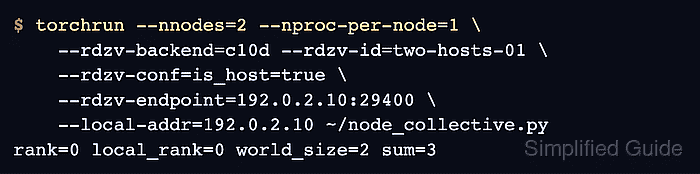
The c10d rendezvous brings the hosts together, while the Gloo backend carries CPU tensor operations between their workers. Those are separate connections, so access to the rendezvous port alone does not guarantee that a collective operation can finish.
Both hosts need matching PyTorch environments and a trusted private network with bidirectional connectivity. One CPU worker per host is enough to check cross-host communication without GPUs, a model, or a training dataset.
Steps to launch a multi-node PyTorch job with torchrun:
- Install the same CPU build of PyTorch in a virtual environment on each Linux host.
The remaining commands use the environment at ~/venvs/torch-lab from that page. On Ubuntu or Debian, creating it requires the distribution's python3-venv package.
Related: How to install Python 3 on Ubuntu or Debian - Activate the PyTorch environment in a shell on each host.
$ source ~/venvs/torch-lab/bin/activate
- Compare the PyTorch version and Gloo availability on both hosts.
$ python -c 'import torch; import torch.distributed as dist; print("torch=" + torch.__version__); print("gloo=" + str(dist.is_gloo_available()))'The two version strings must match, and both hosts must report gloo=True.
- Identify the private network address and interface on each host.
$ ip -brief -4 address
The launch commands below use 192.0.2.10 for the first host, 192.0.2.11 for the second, and enp0s5 as the interface on each. These documentation addresses stand for your hosts' reachable private addresses. 127.0.0.1 and localhost refer to the current host and cannot join two machines.
PyTorch distributed connections have no authentication or encryption. Anyone who can reach them may execute code with the job account's privileges. The hosts must be on a trusted private network with access restricted to the intended peers. Firewall or cloud rules must permit peer traffic in both directions, including TCP port 29400 on the rendezvous host and dynamically allocated worker ports; opening only 29400 is insufficient. The job runs as your ordinary account and needs no root privileges.
- Create ~/node_collective.py in your text editor on each host with the process-group initialization.
- node_collective.py
import os
from datetime import timedelta

import torch
import torch.distributed as dist

dist.init_process_group("gloo", timeout=timedelta(seconds=60))
torchrun supplies the process-group environment. The timeout bounds stalled process-group operations; waiting for a missing host at rendezvous has a separate timeout.
- Append the rank-dependent tensor reduction at the end of ~/node_collective.py on each host.
rank = dist.get_rank()
world_size = dist.get_world_size()
value = torch.tensor([rank + 1], dtype=torch.int64)
dist.all_reduce(value)
With two workers, ranks 0 and 1 contribute 1 and 2. The default sum reduction replaces each worker's tensor with 3, so it checks communication rather than only process creation.
- Append the result check and process-group cleanup at the end of ~/node_collective.py on each host.
expected = world_size * (world_size + 1) // 2
if value.item() != expected:
    raise RuntimeError(f"Expected {expected}, received {value.item()}")

print(
    f"rank={rank} local_rank={os.environ['LOCAL_RANK']} "
    f"world_size={world_size} sum={value.item()}",
    flush=True,
)
dist.destroy_process_group()
The expected sum comes from the actual group size. A failed reduction raises an error instead of printing a success result.
- Save ~/node_collective.py on both hosts.
- Set Gloo's private-network interface in each active shell using that host's interface name.
$ export GLOO_SOCKET_IFNAME=enp0s5
The interface name comes from the address listing and can differ between hosts. This setting prevents automatic selection of a loopback or unrelated interface.
- Launch the first host's worker using your first host's private address for both the rendezvous endpoint and local address.
$ torchrun --nnodes=2 --nproc-per-node=1 \
    --rdzv-backend=c10d --rdzv-id=two-hosts-01 \
    --rdzv-conf=is_host=true \
    --rdzv-endpoint=192.0.2.10:29400 \
    --local-addr=192.0.2.10 ~/node_collective.py
The first shell waits for the other host. --nnodes=2 requires two hosts, and --nproc-per-node=1 gives a total world size of two. The endpoint identifies the host that serves the c10d rendezvous; no separate rendezvous service is needed. --rdzv-conf=is_host=true explicitly makes this first host serve the rendezvous, which avoids relying on hostname-based host detection when the hostname resolves to loopback. Only this host receives that option. --local-addr advertises a reachable address instead of relying on hostname resolution.
- Launch the second host's worker using the same rendezvous endpoint and job ID, with your second host's private address as its local address.
$ torchrun --nnodes=2 --nproc-per-node=1 \
    --rdzv-backend=c10d --rdzv-id=two-hosts-01 \
    --rdzv-endpoint=192.0.2.10:29400 \
    --local-addr=192.0.2.11 ~/node_collective.py
The node count, worker count, backend, job ID, and endpoint must agree on both hosts. A separate concurrent job needs a different job ID and its own rendezvous port. --standalone would create a separate local rendezvous and does not belong in this multi-node launch. If either launch hangs or fails, Ctrl+C stops it in each terminal before a retry.
- Confirm that the two terminals report distinct global ranks with world_size=2 and sum=3. Example output:
rank=0 local_rank=0 world_size=2 sum=3
rank=1 local_rank=0 world_size=2 sum=3
Each terminal prints one rank line. c10d assigns the global ranks, so either host may receive rank 0. Both local ranks are 0 because each host runs one worker. The shared sum shows that both workers completed the same collective; world_size=1, a missing rank, or a traceback does not satisfy the two-host check.