Training with one floating-point dtype can leave accelerator throughput and memory savings unused. PyTorch automatic mixed precision keeps model parameters in their default precision while eligible forward operations use float16 or bfloat16.
The current torch.amp API separates two jobs. autocast chooses an operation-specific dtype for the forward pass and loss calculation, while GradScaler protects float16 gradients from underflow during the backward pass.
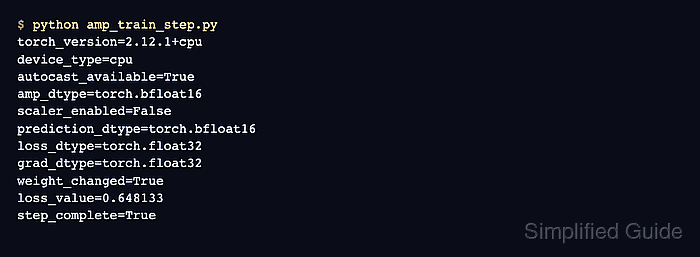
The smoke program selects CUDA float16 when a GPU is available and CPU bfloat16 otherwise. The CPU path proves the AMP control flow and parameter update without claiming accelerator performance; apply the same autocast and scaler placement to an existing training loop after its full-precision behavior is known.
Related: How to enable CUDA in PyTorch
Related: How to run a training loop in PyTorch
Related: How to debug NaN loss in PyTorch
Steps to enable PyTorch mixed precision:
- Create amp_train_step.py with imports and device-aware AMP selection.
- amp_train_step.py
import torch
from torch import nn


torch.manual_seed(7)

device_type = "cuda" if torch.cuda.is_available() else "cpu"
device = torch.device(device_type)
amp_dtype = torch.float16 if device_type == "cuda" else torch.bfloat16

if device_type == "cpu":
    torch.backends.mkldnn.enabled = False
The CPU smoke path disables mkldnn for processors without native bfloat16 instructions; supported production CPUs can retain mkldnn acceleration.
- Append the model, optimizer, loss function, and gradient scaler setup.
- amp_train_step.py
model = nn.Sequential(
    nn.Linear(4, 8),
    nn.ReLU(),
    nn.Linear(8, 1),
).to(device)
optimizer = torch.optim.SGD(model.parameters(), lr=0.05)
loss_fn = nn.MSELoss()
scaler = torch.amp.GradScaler(device_type, enabled=(amp_dtype == torch.float16))
CPU bfloat16 training does not need gradient scaling, so the scaler remains disabled on the CPU path while preserving the same call shape.
- Append a fixed training batch and a pre-update parameter snapshot.
- amp_train_step.py
inputs = torch.randn(16, 4, device=device)
target = torch.randn(16, 1, device=device)
before = model[0].weight.detach().clone()
- Enable autocast around the forward pass and loss calculation in amp_train_step.py.
- amp_train_step.py
optimizer.zero_grad(set_to_none=True)
with torch.amp.autocast(device_type=device_type, dtype=amp_dtype):
    prediction = model(inputs)
    loss = loss_fn(prediction, target)
Backward operations stay outside the autocast context because they use the dtype chosen for their corresponding forward operations.
- Append the scaled backward pass and optimizer update.
- amp_train_step.py
scaler.scale(loss).backward()
gradients_finite = bool(torch.isfinite(model[0].weight.grad).all())
scaler.step(optimizer)
scaler.update()

weight_changed = not torch.equal(before, model[0].weight.detach())
- Append the AMP outcome checks.
- amp_train_step.py
print(f"device_type={device_type}")
print(f"amp_dtype={amp_dtype}")
print(f"scaler_enabled={scaler.is_enabled()}")
print(f"prediction_dtype={prediction.dtype}")
print(f"loss_dtype={loss.dtype}")
print(f"gradients_finite={gradients_finite}")
print(f"weight_changed={weight_changed}")
print(f"loss_value={loss.detach().float().item():.6f}")
- Confirm that amp_train_step.py contains the assembled program.
- amp_train_step.py
import torch
from torch import nn


torch.manual_seed(7)

device_type = "cuda" if torch.cuda.is_available() else "cpu"
device = torch.device(device_type)
amp_dtype = torch.float16 if device_type == "cuda" else torch.bfloat16

if device_type == "cpu":
    torch.backends.mkldnn.enabled = False

model = nn.Sequential(
    nn.Linear(4, 8),
    nn.ReLU(),
    nn.Linear(8, 1),
).to(device)
optimizer = torch.optim.SGD(model.parameters(), lr=0.05)
loss_fn = nn.MSELoss()
scaler = torch.amp.GradScaler(device_type, enabled=(amp_dtype == torch.float16))

inputs = torch.randn(16, 4, device=device)
target = torch.randn(16, 1, device=device)
before = model[0].weight.detach().clone()

optimizer.zero_grad(set_to_none=True)
with torch.amp.autocast(device_type=device_type, dtype=amp_dtype):
    prediction = model(inputs)
    loss = loss_fn(prediction, target)

scaler.scale(loss).backward()
gradients_finite = bool(torch.isfinite(model[0].weight.grad).all())
scaler.step(optimizer)
scaler.update()

weight_changed = not torch.equal(before, model[0].weight.detach())

print(f"device_type={device_type}")
print(f"amp_dtype={amp_dtype}")
print(f"scaler_enabled={scaler.is_enabled()}")
print(f"prediction_dtype={prediction.dtype}")
print(f"loss_dtype={loss.dtype}")
print(f"gradients_finite={gradients_finite}")
print(f"weight_changed={weight_changed}")
print(f"loss_value={loss.detach().float().item():.6f}")
- Run the AMP smoke program.
$ python amp_train_step.py
device_type=cpu
amp_dtype=torch.bfloat16
scaler_enabled=False
prediction_dtype=torch.bfloat16
loss_dtype=torch.float32
gradients_finite=True
weight_changed=True
loss_value=0.648133
prediction_dtype=torch.bfloat16 confirms lower-precision forward execution on the CPU path. gradients_finite=True and weight_changed=True confirm that backward propagation produced finite gradients and the optimizer updated model parameters.

Mohd Shakir Zakaria is a cloud architect with deep roots in software development and open-source advocacy. Certified in AWS, Red Hat, VMware, ITIL, and Linux, he specializes in designing and managing robust cloud and on-premises infrastructures.


