A Python wheel is the installable archive that CI runners, private package indexes, and offline deployment hosts can reuse without rebuilding from the source tree. Building it before handoff catches missing package files, metadata mistakes, and backend failures while the source checkout is still available to fix.
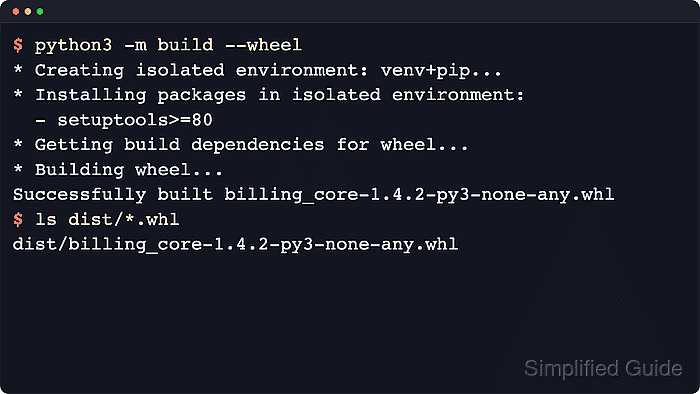
The PyPA build frontend reads pyproject.toml, creates an isolated environment for the backend's [build-system] requirements, and writes artifacts under dist by default. Running python -m build --wheel builds only the wheel directly from the source directory, while plain python -m build builds the default source distribution and wheel pair.
The examples use an activated virtual environment in a POSIX shell and a pure-Python package named inventory-metrics. Substitute py -m pip and py -m build on Windows, and expect a platform-specific wheel tag when the project contains compiled extensions or restricts its supported Python versions.
Steps to build a Python wheel:
- Change into the project directory and confirm that pyproject.toml declares the build backend and package metadata.
$ cd /tmp/inventory-metrics
$ cat pyproject.toml
[build-system]
requires = ["setuptools>=80"]
build-backend = "setuptools.build_meta"

[project]
name = "inventory-metrics"
version = "0.9.0"
description = "Metrics helpers for inventory import jobs."
readme = "README.md"
requires-python = ">=3.11"
The project name, version, and build backend declared here drive the wheel filename and the metadata embedded in the finished archive.
- Install or upgrade the build frontend in the interpreter that should run the package build.
$ python -m pip install --upgrade build
Collecting build
  Downloading build-1.5.0-py3-none-any.whl.metadata (5.7 kB)
Collecting packaging>=24.0 (from build)
  Downloading packaging-26.2-py3-none-any.whl.metadata (3.5 kB)
Collecting pyproject_hooks (from build)
  Downloading pyproject_hooks-1.2.0-py3-none-any.whl.metadata (1.3 kB)
Downloading build-1.5.0-py3-none-any.whl (26 kB)
Downloading packaging-26.2-py3-none-any.whl (100 kB)
Downloading pyproject_hooks-1.2.0-py3-none-any.whl (10 kB)
Installing collected packages: pyproject_hooks, packaging, build

Successfully installed build-1.5.0 packaging-26.2 pyproject_hooks-1.2.0
build is a separate package from the standard library, so the command fails with No module named build until it is installed in the selected interpreter or virtual environment.
When a distro-managed Linux interpreter reports an externally-managed-environment error, activate a project or build virtual environment instead of forcing packages into the operating-system interpreter.
- Build only the wheel archive from the project root.
$ python -m build --wheel
* Creating isolated environment: venv+pip...
* Installing packages in isolated environment:
  - setuptools>=80
* Getting build dependencies for wheel...
* Building wheel...
##### snipped #####
Successfully built inventory_metrics-0.9.0-py3-none-any.whl
The build frontend creates an isolated environment from the project's [build-system] requirements before invoking the backend.
Use python -m build --wheel inside an active virtual environment when the project should be built with that environment's interpreter rather than the system python3.
- Confirm that the wheel was written to the default dist directory and read the compatibility tags in the filename.
$ ls dist/*.whl
dist/inventory_metrics-0.9.0-py3-none-any.whl
The py3-none-any suffix identifies a pure-Python wheel that is not tied to one operating system or CPU architecture. Projects with compiled extensions usually produce interpreter, ABI, and platform tags such as cp313-cp313-manylinux, macosx, or win_amd64 instead.
- Inspect the finished archive before handing it to CI or another host.
$ python -m zipfile -l dist/inventory_metrics-0.9.0-py3-none-any.whl
File Name                                             Modified             Size
inventory_metrics/__init__.py                  2026-06-05 21:17:56           22
inventory_metrics-0.9.0.dist-info/METADATA     2026-06-05 21:18:08          198
inventory_metrics-0.9.0.dist-info/WHEEL        2026-06-05 21:18:08           91
inventory_metrics-0.9.0.dist-info/top_level.txt 2026-06-05 21:18:08           18
inventory_metrics-0.9.0.dist-info/RECORD       2026-06-05 21:18:08          421
The package file and dist-info metadata confirm that the wheel contains the installable payload rather than only a filename in dist.

Mohd Shakir Zakaria is a cloud architect with deep roots in software development and open-source advocacy. Certified in AWS, Red Hat, VMware, ITIL, and Linux, he specializes in designing and managing robust cloud and on-premises infrastructures.


