Analyzing Prometheus TSDB blocks with promtool shows which metric names, labels, and label pairs dominate a persisted block. The report helps investigate fast data growth, noisy exporters, uneven storage patterns, or a retention change that needs evidence from the local block store.
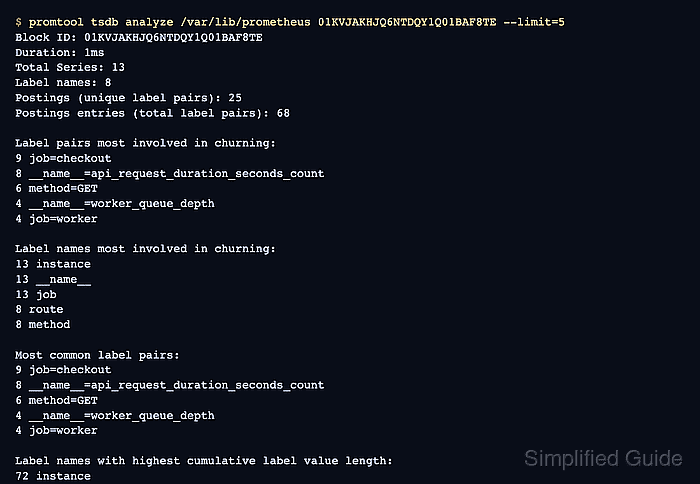
promtool tsdb analyze reads a local TSDB path and reports churn, label pair cardinality, label value length, and metric-name cardinality for one block. Supplying a block ULID from promtool tsdb list keeps the result tied to a specific time range instead of relying on the default latest block.
Read-only block analysis can still create disk and memory pressure when the data directory is large. Run promtool during a quiet window on the Prometheus host, or analyze a copied snapshot when the production data path is large or the server is already under load.
Steps to analyze Prometheus TSDB blocks with promtool:
- Open a shell where promtool can read the Prometheus data directory or a copied snapshot directory.
Use the path from --storage.tsdb.path. Package installs commonly use /var/lib/prometheus, container runs often mount /prometheus, and a local binary run without a custom path defaults to /data.
- List the available TSDB blocks in the data path.
$ promtool tsdb list /var/lib/prometheus
BLOCK ULID                  MIN TIME       MAX TIME       DURATION     NUM SAMPLES  NUM CHUNKS   NUM SERIES   SIZE
01KVJAKHJQ6NTDQY1Q01BAF8TE  1700000000000  1700000000001  1ms          13           13           13           2881
The BLOCK ULID identifies the block to analyze. Use a block whose time range matches the growth, churn, or retention question being investigated.
- Analyze the selected block with a short list limit.
$ promtool tsdb analyze /var/lib/prometheus 01KVJAKHJQ6NTDQY1Q01BAF8TE --limit=5
Block ID: 01KVJAKHJQ6NTDQY1Q01BAF8TE
Duration: 1ms
Total Series: 13
Label names: 8
Postings (unique label pairs): 25
Postings entries (total label pairs): 68

Label pairs most involved in churning:
9 job=checkout
8 __name__=api_request_duration_seconds_count
6 method=GET
4 job=worker
4 __name__=worker_queue_depth

Label names most involved in churning:
13 __name__
13 instance
13 job
8 method
8 route

Most common label pairs:
9 job=checkout
8 __name__=api_request_duration_seconds_count
6 method=GET
4 __name__=worker_queue_depth
4 job=worker

Label names with highest cumulative label value length:
72 instance
62 __name__
45 route
18 queue
18 tenant

Highest cardinality labels:
6 instance
4 route
4 tenant
3 __name__
3 queue

Highest cardinality metric names:
8 api_request_duration_seconds_count
4 worker_queue_depth
1 build_info
--limit=5 keeps each ranked section short. Increase the limit only when the top rows do not identify enough metrics or labels to review.
- Read the summary counts before choosing a follow-up target.
Total Series shows the block's series count, Postings shows unique label pairs, and Postings entries shows how many label-pair references the block index contains.
- Start with the highest cardinality metric names and labels.
High counts are review targets, not automatic removal instructions. Check dashboards, alerts, recording rules, service ownership, and exporter behavior before changing labels or retention.
- Narrow the analysis when one metric family dominates the block.
$ promtool tsdb analyze --match='{__name__="api_request_duration_seconds_count"}' /var/lib/prometheus 01KVJAKHJQ6NTDQY1Q01BAF8TE --limit=5
Block ID: 01KVJAKHJQ6NTDQY1Q01BAF8TE
Duration: 1ms
Total Series: 13
Matcher: {__name__="api_request_duration_seconds_count"}
Label names: 6
Matched series: 8
Postings (unique label pairs): 16
Postings entries (total label pairs): 48

Label pairs most involved in churning:
8 __name__=api_request_duration_seconds_count
8 job=checkout
6 method=GET
3 tenant=north
3 route=/api/orders

Label names most involved in churning:
8 __name__
8 instance
8 job
8 method
8 route

Most common label pairs:
8 __name__=api_request_duration_seconds_count
8 job=checkout
6 method=GET
3 route=/api/orders
3 tenant=north

Label names with highest cumulative label value length:
45 route
44 instance
34 __name__
18 tenant
8 job

Highest cardinality labels:
4 instance
4 route
4 tenant
2 method
1 __name__

Highest cardinality metric names:
8 api_request_duration_seconds_count
The --match selector accepts one matcher set. Run separate analysis commands for different metric families instead of combining unrelated selectors.
- Repeat the block analysis for another ULID when the storage issue spans more than one time range.
A metric that appears in only one block may reflect a short deployment, scrape change, or batch job. A metric or label that dominates several blocks is a stronger candidate for instrumentation, relabeling, or retention review.

Mohd Shakir Zakaria is a cloud architect with deep roots in software development and open-source advocacy. Certified in AWS, Red Hat, VMware, ITIL, and Linux, he specializes in designing and managing robust cloud and on-premises infrastructures.


