High-cardinality metrics in Prometheus create many time series from metric names and changing label values, which increases TSDB memory, disk, and query work. promtool tsdb analyze ranks metric names, labels, and label pairs so the largest sources of series fan-out can be reviewed before instrumentation or scrape changes are made.
promtool reads persisted TSDB blocks from the local data path or from a copied block directory. It does not replace live review of the current head block, so pair it with the Prometheus TSDB Status page or a focused PromQL query when the newest samples have not compacted into a block yet.
The counts identify review targets, not labels to remove automatically. A high label count should be checked against dashboards, alerts, recording rules, and ownership before changing exporter code, relabeling rules, or retention policy.
Steps to find high-cardinality Prometheus metrics:
- Open a shell where promtool can read the Prometheus data directory or a copied TSDB block directory.
- List the available TSDB blocks in the data path.
$ promtool tsdb list /var/lib/prometheus
BLOCK ULID                  MIN TIME       MAX TIME       DURATION     NUM SAMPLES  NUM CHUNKS   NUM SERIES   SIZE
01K8EXAMPLEBLOCK000000000  1760961600000  1760961600001  1ms          196          196          196          34753
Use the path from --storage.tsdb.path. Package installs commonly use /var/lib/prometheus, and local binary runs default to /data.
- Run the TSDB cardinality analysis with a short output limit.
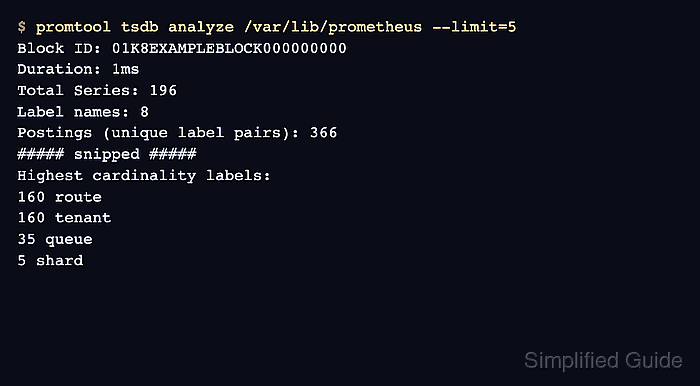
$ promtool tsdb analyze /var/lib/prometheus --limit=5
Block ID: 01K8EXAMPLEBLOCK000000000
Duration: 1ms
Total Series: 196
Label names: 8
Postings (unique label pairs): 366
Postings entries (total label pairs): 748
Label names most involved in churning:
196 __name__
160 tenant
160 route
160 method
35 queue

Most common label pairs:
160 method=GET
160 __name__=api_request_duration_seconds_count
35 __name__=worker_queue_depth
7 shard=04
7 shard=00

Highest cardinality labels:
160 route
160 tenant
35 queue
5 shard
3 __name__

Highest cardinality metric names:
160 api_request_duration_seconds_count
35 worker_queue_depth
1 build_info
- Start with the metric names that show the largest series counts.
api_request_duration_seconds_count carries 160 series in this run, so review it before lower-count metrics.
- Check the labels with the highest distinct value counts.
Labels such as request paths, user IDs, session IDs, request IDs, tenant names, and IP addresses can create a new series for every distinct value.
- Narrow the analysis to the largest metric name.
$ promtool tsdb analyze --match='{__name__="api_request_duration_seconds_count"}' /var/lib/prometheus --limit=5
Block ID: 01K8EXAMPLEBLOCK000000000
Duration: 1ms
Total Series: 196
Matcher: {__name__="api_request_duration_seconds_count"}
Label names: 4
Matched series: 160
Postings (unique label pairs): 322
Postings entries (total label pairs): 640
Label names most involved in churning:
160 route
160 tenant
160 __name__
160 method

Most common label pairs:
160 method=GET
160 __name__=api_request_duration_seconds_count
1 tenant=tenant-025
1 tenant=tenant-061
1 tenant=tenant-078

Highest cardinality labels:
160 route
160 tenant
1 __name__
1 method

Highest cardinality metric names:
160 api_request_duration_seconds_count
The --match selector accepts one matcher set and separates metric-specific label fan-out from namespace-wide labels.
- Verify that the narrowed output names the labels to review.
A metric-specific result that still shows high route and tenant counts points to instrumentation or relabeling review for those labels.

Mohd Shakir Zakaria is a cloud architect with deep roots in software development and open-source advocacy. Certified in AWS, Red Hat, VMware, ITIL, and Linux, he specializes in designing and managing robust cloud and on-premises infrastructures.


