Prometheus federation lets one Prometheus server scrape selected time series from another Prometheus server. Configure it when a regional, service, or global Prometheus server needs a small labeled subset from a source server without scraping every original target again.
The destination server treats the source server as a scrape target, but it requests /federate instead of /metrics. The scrape job passes one or more match[] selectors and sets honor_labels so labels emitted by the source server, including cluster or replica, stay attached to the federated samples.
Keep the selector set narrow enough for the destination server to store and query. Use hostnames reachable from the destination Prometheus network, validate the complete YAML with promtool, reload the destination, and query the destination server for a source-labeled series.
Steps to configure Prometheus federation:
- Check that the source Prometheus server is ready.
$ curl --silent --show-error http://source-prometheus.example.net:9090/-/ready
Prometheus Server is Ready.
Use the same scheme, host, port, proxy path, and authentication that the destination Prometheus server will use to reach the source server.
- Request one intended source series from the /federate endpoint.
$ curl --silent --show-error --get --data-urlencode 'match[]=up{job="prometheus-source"}' http://source-prometheus.example.net:9090/federate
# TYPE up untyped
up{instance="source-prometheus.example.net:9090",job="prometheus-source",service="prometheus",cluster="edge-a",replica="prometheus-01"} 1 1781952527233
Each match[] value is an instant vector selector. Multiple match[] parameters select the union of their matched series.
- Open the active destination Prometheus configuration file.
$ sudo vi /etc/prometheus/prometheus.yml
Use the path from the destination server's --config.file startup flag when the service does not use /etc/prometheus/prometheus.yml.
- Add a federation scrape job under scrape_configs.
- /etc/prometheus/prometheus.yml
scrape_configs:
  - job_name: federate-edge-a
    scrape_interval: 30s
    honor_labels: true
    metrics_path: /federate
    params:
      'match[]':
        - 'up{job="prometheus-source"}'
        - 'prometheus_build_info{job="prometheus-source"}'
    static_configs:
      - targets:
          - source-prometheus.example.net:9090
        labels:
          source: edge-a
honor_labels keeps labels from the source server when they conflict with labels that the destination scrape job would otherwise attach. Choose destination-side labels, such as source, that do not collide with labels already exposed by the source server.
- Check the destination configuration with promtool.
$ promtool check config /etc/prometheus/prometheus.yml
Checking /etc/prometheus/prometheus.yml
 SUCCESS: /etc/prometheus/prometheus.yml is valid prometheus config file syntax
Related: How to test Prometheus configuration
- Reload the destination Prometheus server.
$ curl --silent --show-error --request POST --include http://global-prometheus.example.net:9090/-/reload
HTTP/1.1 200 OK
Date: Sat, 20 Jun 2026 10:48:43 GMT
Content-Length: 0
The HTTP lifecycle endpoint works only when the destination server starts with --web.enable-lifecycle. Use SIGHUP or the host service manager when that endpoint is disabled.
- Query the destination server for the federated target state.
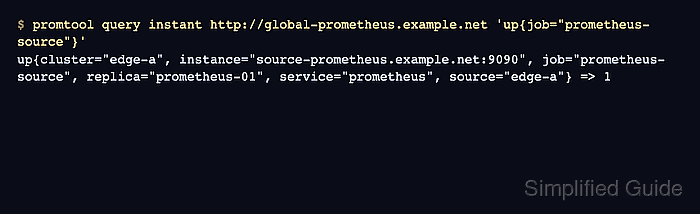
$ promtool query instant http://global-prometheus.example.net 'up{job="prometheus-source"}'
up{cluster="edge-a", instance="source-prometheus.example.net:9090", job="prometheus-source", replica="prometheus-01", service="prometheus", source="edge-a"} => 1
Value 1 means the destination server scraped the source server's current up series through federation. The cluster and replica labels came from the source server, while source came from the destination scrape job.
Related: How to run a PromQL query in Prometheus - Query a second federated metric from the destination server.
$ promtool query instant http://global-prometheus.example.net 'prometheus_build_info{job="prometheus-source"}'
prometheus_build_info{cluster="edge-a", instance="source-prometheus.example.net:9090", job="prometheus-source", replica="prometheus-01", service="prometheus", source="edge-a", version="3.5.4"} => 1
A returned prometheus_build_info series confirms that more than one match[] selector is loaded and reachable through the destination server.

Mohd Shakir Zakaria is a cloud architect with deep roots in software development and open-source advocacy. Certified in AWS, Red Hat, VMware, ITIL, and Linux, he specializes in designing and managing robust cloud and on-premises infrastructures.


