Managing the Prometheus service with systemctl keeps the monitoring server tied to normal Linux boot, maintenance, reload, and status workflows. A managed unit can start at boot, stop cleanly for planned work, reload scrape and rule changes, and report whether the web server is ready for queries.
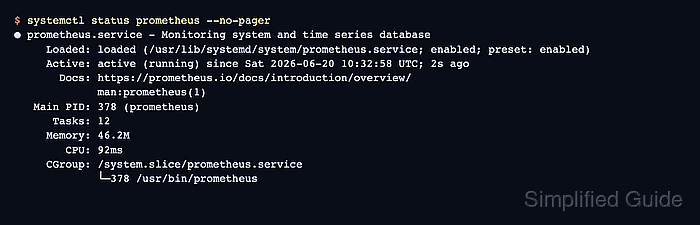
A systemd unit named prometheus is the common target on Linux hosts that run Prometheus from a package. Ubuntu and Debian packages ship that unit with an /etc/default/prometheus environment file, an ExecStart command for /usr/bin/prometheus, and an ExecReload action that sends SIGHUP.
Use reload after validating configuration or rule-file changes, and use restart for startup flags, web configuration, retention arguments, or unit overrides. Check the /-/ready endpoint after a start or restart because an active process state does not always mean Prometheus has finished loading its TSDB and configuration.
Related: How to reload Prometheus configuration
Related: How to test Prometheus configuration
Related: How to set Prometheus retention
Steps to manage the Prometheus service with systemctl:
- Confirm that systemd knows the prometheus unit and read its reload action.
$ systemctl cat prometheus
# /usr/lib/systemd/system/prometheus.service
[Unit]
Description=Monitoring system and time series database
Documentation=https://prometheus.io/docs/introduction/overview/ man:prometheus(1)
After=time-sync.target

[Service]
Restart=on-abnormal
User=prometheus
EnvironmentFile=/etc/default/prometheus
ExecStart=/usr/bin/prometheus $ARGS
ExecReload=/bin/kill -HUP $MAINPID
TimeoutStopSec=20s
SendSIGKILL=no
##### snipped #####
[Install]
WantedBy=multi-user.target
The ExecReload line means systemctl reload prometheus sends SIGHUP to the running server. Custom units without ExecReload need a unit update or a restart path instead.
- Enable Prometheus at boot and start it now.
$ sudo systemctl enable --now prometheus
Synchronizing state of prometheus.service with SysV service script with /usr/lib/systemd/systemd-sysv-install.
Executing: /usr/lib/systemd/systemd-sysv-install enable prometheus
Created symlink '/etc/systemd/system/multi-user.target.wants/prometheus.service' -> '/usr/lib/systemd/system/prometheus.service'.
If the unit is already enabled, systemd may print less output. The --now flag still asks systemd to start the service immediately.
- Confirm the boot-enabled state.
$ systemctl is-enabled prometheus
enabled
- Confirm the running process state.
$ systemctl is-active prometheus
active
If the state is failed or inactive after a start attempt, inspect the journal before checking the web endpoint.
- Check the local readiness endpoint.
$ curl --silent --show-error http://127.0.0.1:9090/-/ready
Prometheus Server is Ready.
Use the host and port from the service's --web.listen-address flag when Prometheus does not listen on the default local port.
- Reload Prometheus after a validated configuration or rule-file change.
$ sudo systemctl reload prometheus
Prometheus reloads configuration and rule files when it receives SIGHUP. Validate YAML with promtool before reloading a changed file.
Related: How to reload Prometheus configuration
Related: How to test Prometheus configuration - Confirm the service stayed active after reload.
$ systemctl is-active prometheus
active
- Restart Prometheus when startup flags, storage retention, web configuration, or unit overrides changed.
$ sudo systemctl restart prometheus
A restart stops this Prometheus instance briefly. Use a redundant pair or a planned maintenance window when query or scrape continuity matters.
Related: How to set Prometheus retention
- Check detailed service status after the restart.
$ systemctl status prometheus --no-pager ● prometheus.service - Monitoring system and time series database Loaded: loaded (/usr/lib/systemd/system/prometheus.service; enabled; preset: enabled) Active: active (running) since Sat 2026-06-20 10:32:58 UTC; 2s ago Docs: https://prometheus.io/docs/introduction/overview/ man:prometheus(1) Main PID: 378 (prometheus) Tasks: 12 Memory: 46.2M CPU: 92ms CGroup: /system.slice/prometheus.service └─378 /usr/bin/prometheus Jun 20 10:32:58 linux-host prometheus[378]: ts=2026-06-20T10:32:58.263Z caller=main.go:1345 level=info msg="Loading configuration file" filename=/etc/prometheus/prometheus.yml Jun 20 10:32:58 linux-host prometheus[378]: ts=2026-06-20T10:32:58.263Z caller=main.go:1384 level=info msg="Completed loading of configuration file" filename=/etc/prometheus/prometheus.yml Jun 20 10:32:58 linux-host prometheus[378]: ts=2026-06-20T10:32:58.264Z caller=main.go:1124 level=info msg="Server is ready to receive web requests." - Inspect the service journal when start, reload, or restart does not reach the expected state.
$ sudo journalctl -u prometheus --no-pager
Jun 20 10:32:04 linux-host systemd[1]: Started prometheus.service - Monitoring system and time series database.
Jun 20 10:32:04 linux-host prometheus[77]: ts=2026-06-20T10:32:04.044Z caller=main.go:1124 level=info msg="Server is ready to receive web requests."
Jun 20 10:32:19 linux-host systemd[1]: Reloading prometheus.service - Monitoring system and time series database...
Jun 20 10:32:19 linux-host prometheus[77]: ts=2026-06-20T10:32:19.875Z caller=main.go:1345 level=info msg="Loading configuration file" filename=/etc/prometheus/prometheus.yml
Jun 20 10:32:19 linux-host systemd[1]: Reloaded prometheus.service - Monitoring system and time series database.
##### snipped #####
Parser errors, bad startup flags, permission errors, and TSDB startup messages usually appear in the unit journal before they appear in the web UI.
- Stop Prometheus only when the instance should stop scraping targets and answering queries.
$ sudo systemctl stop prometheus
Stopping the service leaves dashboards, alert evaluations, and remote-write traffic without this Prometheus instance until it starts again.
- Confirm the stopped state.
$ systemctl is-active prometheus
inactive

Mohd Shakir Zakaria is a cloud architect with deep roots in software development and open-source advocacy. Certified in AWS, Red Hat, VMware, ITIL, and Linux, he specializes in designing and managing robust cloud and on-premises infrastructures.


