PostgreSQL performance work goes wrong when settings change before the bottleneck is known. A workload that mixes slow statements, stale statistics, memory spills, checkpoints, and connection pressure needs measurements tied to the query or subsystem being changed.
Tuning starts with statement-level evidence from slow logs or pg_stat_statements, then checks the plan with EXPLAIN (ANALYZE, BUFFERS) before changing indexes, vacuum behavior, memory, WAL, planner costs, partitions, or connection handling. Each change should have a matching before/after metric so a faster query does not hide a new write, memory, or checkpoint problem.
Examples use current supported PostgreSQL releases with local superuser access through psql on Linux. EXPLAIN ANALYZE executes the statement, CREATE INDEX CONCURRENTLY still scans the table while it avoids blocking ordinary writes, and memory or WAL settings should be changed one at a time under comparable load.
Steps to optimize PostgreSQL performance:
- Check whether slow statement logging is already enabled in log_min_duration_statement.
$ sudo -u postgres psql -Atc "SHOW log_min_duration_statement;"
-1
-1 means duration logging is disabled. Lower thresholds produce larger logs and can increase disk I/O during traffic spikes.
- Verify that pg_stat_statements is loaded from shared_preload_libraries.
$ sudo -u postgres psql -Atc "SHOW shared_preload_libraries;"
pg_stat_statements
Changing shared_preload_libraries requires a PostgreSQL restart, which ends existing sessions.
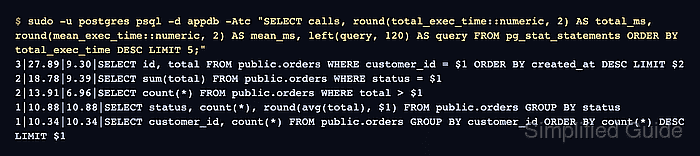
- List the most expensive statements from pg_stat_statements.
$ sudo -u postgres psql -d appdb -Atc "SELECT calls, round(total_exec_time::numeric, 2) AS total_ms, round(mean_exec_time::numeric, 2) AS mean_ms, left(query, 120) AS query FROM pg_stat_statements ORDER BY total_exec_time DESC LIMIT 5;"
3|27.89|9.30|SELECT id, total FROM public.orders WHERE customer_id = $1 ORDER BY created_at DESC LIMIT $2
2|18.78|9.39|SELECT sum(total) FROM public.orders WHERE status = $1
2|13.91|6.96|SELECT count(*) FROM public.orders WHERE total > $1
1|10.88|10.88|SELECT status, count(*), round(avg(total), $1) FROM public.orders GROUP BY status
1|10.34|10.34|SELECT customer_id, count(*) FROM public.orders GROUP BY customer_id ORDER BY count(*) DESC LIMIT $1
The pg_stat_statements view requires CREATE EXTENSION pg_stat_statements; in the target database.
- Validate a top statement before changing it with EXPLAIN (ANALYZE, BUFFERS).
$ sudo -u postgres psql -d appdb -c "EXPLAIN (ANALYZE, BUFFERS) SELECT id, total FROM public.orders WHERE customer_id = 42 ORDER BY created_at DESC LIMIT 50;"
                                                      QUERY PLAN
-----------------------------------------------------------------------------------------------------------------------
 Limit  (cost=3012.93..3013.06 rows=50 width=22) (actual time=5.463..5.469 rows=50.00 loops=1)
   Buffers: shared hit=1131
   ->  Sort  (cost=3012.93..3013.68 rows=299 width=22) (actual time=5.462..5.464 rows=50.00 loops=1)
         Sort Key: created_at DESC
         Sort Method: top-N heapsort  Memory: 28kB
         Buffers: shared hit=1131
         ->  Seq Scan on orders  (cost=0.00..3003.00 rows=299 width=22) (actual time=0.006..5.393 rows=300.00 loops=1)
               Filter: (customer_id = 42)
               Rows Removed by Filter: 149700
               Buffers: shared hit=1128
 Planning:
   Buffers: shared hit=91
 Planning Time: 0.195 ms
 Execution Time: 5.491 ms
(14 rows)
EXPLAIN ANALYZE executes the statement and can cause real load on production systems.
- Create an index that matches the frequent filter and ordering pattern.
$ sudo -u postgres psql -d appdb -c "CREATE INDEX CONCURRENTLY IF NOT EXISTS orders_customer_created_idx ON public.orders (customer_id, created_at DESC);"
CREATE INDEX
Indexes improve reads but increase write cost, VACUUM work, and storage use. CONCURRENTLY avoids blocking ordinary writes, but it still scans the table and can run longer on large relations.
Related: How to create an index in PostgreSQL
- Re-run the same plan check after the index is ready.
$ sudo -u postgres psql -d appdb -c "EXPLAIN (ANALYZE, BUFFERS) SELECT id, total FROM public.orders WHERE customer_id = 42 ORDER BY created_at DESC LIMIT 50;"
                                                                     QUERY PLAN
----------------------------------------------------------------------------------------------------------------------------------------------------
 Limit  (cost=0.42..179.89 rows=50 width=22) (actual time=0.020..0.118 rows=50.00 loops=1)
   Buffers: shared hit=53
   ->  Index Scan using orders_customer_created_idx on orders  (cost=0.42..1073.64 rows=299 width=22) (actual time=0.019..0.115 rows=50.00 loops=1)
         Index Cond: (customer_id = 42)
         Index Searches: 1
         Buffers: shared hit=53
 Planning:
   Buffers: shared hit=122 read=1
 Planning Time: 0.268 ms
 Execution Time: 0.139 ms
(10 rows)
The changed top node, lower buffer count, and lower execution time show the indexed path for this statement.
- Run VACUUM (VERBOSE, ANALYZE) on a table with bloat or stale statistics.
$ sudo -u postgres psql -d appdb -c "VACUUM (VERBOSE, ANALYZE) public.orders;"
INFO:  vacuuming "appdb.public.orders"
INFO:  launched 1 parallel vacuum worker for index cleanup (planned: 1)
INFO:  finished vacuuming "appdb.public.orders": index scans: 0
pages: 0 removed, 1128 remain, 1 scanned (0.09% of total), 0 eagerly scanned
tuples: 0 removed, 150000 remain, 0 are dead but not yet removable
##### snipped #####
INFO:  analyzing "public.orders"
INFO:  "orders": scanned 1128 of 1128 pages, containing 150000 live rows and 0 dead rows; 30000 rows in sample, 150000 estimated total rows
VACUUM
Frequent bloat often signals autovacuum thresholds that are too lax for the write rate.
- Check the current shared_buffers value before adjusting cache sizing.
$ sudo -u postgres psql -Atc "SHOW shared_buffers;"
128MB
shared_buffers is global memory; oversized values can starve the OS page cache and other services.
- Check the current work_mem value before tuning sort and hash operations.
$ sudo -u postgres psql -Atc "SHOW work_mem;"
4MB
work_mem is per operation per query; high values can exhaust RAM under concurrency.
Related: How to tune work_mem in PostgreSQL
Tool: Postgres Work Mem Calculator - Check WAL sizing to reduce checkpoint spikes on write-heavy workloads.
$ sudo -u postgres psql -Atc "SHOW max_wal_size;"
1GB
Small WAL budgets trigger frequent checkpoints, which can amplify I/O latency.
- Check random_page_cost to align planner choices with storage latency.
$ sudo -u postgres psql -Atc "SHOW random_page_cost;"
4
Lower values are common on SSD-backed storage so index plans are not over-penalized.
- Evaluate partitioning for very large tables that support partition pruning.
Partitioning helps when queries, retention, and maintenance can target partitions instead of scanning everything.
- List the longest-running non-idle sessions to spot blocking and wait events.
$ sudo -u postgres psql -d appdb -c "SELECT pid, usename, state, now()-query_start AS age, wait_event_type, wait_event, left(query, 60) AS query FROM pg_stat_activity WHERE state <> 'idle' ORDER BY age DESC LIMIT 10;"
 pid | usename  | state  |   age    | wait_event_type | wait_event |                            query
-----+----------+--------+----------+-----------------+------------+--------------------------------------------------------------
 498 | postgres | active | 00:00:00 |                 |            | SELECT pid, usename, state, now()-query_start AS age, wait_e
(1 row)
wait_event_type and wait_event highlight contention sources such as locks, WAL, or I/O.
- Check the configured connection ceiling in max_connections.
$ sudo -u postgres psql -Atc "SHOW max_connections;"
100
High connection limits increase baseline memory use and can amplify contention during bursts.
- Add a connection pooler when client concurrency exceeds sustainable session counts.
Poolers such as PgBouncer reduce process overhead by multiplexing many clients onto fewer backend sessions.
- Capture I/O and cache-hit baselines from pg_stat_database for before/after comparisons.
$ sudo -u postgres psql -d appdb -Atc "SELECT datname, blks_hit, blks_read, round(blks_hit*100.0/nullif(blks_hit+blks_read,0), 2) AS hit_pct FROM pg_stat_database WHERE datname = current_database();"
appdb|684400|1162|99.83
Repeat the query after each change and compare hit_pct and blks_read under similar load.

Mohd Shakir Zakaria is a cloud architect with deep roots in software development and open-source advocacy. Certified in AWS, Red Hat, VMware, ITIL, and Linux, he specializes in designing and managing robust cloud and on-premises infrastructures.


