Repeated PostgreSQL statements can consume most of a server's execution time while ordinary database metrics still look acceptable. Enabling pg_stat_statements records normalized query patterns inside the server, so slow or high-frequency SQL can be ranked from the database instead of reconstructed from application logs.
The pg_stat_statements module loads at server start and keeps statement counters in shared memory across the whole instance. The database-level CREATE EXTENSION command exposes those counters through the pg_stat_statements and pg_stat_statements_info views in each database that needs to query them.
Changing shared_preload_libraries requires a full restart, which drops active sessions. Current PostgreSQL releases also need compute_query_id set to auto or on, and query text can expose application details, so restrict access to superusers or controlled monitoring roles such as pg_read_all_stats.
Related: How to analyze slow queries in PostgreSQL \\
Related: How to monitor PostgreSQL performance metrics
Steps to enable pg_stat_statements in PostgreSQL:
- Show the active postgresql.conf location from the running server.
$ sudo -u postgres psql -X -At -c "SHOW config_file;"
/etc/postgresql/18/main/postgresql.conf
- Back up the reported configuration file before editing it.
$ sudo cp /etc/postgresql/18/main/postgresql.conf /etc/postgresql/18/main/postgresql.conf.before-pg-stat-statements
Replace the path with the value returned by SHOW config_file.
- Open the reported postgresql.conf file in an editor with elevated privileges.
$ sudoedit /etc/postgresql/18/main/postgresql.conf
- Add pg_stat_statements to shared_preload_libraries and leave query ID calculation enabled.
shared_preload_libraries = 'pg_stat_statements'
compute_query_id = auto
Preserve existing preload entries by appending pg_stat_statements to the existing comma-separated list inside the same quoted value.
- Configure optional pg_stat_statements settings when higher capacity or different tracking is required.
pg_stat_statements.max = 10000
pg_stat_statements.track = top
pg_stat_statements.max defaults to 5000 in current PostgreSQL releases, and raising it increases shared memory use. pg_stat_statements.track defaults to top; use all only when nested statements inside functions need to be counted.
- Restart the PostgreSQL service to load the preloaded library.
$ sudo systemctl restart postgresql
A server restart disconnects existing sessions and can abort in-flight transactions.
When postgresql is not the unit name, identify the correct service with systemctl list-units 'postgresql*'.
- Confirm pg_stat_statements appears in shared_preload_libraries after the restart.
$ sudo -u postgres psql -X -At -c "SHOW shared_preload_libraries;"
pg_stat_statements
- Confirm query ID calculation is enabled.
$ sudo -u postgres psql -X -At -c "SHOW compute_query_id;"
auto
pg_stat_statements needs query IDs to group matching statements. Use on instead of auto only when local policy requires explicit query ID calculation.
- Create the pg_stat_statements extension in the target database.
$ sudo -u postgres psql -X -d postgres -c "CREATE EXTENSION IF NOT EXISTS pg_stat_statements;"
CREATE EXTENSION
Run CREATE EXTENSION in each database that needs to query the pg_stat_statements view.
An error about a missing extension control file typically indicates the PostgreSQL contrib/extension files are not installed for the server version.
- Reset collected statement statistics when a clean measurement window is required.
$ sudo -u postgres psql -X -d postgres -c "SELECT pg_stat_statements_reset();"
   pg_stat_statements_reset
-------------------------------
 2026-06-07 05:37:01.795373+00
(1 row)
The no-argument reset clears collected pg_stat_statements counters for the whole PostgreSQL instance.
- Execute a simple statement to generate initial statistics.
$ sudo -u postgres psql -X -d postgres -c "SELECT now();" now ------------------------------- 2026-06-07 05:37:01.811228+00 (1 row) - Query the pg_stat_statements view to confirm statements are being tracked.
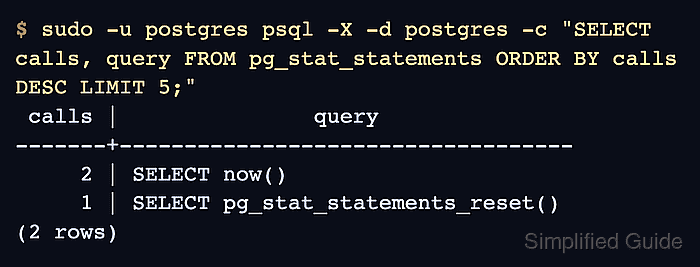
$ sudo -u postgres psql -X -d postgres -c "SELECT calls, query FROM pg_stat_statements ORDER BY calls DESC LIMIT 5;"
 calls |               query
-------+-----------------------------------
     2 | SELECT now()
     1 | SELECT pg_stat_statements_reset()
(2 rows)
The recorded query text is normalized for grouping, so literals are commonly replaced with placeholders. The example shows SELECT now() after it was run twice during validation.

Mohd Shakir Zakaria is a cloud architect with deep roots in software development and open-source advocacy. Certified in AWS, Red Hat, VMware, ITIL, and Linux, he specializes in designing and managing robust cloud and on-premises infrastructures.


