PHP cURL clients often receive a redirect before the response the application actually needs. Without explicit redirect handling, the script stops at the first 301, 302, 307, or 308 response and can treat an empty redirect body as the API result.
PHP exposes libcurl redirect handling through CURLOPT_FOLLOWLOCATION. Pair it with CURLOPT_MAXREDIRS, CURLOPT_RETURNTRANSFER, and curl_getinfo() so the client captures the final body, final URL, HTTP status, and redirect count after curl_exec() returns.
Set an allowed redirect protocol list when the runtime exposes it, and do not send sensitive custom headers across redirects unless every target is trusted. Shared-hosting runtimes with open_basedir can make CURLOPT_FOLLOWLOCATION unavailable; fix the runtime policy or implement manual redirect handling with the same host and scheme checks.
Related: Follow HTTP redirects with cURL
Related: How to handle HTTP errors with PHP cURL
Related: How to read response headers with PHP cURL
Related: How to debug PHP cURL with verbose output
Tool: HTTP Redirect Checker
Steps to follow redirects with PHP cURL:
- Confirm that the PHP cURL extension and redirect option are available in the runtime that will run the request.
$ php -r 'var_export(extension_loaded("curl") && defined("CURLOPT_FOLLOWLOCATION")); echo PHP_EOL;'
true
If this prints false, install or enable the PHP cURL extension first. When the extension is loaded but CURLOPT_FOLLOWLOCATION is still unavailable, inspect open_basedir restrictions before changing application code.
- Create a local endpoint that returns two redirects and one final JSON response.
- redirect-server.php
<?php
$path = parse_url($_SERVER['REQUEST_URI'], PHP_URL_PATH);

if ($path === '/start') {
    header('Location: /handoff', true, 302);
    echo "redirecting to /handoff\n";
    return;
}

if ($path === '/handoff') {
    header('Location: /final', true, 301);
    echo "redirecting to /final\n";
    return;
}

if ($path === '/loop') {
    header('Location: /loop', true, 302);
    echo "redirect loop\n";
    return;
}

if ($path === '/final') {
    header('Content-Type: application/json');
    echo json_encode([
        'status' => 'ok',
        'path' => $path,
    ], JSON_UNESCAPED_SLASHES) . PHP_EOL;
    return;
}

http_response_code(404);
echo "not found\n";
The start path proves a normal redirect chain. The loop path gives a safe way to verify that the client stops after the configured redirect limit.
- Start the local endpoint in a second terminal.
$ php -S 127.0.0.1:8080 redirect-server.php
Keep the server running while testing the client, then stop it with Ctrl+C after verification.
- Create the PHP cURL client that follows redirects and prints the final transfer details.
- follow-redirect.php
<?php
$url = $argv[1] ?? 'http://127.0.0.1:8080/start';

$ch = curl_init($url);
if ($ch === false) {
    fwrite(STDERR, "Could not initialize cURL.\n");
    exit(1);
}

$options = [
    CURLOPT_RETURNTRANSFER => true,
    CURLOPT_FOLLOWLOCATION => true,
    CURLOPT_MAXREDIRS => 5,
    CURLOPT_TIMEOUT => 10,
    CURLOPT_USERAGENT => 'ExampleRedirectClient/1.0',
];

if (defined('CURLOPT_REDIR_PROTOCOLS_STR')) {
    $options[CURLOPT_REDIR_PROTOCOLS_STR] = 'http,https';
} elseif (
    defined('CURLOPT_REDIR_PROTOCOLS')
    && defined('CURLPROTO_HTTP')
    && defined('CURLPROTO_HTTPS')
) {
    $options[CURLOPT_REDIR_PROTOCOLS] = CURLPROTO_HTTP | CURLPROTO_HTTPS;
}

curl_setopt_array($ch, $options);

$body = curl_exec($ch);
if ($body === false) {
    $errno = curl_errno($ch);
    $error = curl_error($ch);
    curl_close($ch);

    echo "cURL error {$errno}: {$error}" . PHP_EOL;
    exit(1);
}

$status = curl_getinfo($ch, CURLINFO_HTTP_CODE);
$finalUrl = curl_getinfo($ch, CURLINFO_EFFECTIVE_URL);
$redirects = curl_getinfo($ch, CURLINFO_REDIRECT_COUNT);
curl_close($ch);

echo "HTTP status: {$status}" . PHP_EOL;
echo "Final URL: {$finalUrl}" . PHP_EOL;
echo "Redirects followed: {$redirects}" . PHP_EOL;
echo "Response body: " . trim($body) . PHP_EOL;

if ($status < 200 || $status >= 300) {
    exit(1);
}
CURLOPT_REDIR_PROTOCOLS_STR is available in newer PHP and libcurl combinations. The fallback keeps older runtimes limited to HTTP and HTTPS redirects when the string option is not exposed.
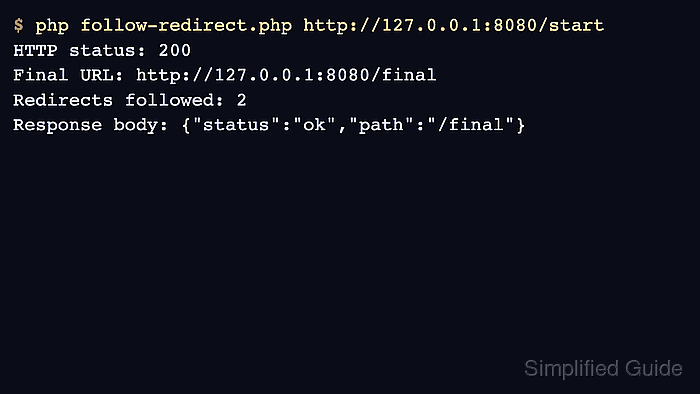
- Run the client against the redirecting URL and confirm that it lands on the final response.
$ php follow-redirect.php http://127.0.0.1:8080/start
HTTP status: 200
Final URL: http://127.0.0.1:8080/final
Redirects followed: 2
Response body: {"status":"ok","path":"/final"}
The final URL and redirect count prove that PHP cURL followed both Location headers before returning the JSON body.
- Verify that a redirect loop fails at the configured limit instead of running indefinitely.
$ php follow-redirect.php http://127.0.0.1:8080/loop
cURL error 47: Maximum (5) redirects followed
Keep CURLOPT_MAXREDIRS explicit in application code. A small limit makes redirect loops and routing mistakes fail before the request ties up the worker.
- Adapt the URL, headers, and response handling to the real endpoint after the local check passes.
For authenticated requests, review every redirect target before allowing custom headers such as Authorization or X-Api-Key. libcurl protects built-in authentication and explicit Cookie headers across host changes by default, but other custom headers can still follow the redirected request.
- Recheck redirected POST requests separately when the request body must reach the final endpoint.
libcurl can switch POST to GET after 301, 302, and 303 redirects. Use CURLOPT_POSTREDIR only when the target endpoint is expected to receive the original body after those redirects. Related: How to send a custom HTTP method with PHP cURL

Mohd Shakir Zakaria is a cloud architect with deep roots in software development and open-source advocacy. Certified in AWS, Red Hat, VMware, ITIL, and Linux, he specializes in designing and managing robust cloud and on-premises infrastructures.


