Response headers expose the metadata an API client needs before it trusts or parses a body. A PHP cURL request that only keeps the body can miss the content type, rate-limit counters, cookies, trace identifiers, and cache rules that explain how the server handled the call.
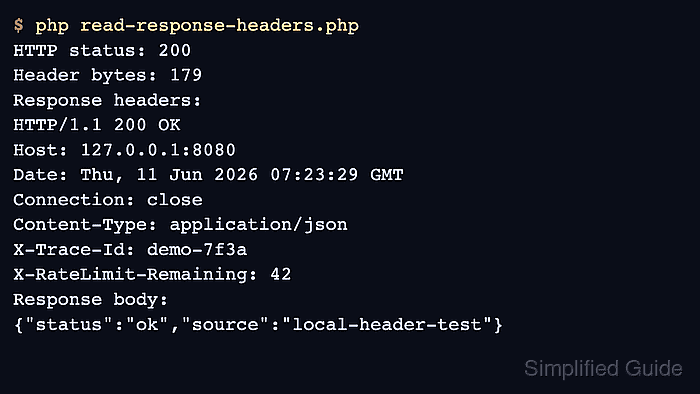
With CURLOPT_RETURNTRANSFER and CURLOPT_HEADER enabled together, curl_exec() returns one string containing the headers followed by the body. curl_getinfo() with CURLINFO_HEADER_SIZE gives the byte boundary, so PHP can split the transfer without guessing where the header block ends.
A disposable local endpoint returns JSON plus custom headers, then the client prints the status, header byte count, header block, and body. Redirects and proxy tunnel responses can add extra header blocks, so keep redirect handling deliberate and parse the final block only when the application needs the final response headers.
Related: How to send a GET request with PHP cURL
Related: How to handle HTTP errors with PHP cURL
Related: How to follow redirects with PHP cURL
Related: How to debug PHP cURL with verbose output
Steps to read response headers with PHP cURL:
- Confirm that the PHP cURL extension is loaded in the runtime that will run the request.
$ php -r 'var_export(extension_loaded("curl")); echo PHP_EOL;'
true
Install or enable the platform cURL extension package, such as php-curl on Debian or Ubuntu systems, when this command prints false.
- Create a local endpoint that returns a JSON body and response headers the client can inspect.
- header-server.php
<?php
header_remove('X-Powered-By');
header('Content-Type: application/json');
header('X-Trace-Id: demo-7f3a');
header('X-RateLimit-Remaining: 42');

echo json_encode([
    'status' => 'ok',
    'source' => 'local-header-test',
], JSON_UNESCAPED_SLASHES) . PHP_EOL;
- Start the local endpoint in a second terminal while testing the client script.
$ php -S 127.0.0.1:8080 header-server.php
Stop the built-in server with Ctrl+C after the response-header check is complete.
- Create the PHP cURL client that captures headers and body in the same transfer.
- read-response-headers.php
<?php
$url = $argv[1] ?? 'http://127.0.0.1:8080/headers';

$ch = curl_init($url);
if ($ch === false) {
    fwrite(STDERR, "Could not initialize cURL.\n");
    exit(1);
}

curl_setopt_array($ch, [
    CURLOPT_RETURNTRANSFER => true,
    CURLOPT_HEADER => true,
    CURLOPT_TIMEOUT => 10,
    CURLOPT_HTTPHEADER => [
        'Accept: application/json',
    ],
]);

$response = curl_exec($ch);
if ($response === false) {
    $errno = curl_errno($ch);
    $error = curl_error($ch);
    curl_close($ch);

    echo "cURL error {$errno}: {$error}" . PHP_EOL;
    exit(1);
}

$status = curl_getinfo($ch, CURLINFO_HTTP_CODE);
$headerSize = curl_getinfo($ch, CURLINFO_HEADER_SIZE);
curl_close($ch);

$headerText = substr($response, 0, $headerSize);
$body = substr($response, $headerSize);

echo "HTTP status: {$status}" . PHP_EOL;
echo "Header bytes: {$headerSize}" . PHP_EOL;
echo "Response headers:" . PHP_EOL;
echo trim($headerText) . PHP_EOL;
echo "Response body:" . PHP_EOL;
echo trim($body) . PHP_EOL;
CURLOPT_HEADER asks cURL to include the response header block in the returned transfer. CURLINFO_HEADER_SIZE gives the exact split point between that header text and the body captured by CURLOPT_RETURNTRANSFER.
- Run the client and confirm that the response headers are printed before the body.
$ php read-response-headers.php
HTTP status: 200
Header bytes: 179
Response headers:
HTTP/1.1 200 OK
Host: 127.0.0.1:8080
Date: Thu, 11 Jun 2026 07:23:29 GMT
Connection: close
Content-Type: application/json
X-Trace-Id: demo-7f3a
X-RateLimit-Remaining: 42
Response body:
{"status":"ok","source":"local-header-test"}
The custom X-Trace-Id and X-RateLimit-Remaining fields prove that PHP captured the response header block instead of only the JSON body.
- Replace the local URL with the target endpoint after the local check passes.
When CURLOPT_FOLLOWLOCATION is also enabled, $headerText can contain one header block per hop. Keep the whole block for troubleshooting, or split on blank lines and read the last block when only the final response matters. Use the tool only with public or non-secret test URLs. Related: How to follow redirects with PHP cURL
Tool: Hypertext Transfer Protocol (HTTP) Header Checker

Mohd Shakir Zakaria is a cloud architect with deep roots in software development and open-source advocacy. Certified in AWS, Red Hat, VMware, ITIL, and Linux, he specializes in designing and managing robust cloud and on-premises infrastructures.


