Rolling windows turn ordered observations into moving statistics that update at each row. In pandas, they suit moving averages and rolling totals where every result must reflect a defined run of recent records.
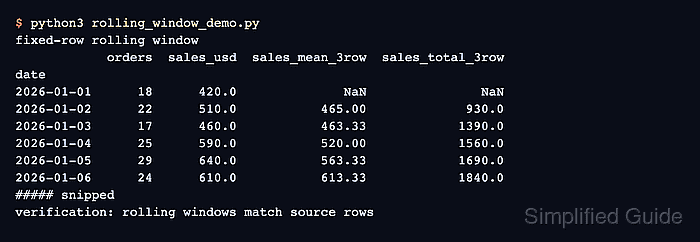
The Series.rolling() method creates the window object, while aggregations such as mean() and sum() produce the values. An integer window counts observations, labels each result at the right edge by default, and returns NaN until the min_periods threshold is met.
Row order determines which values enter every window, so the input is sorted by date before the calculation. Comparing one result with a direct slice of the same source rows also catches an incorrect window size or ordering assumption.
Related: How to create a pandas DataFrame
Related: How to find missing values in pandas
Steps to calculate pandas rolling windows:
- Create the date-ordered sales input in rolling_window_demo.py.
- rolling_window_demo.py
import pandas as pd

orders = pd.DataFrame(
    {
        "date": pd.to_datetime(
            [
                "2026-01-01",
                "2026-01-02",
                "2026-01-03",
                "2026-01-04",
                "2026-01-05",
                "2026-01-06",
            ]
        ),
        "sales_usd": [420.0, 510.0, 460.0, 590.0, 640.0, 610.0],
    }
)
orders = orders.sort_values("date").set_index("date")
- Add the three-row rolling calculations below the ordered input.
rolling = orders["sales_usd"].rolling(window=3, min_periods=2)
result = orders.assign(
    sales_mean_3row=rolling.mean().round(2),
    sales_total_3row=rolling.sum(),
)
window=3 includes the current row and the previous two rows. min_periods=2 produces the first value after two observations instead of waiting for all three.
- Add the source-row verification below the rolling calculations.
check_date = pd.Timestamp("2026-01-05")
window_values = orders.loc["2026-01-03":"2026-01-05", "sales_usd"]
actual_mean = result.at[check_date, "sales_mean_3row"]
actual_total = result.at[check_date, "sales_total_3row"]

assert actual_mean == round(window_values.mean(), 2)
assert actual_total == window_values.sum()

print(result.to_string())
print(f"\n2026-01-05 source values: {window_values.tolist()}")
print(f"rolling mean: {actual_mean:.2f}")
print(f"rolling total: {actual_total:.1f}")
The 2026-01-05 result must use 460.0, 590.0, and 640.0. Either assertion stops the script if the rolling columns do not match those source values.
- Run rolling_window_demo.py.
$ python3 rolling_window_demo.py
            sales_usd  sales_mean_3row  sales_total_3row
date
2026-01-01      420.0              NaN               NaN
2026-01-02      510.0           465.00             930.0
2026-01-03      460.0           463.33            1390.0
2026-01-04      590.0           520.00            1560.0
2026-01-05      640.0           563.33            1690.0
2026-01-06      610.0           613.33            1840.0

2026-01-05 source values: [460.0, 590.0, 640.0]
rolling mean: 563.33
rolling total: 1690.0

Mohd Shakir Zakaria is a cloud architect with deep roots in software development and open-source advocacy. Certified in AWS, Red Hat, VMware, ITIL, and Linux, he specializes in designing and managing robust cloud and on-premises infrastructures.


