Business tables often separate event records from reusable attributes. Orders store totals while a customer table owns segment and region, and keyed matching adds that context without duplicating customer details in every source row.
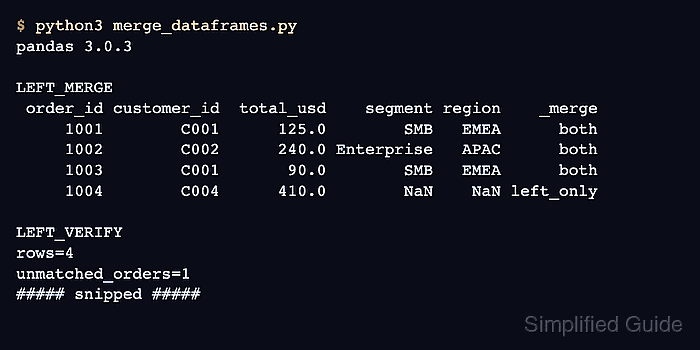
The DataFrame.merge() method matches values in one or more columns using database-style join semantics. A left merge suits order enrichment because every order remains in the result even when the customer lookup has no match.
The customer table must contain one row per customer for a many-to-one relationship. validate=“many_to_one” stops duplicate lookup keys from multiplying rows, while indicator=True exposes unmatched orders; pandas also matches null keys to null keys, unlike usual SQL behavior.
Related: How to create a pandas DataFrame
Related: How to concatenate pandas DataFrames
Related: How to filter rows in a pandas DataFrame
Steps to merge pandas DataFrames:
- Create merge_dataframes.py with the order and customer tables.
- merge_dataframes.py
import pandas as pd

orders = pd.DataFrame(
    {
        "order_id": [1001, 1002, 1003, 1004],
        "customer_id": ["C001", "C002", "C001", "C004"],
        "total_usd": [125.0, 240.0, 90.0, 410.0],
    }
)

customers = pd.DataFrame(
    {
        "customer_id": ["C001", "C002", "C003"],
        "segment": ["SMB", "Enterprise", "SMB"],
        "region": ["EMEA", "APAC", "AMER"],
    }
)
The orders table repeats customer IDs because one customer can place several orders, while the customers table supplies one lookup row per ID.
- Add a lookup-key uniqueness assertion below the customers DataFrame.
assert customers["customer_id"].is_unique
- Merge the orders with the customer lookup below the uniqueness assertion.
enriched_orders = orders.merge(
    customers,
    on="customer_id",
    how="left",
    validate="many_to_one",
    indicator=True,
)
Null keys match one another in pandas, so input rows with missing customer IDs can join instead of remaining unmatched.
- Select the unmatched orders below the merge block.
unmatched_orders = enriched_orders.loc[
    enriched_orders["_merge"] == "left_only",
    ["order_id", "customer_id"],
]
indicator=True adds _merge values of both, left_only, or right_only to identify each row's key source.
- Append fail-capable row and key checks below the unmatched selection.
assert len(enriched_orders) == len(orders)
assert enriched_orders["order_id"].is_unique
assert unmatched_orders["customer_id"].tolist() == ["C004"]
- Append the merged table and summary display below the checks.
rows_preserved = len(enriched_orders) == len(orders)
unmatched_ids = unmatched_orders["customer_id"].tolist()

print(enriched_orders.to_string(index=False))
print(f"\nrows preserved={rows_preserved}")
print(f"unmatched customer IDs={unmatched_ids}")
- Run the completed merge program to confirm lookup values, preserved rows, and the unmatched customer ID.
$ python3 merge_dataframes.py
 order_id customer_id  total_usd    segment region    _merge
     1001        C001      125.0        SMB   EMEA      both
     1002        C002      240.0 Enterprise   APAC      both
     1003        C001       90.0        SMB   EMEA      both
     1004        C004      410.0        NaN    NaN left_only

rows preserved=True
unmatched customer IDs=['C004']

Mohd Shakir Zakaria is a cloud architect with deep roots in software development and open-source advocacy. Certified in AWS, Red Hat, VMware, ITIL, and Linux, he specializes in designing and managing robust cloud and on-premises infrastructures.


