TLS listeners often keep more than one protocol version enabled while clients and security policies move at different speeds. A direct OpenSSL probe shows whether a specific endpoint negotiates TLS 1.3, still accepts TLS 1.2, or rejects an older version that a scanner flagged.
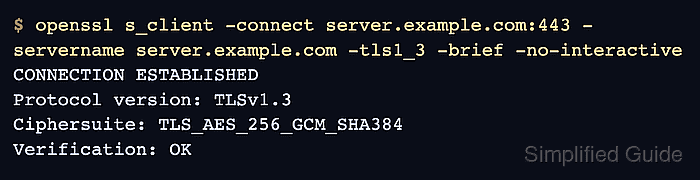
The openssl s_client command can force one protocol version with -tls1_3, -tls1_2, -tls1_1, or similar flags. Supplying -servername keeps Server Name Indication, or SNI, aligned with the virtual host so shared addresses, proxies, and CDN edges return the same listener policy real clients reach.
A successful version probe prints CONNECTION ESTABLISHED and Protocol version in brief output. A rejected probe normally returns a handshake alert such as tlsv1 alert protocol version, while very old versions can also be blocked by the local OpenSSL security policy before the server result is reached.
Related: How to test a TLS certificate using OpenSSL
Related: How to test a TLS cipher suite using OpenSSL
Related: How to test TLS ALPN negotiation using OpenSSL
Tool: SSL Checker
Steps to test TLS protocol versions using OpenSSL:
- Identify the endpoint socket, SNI name, and protocol versions to test.
Use the DNS name clients request as -servername. Add the correct -starttls option only for services such as SMTP, IMAP, POP3, or LDAP that upgrade to TLS after a clear-text greeting.
- Test TLS 1.3 against the endpoint.
$ openssl s_client -connect server.example.com:443 -servername server.example.com -tls1_3 -brief -no-interactive
CONNECTION ESTABLISHED
Protocol version: TLSv1.3
Ciphersuite: TLS_AES_256_GCM_SHA384
Peer certificate: CN=server.example.com
Verification: OK
Protocol version: TLSv1.3 means the listener accepted a TLS 1.3 handshake for that socket, route, and SNI name.
- Test TLS 1.2 when the service policy or client support matrix still allows it.
$ openssl s_client -connect server.example.com:443 -servername server.example.com -tls1_2 -brief -no-interactive
CONNECTION ESTABLISHED
Protocol version: TLSv1.2
Ciphersuite: ECDHE-RSA-AES256-GCM-SHA384
Peer certificate: CN=server.example.com
Verification: OK
A successful TLS 1.2 result does not prove that older versions are enabled. Probe each version named by the policy, audit, or scanner finding.
- Probe a legacy version only when a policy audit or scanner finding requires it.
$ openssl s_client -connect server.example.com:443 -servername server.example.com -tls1_1 -cipher 'DEFAULT:@SECLEVEL=0' -brief -no-interactive
error:0A00042E:SSL routines:ssl3_read_bytes:tlsv1 alert protocol version
Exit status: 1
The -cipher value shown lowers the local client security level only for this legacy probe. Do not use DEFAULT:@SECLEVEL=0 for normal client traffic.

Mohd Shakir Zakaria is a cloud architect with deep roots in software development and open-source advocacy. Certified in AWS, Red Hat, VMware, ITIL, and Linux, he specializes in designing and managing robust cloud and on-premises infrastructures.


