TLS cipher policies decide which cryptographic suite a server will accept during the handshake. Testing a named suite with OpenSSL is useful after changing a web server, proxy, load balancer, or mail gateway policy because the endpoint should accept the approved suite and reject the disabled one from the same client-side probe.
OpenSSL uses separate controls for the two current cipher families. TLS 1.2 and older suites are offered through -cipher, while TLS 1.3 ciphersuites are offered through -ciphersuites. The openssl ciphers command confirms that the local OpenSSL build recognizes the name before openssl s_client offers it to the endpoint.
Use the service DNS name with -servername so shared listeners, proxies, and CDN edges select the same virtual host that real clients use. A successful socket connection is not enough evidence by itself; the Protocol version and Ciphersuite lines must match the suite being tested, while an expected handshake failure proves that a disabled suite was not negotiated.
Steps to test a TLS cipher suite using OpenSSL:
- Confirm that local OpenSSL recognizes the TLS 1.2 cipher name.
$ openssl ciphers -s -v -tls1_2 'ECDHE-RSA-AES128-GCM-SHA256'
ECDHE-RSA-AES128-GCM-SHA256    TLSv1.2 Kx=ECDH     Au=RSA   Enc=AESGCM(128)            Mac=AEAD
-s lists ciphers supported by the local build and protocol bound. Without -tls1_2, TLS 1.3 defaults can appear before the TLS 1.2 cipher list.
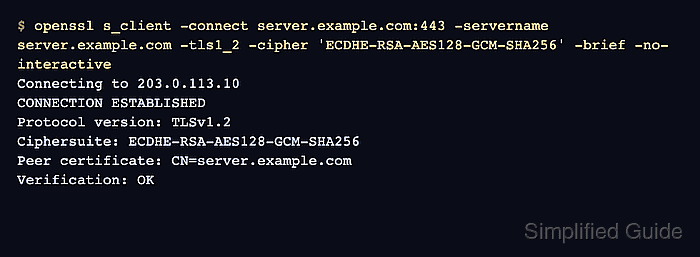
- Test a TLS 1.2 endpoint with the allowed cipher.
$ openssl s_client -connect server.example.com:443 -servername server.example.com -tls1_2 -cipher 'ECDHE-RSA-AES128-GCM-SHA256' -brief -no-interactive
Connecting to 203.0.113.10
CONNECTION ESTABLISHED
Protocol version: TLSv1.2
Ciphersuite: ECDHE-RSA-AES128-GCM-SHA256
Peer certificate: CN=server.example.com
Hash used: SHA256
Signature type: rsa_pss_rsae_sha256
Verification: OK
Supported Elliptic Curve Point Formats: uncompressed:ansiX962_compressed_prime:ansiX962_compressed_char2
Peer Temp Key: X25519, 253 bits
The Protocol version and exact Ciphersuite lines are the cipher-policy evidence. Verification: OK describes certificate trust for this run, not hostname coverage or every client path.
- Probe a TLS 1.2 cipher that the policy should reject.
$ openssl s_client -connect server.example.com:443 -servername server.example.com -tls1_2 -cipher 'ECDHE-RSA-CHACHA20-POLY1305' -brief -no-interactive
Connecting to 203.0.113.10
error:0A000410:SSL routines:ssl3_read_bytes:ssl/tls alert handshake failure:../ssl/record/rec_layer_s3.c:918:SSL alert number 40
A handshake failure is expected only when the server should reject that suite. A timeout, DNS error, certificate trust error, or wrong certificate points to a different TLS endpoint problem.
- Confirm the TLS 1.3 ciphersuite name with the TLS 1.3 option.
$ openssl ciphers -s -v -tls1_3 -ciphersuites TLS_AES_256_GCM_SHA384
TLS_AES_256_GCM_SHA384         TLSv1.3 Kx=any      Au=any   Enc=AESGCM(256)            Mac=AEAD
TLS 1.3 ciphersuites use the -ciphersuites option. The -cipher option does not select TLS 1.3 ciphersuites.
- Test the endpoint with the allowed TLS 1.3 ciphersuite.
$ openssl s_client -connect server.example.com:443 -servername server.example.com -tls1_3 -ciphersuites TLS_AES_256_GCM_SHA384 -brief -no-interactive
Connecting to 203.0.113.10
CONNECTION ESTABLISHED
Protocol version: TLSv1.3
Ciphersuite: TLS_AES_256_GCM_SHA384
Peer certificate: CN=server.example.com
Hash used: SHA256
Signature type: rsa_pss_rsae_sha256
Verification: OK
Negotiated TLS1.3 group: X25519MLKEM768
The negotiated group can differ by OpenSSL build and server policy. The ciphersuite line is the field to compare with the target TLS 1.3 policy.
- Probe a TLS 1.3 ciphersuite that the policy should reject.
$ openssl s_client -connect server.example.com:443 -servername server.example.com -tls1_3 -ciphersuites TLS_AES_128_GCM_SHA256 -brief -no-interactive
Connecting to 203.0.113.10
error:0A000410:SSL routines:ssl3_read_bytes:ssl/tls alert handshake failure:../ssl/record/rec_layer_s3.c:918:SSL alert number 40
Repeat the accepted and rejected probes from the same network path that real clients use when testing a load balancer, CDN edge, split DNS answer, or segmented internal service.

Mohd Shakir Zakaria is a cloud architect with deep roots in software development and open-source advocacy. Certified in AWS, Red Hat, VMware, ITIL, and Linux, he specializes in designing and managing robust cloud and on-premises infrastructures.


