OCSP lets a certificate issuer answer whether a specific certificate is still valid, revoked, or unknown without downloading a full certificate revocation list. OpenSSL can send that request from a terminal when a browser, load balancer, or monitoring system needs independent revocation evidence.
An OCSP lookup needs the target certificate and the certificate that issued it because the request identifies the certificate by issuer hashes and serial number. The responder URL normally comes from the target certificate's Authority Information Access extension, but internal PKI environments may document a responder URL separately.
Response verification is part of the check. Use a CA file that can validate the responder certificate or issuer chain, and avoid -noverify unless the goal is only to inspect an untrusted response during troubleshooting.
Steps to check OCSP status using OpenSSL:
- Open a terminal where the target certificate, issuer certificate, and responder trust chain are available.
Use server.crt for the certificate being checked, issuer.crt for its issuing CA certificate, and issuer-chain.crt for the CA certificates trusted to validate the OCSP responder.
- Print the target certificate identity and serial number.
$ openssl x509 -in server.crt -noout -subject -issuer -serial
subject=CN=server.example.com, O=Example Corp
issuer=CN=Example Issuing CA, O=Example PKI
serial=344F64AB3981440E092F1C95F16F1742CCBD33E8
The serial number and issuer identify the certificate in the OCSP request.
- Confirm that the issuer certificate matches the target certificate's issuer.
$ openssl x509 -in issuer.crt -noout -subject
subject=CN=Example Issuing CA, O=Example PKI
The issuer certificate subject should match the target certificate issuer. Use the intermediate that directly issued the certificate, not only the root CA.
- Print the OCSP responder URL from the target certificate.
$ openssl x509 -in server.crt -noout -ocsp_uri
http://ocsp.example-ca.com:8888
If no URL is printed, get the responder address from the issuing CA or internal PKI documentation before continuing.
- Query the OCSP responder and verify the signed response.
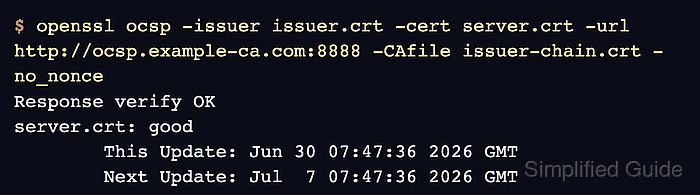
$ openssl ocsp -issuer issuer.crt -cert server.crt -url http://ocsp.example-ca.com:8888 -CAfile issuer-chain.crt -no_nonce
Response verify OK
server.crt: good
	This Update: Jun 30 07:47:36 2026 GMT
	Next Update: Jul  7 07:47:36 2026 GMT
Response verify OK means OpenSSL verified the OCSP response signer. The certificate status line can also show revoked or unknown. Do not approve a certificate deployment from server.crt: good alone when response verification is missing, the issuer file is wrong, or the response is outside the This Update and Next Update window.

Mohd Shakir Zakaria is a cloud architect with deep roots in software development and open-source advocacy. Certified in AWS, Red Hat, VMware, ITIL, and Linux, he specializes in designing and managing robust cloud and on-premises infrastructures.


