X.509 certificate files carry identity and policy fields that need inspection before renewal, installation, ticket handoff, or incident review. OpenSSL can decode a local certificate file and show who it names, who issued it, when it is valid, and which TLS roles or hostnames it claims.
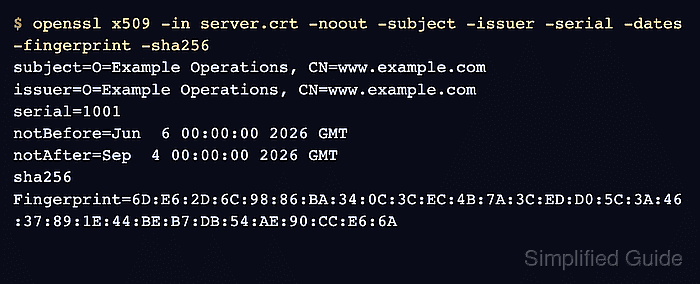
The openssl x509 command reads certificate files without modifying them. Focused options print the common handoff fields, while -text exposes extensions such as Subject Alternative Name, Key Usage, Extended Key Usage, and Basic Constraints.
Decoded fields are local-file evidence, not deployment validation. A file can parse correctly while a proxy serves a different certificate, a chain is incomplete, or a client rejects the issuer, name, or revocation status. Use the serial number and SHA-256 fingerprint as exact-file identifiers, and use chain or live endpoint checks when the deployed service itself needs proof.
Steps to view certificate details using OpenSSL:
- Print the core certificate identity, validity, and fingerprint fields.
$ openssl x509 -in server.crt -noout -subject -issuer -serial -dates -fingerprint -sha256
subject=O=Example Operations, CN=server.example.com
issuer=O=Example Operations, CN=server.example.com
serial=1001
notBefore=Jun 30 07:11:48 2026 GMT
notAfter=Sep 28 07:11:48 2026 GMT
sha256 Fingerprint=7D:36:33:01:D0:4E:E3:36:E1:40:D1:6A:6A:A3:21:45:A5:64:EB:8E:01:66:EF:61:DD:89:00:A4:36:D1:B6:C9
Replace server.crt with the certificate path. -noout prevents OpenSSL from reprinting the PEM certificate body, and -sha256 prints the fingerprint used to compare the exact certificate file across systems.
- Decode the certificate fields and extensions when usage or name details matter.
$ openssl x509 -in server.crt -noout -text -certopt no_pubkey,no_sigdump
Certificate:
    Data:
        Version: 3 (0x2)
        Serial Number: 4097 (0x1001)
        Signature Algorithm: sha256WithRSAEncryption
        Issuer: O=Example Operations, CN=server.example.com
        Validity
            Not Before: Jun 30 07:11:48 2026 GMT
            Not After : Sep 28 07:11:48 2026 GMT
        Subject: O=Example Operations, CN=server.example.com
        X509v3 extensions:
            X509v3 Subject Key Identifier:
                E4:A7:8F:95:B7:0A:6A:65:A1:32:E8:CF:66:4C:A7:F7:82:B4:1A:DA
            X509v3 Authority Key Identifier:
                E4:A7:8F:95:B7:0A:6A:65:A1:32:E8:CF:66:4C:A7:F7:82:B4:1A:DA
            X509v3 Subject Alternative Name:
                DNS:server.example.com, DNS:www.example.com
            X509v3 Basic Constraints:
                CA:FALSE
            X509v3 Key Usage:
                Digital Signature, Key Encipherment
            X509v3 Extended Key Usage:
                TLS Web Server Authentication
-certopt no_pubkey,no_sigdump keeps the decoded view focused by omitting the bulky public-key block and signature hex dump while leaving certificate fields and extensions visible.
- Print only the Subject Alternative Name extension when checking name coverage.
$ openssl x509 -in server.crt -noout -ext subjectAltName
X509v3 Subject Alternative Name:
    DNS:server.example.com, DNS:www.example.com
Modern TLS hostname checks use Subject Alternative Name entries. A familiar Common Name in the subject is not enough proof that a server name is covered.
- Check the expected DNS name against the certificate.
$ openssl x509 -in server.crt -noout -checkhost server.example.com
Hostname server.example.com does match certificate
Use the DNS name that clients request. A match here proves name coverage inside this file, not that the deployed endpoint is serving this certificate.
- Read a binary DER certificate with an explicit input format.
$ openssl x509 -inform DER -in server.der -noout -subject -issuer -dates
subject=O=Example Operations, CN=server.example.com
issuer=O=Example Operations, CN=server.example.com
notBefore=Jun 30 07:11:48 2026 GMT
notAfter=Sep 28 07:11:48 2026 GMT
Use -inform DER for binary certificate files such as many .der or .cer files. If the command still fails, the file may be a different certificate container rather than a single DER-encoded X.509 certificate.

Mohd Shakir Zakaria is a cloud architect with deep roots in software development and open-source advocacy. Certified in AWS, Red Hat, VMware, ITIL, and Linux, he specializes in designing and managing robust cloud and on-premises infrastructures.


