PKCS#12 archives, commonly saved as .pfx or .p12 files, are how many Windows certificate stores, load balancers, appliances, and vendor portals hand off certificate material. The archive can hold a leaf certificate, its private key, and CA certificates in one password-protected file. Many Linux services, reverse proxies, and command-line tools need those parts as separate PEM files before the certificate can be installed or checked.
OpenSSL reads the archive with the pkcs12 subcommand and filters certificate and key bags into separate outputs. Extracting the leaf certificate, CA chain, and private key into different files keeps service configuration clearer than a combined bundle, especially when the destination expects one path for the certificate and another path for the key.
A protected passphrase file keeps the PFX import password out of shell history and process listings. Let OpenSSL prompt interactively instead when no controlled secret file is available. Use an unencrypted private-key output only for software that cannot unlock an encrypted key during startup, and keep the extracted key readable only by the service account or administrator that needs it.
Steps to convert a PFX file to PEM using OpenSSL:
- Create a private working directory for the conversion.
$ install -d -m 700 "$HOME/pfx-export"
- Copy the PFX archive into the working directory with restricted permissions.
$ install -m 600 "$HOME/Downloads/www.example.net.pfx" "$HOME/pfx-export/www.example.net.pfx"
- Copy the PFX password from protected storage into the working directory.
$ install -m 600 /run/secrets/pfx-password "$HOME/pfx-export/pfx-password.txt"
Replace /run/secrets/pfx-password with the protected source that holds the PFX import password. Omit -passin file:pfx-password.txt in later commands to type the password at the OpenSSL prompt instead.
- Open the private working directory.
$ cd "$HOME/pfx-export"
- Confirm that only the current user can read the staged PFX archive and password file.
$ ls -l www.example.net.pfx pfx-password.txt
-rw------- 1 deploy deploy   22 Jun 30 07:03 pfx-password.txt
-rw------- 1 deploy deploy 3602 Jun 30 07:03 www.example.net.pfx
- Inspect the PFX archive without printing certificate or key material.
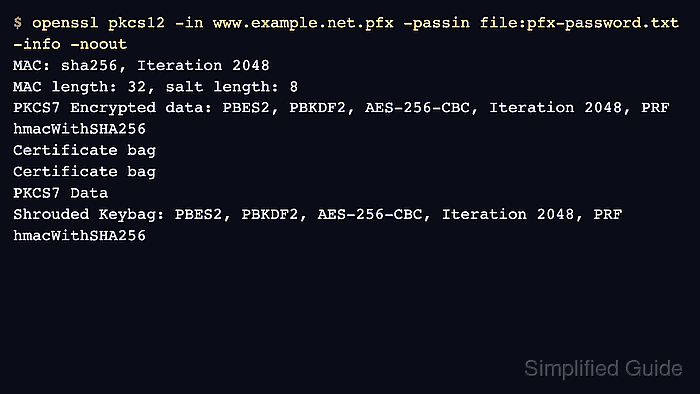
$ openssl pkcs12 -in www.example.net.pfx -passin file:pfx-password.txt -info -noout
MAC: sha256, Iteration 2048
MAC length: 32, salt length: 8
PKCS7 Encrypted data: PBES2, PBKDF2, AES-256-CBC, Iteration 2048, PRF hmacWithSHA256
Certificate bag
Certificate bag
PKCS7 Data
Shrouded Keybag: PBES2, PBKDF2, AES-256-CBC, Iteration 2048, PRF hmacWithSHA256
-info -noout confirms that the password opens the archive and shows the bag types without writing private material to the terminal. Use -legacy only for older archives that fail because they use legacy PKCS#12 algorithms.
- Extract the leaf certificate to its own PEM file.
$ openssl pkcs12 -in www.example.net.pfx -passin file:pfx-password.txt -clcerts -nokeys -out www.example.net.crt.pem
-clcerts -nokeys writes the client or leaf certificate and skips private keys and CA certificates.
- Extract CA certificates from the archive into a separate chain file.
$ openssl pkcs12 -in www.example.net.pfx -passin file:pfx-password.txt -cacerts -nokeys -out www.example.net.chain.pem
Some PFX exports do not include the issuing chain. Get the current intermediate or CA bundle from the issuer or internal PKI source when the extracted chain is empty.
- Extract the private key as an unencrypted PEM key only when the target service requires it.
$ openssl pkcs12 -in www.example.net.pfx -passin file:pfx-password.txt -nocerts -noenc -out www.example.net.key.pem
-noenc writes the private key without passphrase protection. Omit -noenc when the consuming software supports encrypted keys.
- Restrict the extracted private key.
$ chmod 600 www.example.net.key.pem
- Review the extracted file permissions.
$ ls -l www.example.net.chain.pem www.example.net.crt.pem www.example.net.key.pem
-rw------- 1 deploy deploy 1359 Jun 30 07:03 www.example.net.chain.pem
-rw------- 1 deploy deploy 1405 Jun 30 07:03 www.example.net.crt.pem
-rw------- 1 deploy deploy 1866 Jun 30 07:03 www.example.net.key.pem
Do not attach the private key, PFX archive, or password file to tickets, chat messages, screenshots, or saved troubleshooting logs.
- Check that the extracted certificate has the expected subject, issuer, and expiry date.
$ openssl x509 -in www.example.net.crt.pem -noout -subject -issuer -enddate
subject=CN=www.example.net, O=Example Web
issuer=CN=Example Issuing CA, O=Example Internal PKI
notAfter=Oct  2 07:03:49 2028 GMT
Stop before installation if the subject, issuer, or expiry date belongs to a different certificate than the target service should use.
- Write the public key from the extracted certificate.
$ openssl x509 -in www.example.net.crt.pem -pubkey -noout -out www.example.net.crt.pub.pem
- Write the public key derived from the extracted private key.
$ openssl pkey -in www.example.net.key.pem -pubout -out www.example.net.key.pub.pem
- Compare the public-key digests from both files.
$ openssl dgst -sha256 www.example.net.crt.pub.pem www.example.net.key.pub.pem
SHA2-256(www.example.net.crt.pub.pem)= dad67fc5b8cad7efd4e60dbd54d24a8e0d33a97fde072581927c608a2be64e5e
SHA2-256(www.example.net.key.pub.pem)= dad67fc5b8cad7efd4e60dbd54d24a8e0d33a97fde072581927c608a2be64e5e
Matching digests show that the certificate and private key belong to the same key pair.
Tool: SSL Matcher (Certificate, CSR, and Key) - Verify the extracted certificate against the extracted chain when the chain contains the required issuing CA material.
$ openssl verify -CAfile www.example.net.chain.pem www.example.net.crt.pem
www.example.net.crt.pem: OK
If the extracted chain contains only intermediates, verify against the organization CA bundle or system trust store instead of treating a local openssl verify failure as proof that extraction failed.
Related: How to verify a certificate chain using OpenSSL - Remove the temporary password and public-key comparison files after verification passes.
$ rm -f pfx-password.txt www.example.net.crt.pub.pem www.example.net.key.pub.pem
Keep the original PFX archive and extracted private key in approved secret storage only. Delete local working copies when the target service no longer needs them.