Mutual TLS (mTLS) protects private APIs, admin endpoints, and service-to-service traffic by making the client prove its identity during the TLS handshake. A PKCS#12 archive, usually saved as .p12 or .pfx, bundles the client certificate and private key into one password-protected file that cURL can present to the server.
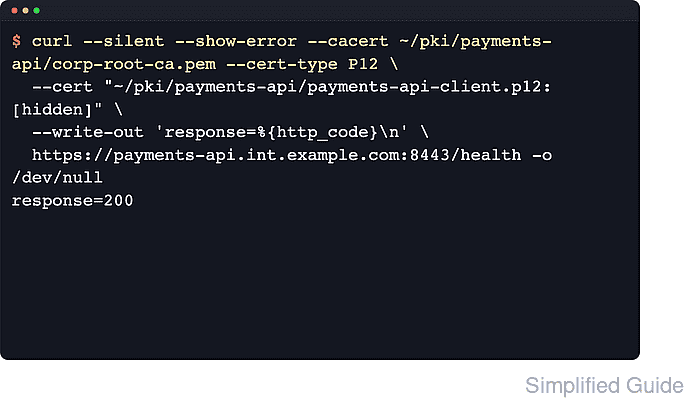
In cURL, --cert points to the client identity, --cert-type P12 tells cURL to treat that file as PKCS#12 instead of PEM, and --cacert verifies the server certificate against the issuing certificate authority. Without the CA file or another trusted CA source, the server can still fail verification even when the client certificate is correct.
The exact workflow depends on the TLS backend under cURL. File-based PKCS#12 client certificates work with OpenSSL builds, GnuTLS support starts with curl 8.11.0, and macOS Secure Transport builds can load .p12 archives directly. If the backend is Schannel on Windows, import the .p12 or .pfx archive into the certificate store first and reference the store path with --cert instead of using the file-based command shown below. Putting the PKCS#12 password directly on the command line is useful for a quick proof, but it exposes the secret to shell history and process inspection on many systems.
Steps to use PKCS#12 client certificates with cURL:
- Check which TLS backend your cURL build uses before choosing the PKCS#12 loading path.
$ curl --version
curl 8.18.0 (aarch64-unknown-linux-gnu) libcurl/8.18.0 OpenSSL/3.5.5 zlib/1.3.1 brotli/1.2.0 zstd/1.5.7 libidn2/2.3.8 libpsl/0.21.2 libssh2/1.11.1 nghttp2/1.68.0 librtmp/2.3 mit-krb5/1.22.1 OpenLDAP/2.6.10
Release-Date: 2026-01-07, security patched: 8.18.0-1ubuntu2.1
Protocols: dict file ftp ftps gopher gophers http https imap imaps ipfs ipns ldap ldaps mqtt pop3 pop3s rtmp rtsp scp sftp smb smbs smtp smtps telnet tftp ws wss
Features: alt-svc AsynchDNS brotli GSS-API HSTS HTTP2 HTTPS-proxy IDN IPv6 Kerberos Largefile libz NTLM PSL SPNEGO SSL threadsafe TLS-SRP UnixSockets zstd
Use the file-based PKCS#12 command in this article on OpenSSL, GnuTLS 8.11.0+, and macOS Secure Transport builds that read .p12 archives directly.
If this line shows Schannel, import the archive into the Windows certificate store first and use a store path such as CurrentUser\MY\934a7ac6f8a5d579285a74fa61e19f23ddfe8d7a with --cert. The file-based PKCS#12 example below is not the Schannel path.
- Restrict the PKCS#12 archive and CA file so other local users cannot read them.
$ chmod 600 ~/pki/payments-api-client.p12 ~/pki/corp-root-ca.pem
A readable PKCS#12 archive exposes the same private key that authenticates the client to the protected service.
- Send the request with the PKCS#12 archive, its password, and the CA file that verifies the server certificate.
$ curl --silent --show-error \
  --cacert ~/pki/corp-root-ca.pem \
  --cert-type P12 \
  --cert ~/pki/payments-api-client.p12:<p12-password> \
  --output /dev/null \
  --write-out 'verify=%{ssl_verify_result} http=%{response_code}\n' \
  https://payments-api.int.example.com:8443/health
verify=0 http=200
On PEM-default backends, leaving out --cert-type P12 usually ends with curl: (58) because cURL tries to parse the PKCS#12 archive as a PEM certificate.
The :password suffix is exposed to shell history and process listings on many systems, so move it into a protected cURL config file or another secret source before using this pattern in automation.
- Repeat the request with verbose output when you need proof that the server requested a client certificate and the handshake completed cleanly.
$ curl --verbose --silent --show-error \
  --cacert ~/pki/corp-root-ca.pem \
  --cert-type P12 \
  --cert ~/pki/payments-api-client.p12:<p12-password> \
  https://payments-api.int.example.com:8443/health \
  --output /dev/null
* Host payments-api.int.example.com:8443 was resolved.
*   Trying 192.0.2.24:8443...
##### snipped #####
* TLSv1.3 (IN), TLS handshake, Request CERT (13):
##### snipped #####
* SSL certificate verified via OpenSSL.
* Established connection to payments-api.int.example.com (192.0.2.24 port 8443)
> GET /health HTTP/1.1
##### snipped #####
< HTTP/1.1 200 OK
Look for the server's Request CERT line, a successful certificate verification message, and the expected HTTP status before reusing the command in scripts or CI.

Mohd Shakir Zakaria is a cloud architect with deep roots in software development and open-source advocacy. Certified in AWS, Red Hat, VMware, ITIL, and Linux, he specializes in designing and managing robust cloud and on-premises infrastructures.


