Pixel-level search works well when a known icon, label, or component appears without rotation or scale changes. OpenCV template matching turns that search into image coordinates that can drive inspection, cropping, or later automation.
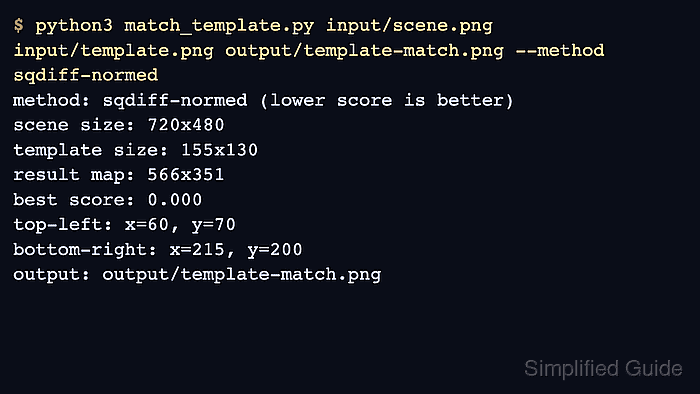
The cv2.matchTemplate() function slides a smaller template over the source image. Its score map contains one score for each valid template top-left position and has dimensions (W-w+1) by (H-h+1), so a 720×480 scene and a 200×160 template produce a 521×321 result.
Grayscale TM_SQDIFF_NORMED matching treats the lowest normalized pixel difference as the strongest location. The source and template still need the same scale and orientation; rotated or resized targets need feature matching or an object detector instead.
Steps to match a template with OpenCV:
- Create match_template.py with argument parsing, image loading, and dimension validation.
- match_template.py
#!/usr/bin/env python3
import argparse
import json
from pathlib import Path

import cv2


parser = argparse.ArgumentParser(description="Locate a template image inside a larger image.")
parser.add_argument("scene", type=Path)
parser.add_argument("template", type=Path)
parser.add_argument("output", type=Path)
args = parser.parse_args()

scene_color = cv2.imread(str(args.scene), cv2.IMREAD_COLOR)
scene_gray = cv2.imread(str(args.scene), cv2.IMREAD_GRAYSCALE)
template_gray = cv2.imread(str(args.template), cv2.IMREAD_GRAYSCALE)

if scene_color is None or scene_gray is None:
    raise SystemExit(f"could not read scene image: {args.scene}")
if template_gray is None:
    raise SystemExit(f"could not read template image: {args.template}")
if template_gray.shape[0] > scene_gray.shape[0] or template_gray.shape[1] > scene_gray.shape[1]:
    raise SystemExit("template image must not be larger than the scene image")
The sample command expects input/scene.png and input/template.png. The template must not be larger than the scene image.
- Add the score-map search after the image validation block.
- match_template.py
result = cv2.matchTemplate(scene_gray, template_gray, cv2.TM_SQDIFF_NORMED)
best_difference, _, top_left, _ = cv2.minMaxLoc(result)
height, width = template_gray.shape
bottom_right = (top_left[0] + width, top_left[1] + height)
- Finish the matcher with annotation, coordinate reporting, and result output after the match coordinates.
- match_template.py
cv2.rectangle(scene_color, top_left, bottom_right, (0, 0, 255), 3)
cv2.putText(
    scene_color,
    f"difference {best_difference:.3f}",
    (top_left[0], max(25, top_left[1] - 10)),
    cv2.FONT_HERSHEY_SIMPLEX,
    0.7,
    (0, 0, 255),
    2,
)
args.output.parent.mkdir(parents=True, exist_ok=True)
if not cv2.imwrite(str(args.output), scene_color):
    raise SystemExit(f"could not write output image: {args.output}")

report_path = args.output.with_suffix(".json")
report_path.write_text(
    json.dumps(
        {
            "best_difference": best_difference,
            "top_left": top_left,
            "bottom_right": bottom_right,
        },
        indent=2,
    )
    + "\n",
    encoding="utf-8",
)

print(f"scene size: {scene_gray.shape[1]}x{scene_gray.shape[0]}")
print(f"template size: {width}x{height}")
print(f"result map: {result.shape[1]}x{result.shape[0]}")
print(f"best difference: {best_difference:.3f}")
print(f"top-left: x={top_left[0]}, y={top_left[1]}")
print(f"bottom-right: x={bottom_right[0]}, y={bottom_right[1]}")
print(f"report: {report_path}")
print(f"output: {args.output}")
- Run the completed matcher against the source and template images.
$ python3 match_template.py input/scene.png input/template.png output/template-match.png
scene size: 720x480
template size: 200x160
result map: 521x321
best difference: 0.000
top-left: x=72, y=58
bottom-right: x=272, y=218
report: output/template-match.json
output: output/template-match.png
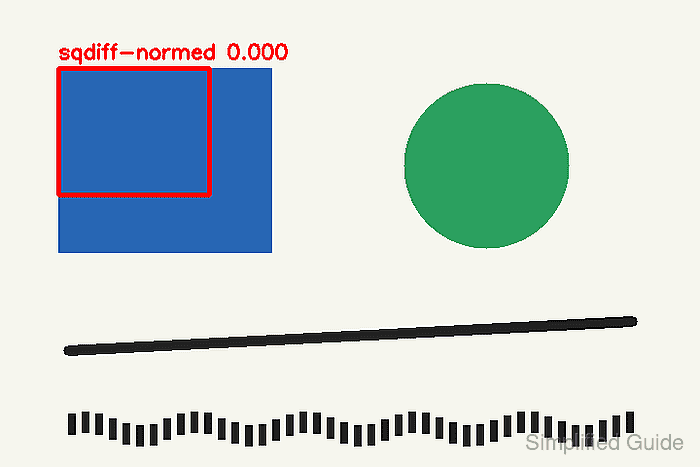
A difference of 0.000 means that the selected source region and template contain identical grayscale pixels. Real photographs usually produce a nonzero best difference.
- Create verify_match.py for fail-capable coordinate-report verification.
- verify_match.py
#!/usr/bin/env python3
import argparse
import json
from pathlib import Path

import cv2
import numpy as np


parser = argparse.ArgumentParser(description="Verify reported template-match coordinates.")
parser.add_argument("scene", type=Path)
parser.add_argument("template", type=Path)
parser.add_argument("report", type=Path)
args = parser.parse_args()

scene = cv2.imread(str(args.scene), cv2.IMREAD_GRAYSCALE)
template = cv2.imread(str(args.template), cv2.IMREAD_GRAYSCALE)
if scene is None or template is None:
    raise SystemExit("could not read the scene or template image")

report = json.loads(args.report.read_text(encoding="utf-8"))
reported_top_left = tuple(report["top_left"])
reported_difference = float(report["best_difference"])

scores = cv2.matchTemplate(scene, template, cv2.TM_SQDIFF_NORMED)
verified_difference, _, verified_top_left, _ = cv2.minMaxLoc(scores)
equally_best = int(
    np.count_nonzero(np.isclose(scores, verified_difference, rtol=0.0, atol=1e-12))
)

print(f"reported top-left: x={reported_top_left[0]}, y={reported_top_left[1]}")
print(f"verified top-left: x={verified_top_left[0]}, y={verified_top_left[1]}")
print(f"reported difference: {reported_difference:.6f}")
print(f"verified difference: {verified_difference:.6f}")
print(f"equally best locations: {equally_best}")

if reported_top_left != verified_top_left:
    raise SystemExit("reported coordinates do not match the verified minimum")
if abs(reported_difference - verified_difference) > 1e-9:
    raise SystemExit("reported score does not match the verified minimum")
if equally_best != 1:
    raise SystemExit("the template does not have one distinctive best location")
- Verify the current coordinates report against the scene and template images.
$ python3 verify_match.py input/scene.png input/template.png output/template-match.json
reported top-left: x=72, y=58
verified top-left: x=72, y=58
reported difference: 0.000000
verified difference: 0.000000
equally best locations: 1

Mohd Shakir Zakaria is a cloud architect with deep roots in software development and open-source advocacy. Certified in AWS, Red Hat, VMware, ITIL, and Linux, he specializes in designing and managing robust cloud and on-premises infrastructures.


