Object detection turns an image into class labels, confidence scores, and boxes that locate each detected object. OpenCV DNN is useful when a trained detector already exists and the application only needs local CPU inference without a full training framework.
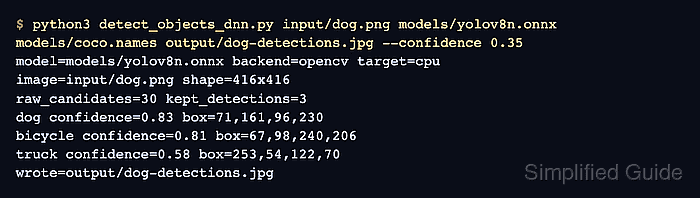
The OpenCV DNN module runs inference rather than training. A Python script can load a YOLOv8 ONNX model with readNetFromONNX, prepare an input blob with blobFromImage, run forward, apply non-maximum suppression, and draw the remaining detections back onto the source image.
Keep the model, label file, confidence threshold, and test image together so each result can be traced back to the detector that produced it. A successful smoke test reports expected object classes and writes an annotated image that another OpenCV step can open.
Related: How to install OpenCV on Ubuntu
Related: How to install OpenCV on macOS
Related: How to install OpenCV on Windows
Related: How to read and write an image with OpenCV
Steps to run object detection with OpenCV DNN:
- Open a Python environment with OpenCV and NumPy available.
Use the same environment to download the files, save the script, and run inference so relative paths resolve from one working directory.
- Create working directories for the test image, model, labels, and annotated output.
$ mkdir -p input models output
- Download the YOLOv8 ONNX model referenced by the OpenCV DNN sample configuration.
$ curl --fail --location --output models/yolov8n.onnx \
  https://github.com/CVHub520/X-AnyLabeling/releases/download/v0.1.0/yolov8n.onnx
The sample model uses 640×640 input, RGB channel order, and a 1/255 scale factor.
- Download the COCO class labels used by the YOLO sample.
$ curl --fail --location --output models/coco.names \
  https://raw.githubusercontent.com/opencv/opencv/4.x/samples/data/dnn/object_detection_classes_yolo.txt
- Download the OpenCV test image.
$ curl --fail --location --output input/dog.png \
  https://raw.githubusercontent.com/opencv/opencv_extra/4.x/testdata/dnn/dog416.png
Replace input/dog.png with any readable image when validating a different detector or scene.
- Save the detection script as detect_objects_dnn.py.
- detect_objects_dnn.py
from argparse import ArgumentParser
from pathlib import Path

import cv2 as cv
import numpy as np


def load_classes(path):
    with open(path, "r", encoding="utf-8") as handle:
        return [line.strip() for line in handle if line.strip()]


def letterbox(image, size):
    height, width = image.shape[:2]
    scale = min(size / width, size / height)
    resized_width = int(round(width * scale))
    resized_height = int(round(height * scale))
    resized = cv.resize(image, (resized_width, resized_height), interpolation=cv.INTER_LINEAR)

    canvas = np.full((size, size, 3), 114, dtype=np.uint8)
    pad_x = (size - resized_width) // 2
    pad_y = (size - resized_height) // 2
    canvas[pad_y:pad_y + resized_height, pad_x:pad_x + resized_width] = resized
    return canvas, scale, pad_x, pad_y


def yolo_rows(output):
    predictions = output[0]
    if predictions.ndim == 3:
        predictions = predictions[0]
    if predictions.shape[0] < predictions.shape[1]:
        predictions = predictions.T
    return predictions


def clip_box(x, y, width, height, image_width, image_height):
    x = max(0, min(int(round(x)), image_width - 1))
    y = max(0, min(int(round(y)), image_height - 1))
    width = max(1, min(int(round(width)), image_width - x))
    height = max(1, min(int(round(height)), image_height - y))
    return [x, y, width, height]


parser = ArgumentParser(description="Run YOLOv8 object detection with OpenCV DNN.")
parser.add_argument("image", help="Input image path.")
parser.add_argument("model", help="YOLOv8 ONNX model path.")
parser.add_argument("classes", help="Class names file, one label per line.")
parser.add_argument("output", help="Annotated output image path.")
parser.add_argument("--confidence", type=float, default=0.35, help="Confidence threshold.")
parser.add_argument("--nms", type=float, default=0.45, help="Non-maximum suppression threshold.")
parser.add_argument("--input-size", type=int, default=640, help="Square DNN input size.")
parser.add_argument("--max-print", type=int, default=5, help="Maximum kept detections to print.")
args = parser.parse_args()

image = cv.imread(args.image, cv.IMREAD_COLOR)
if image is None:
    raise SystemExit(f"Could not read image: {args.image}")

classes = load_classes(args.classes)
net = cv.dnn.readNetFromONNX(args.model)
net.setPreferableBackend(cv.dnn.DNN_BACKEND_OPENCV)
net.setPreferableTarget(cv.dnn.DNN_TARGET_CPU)

input_image, scale, pad_x, pad_y = letterbox(image, args.input_size)
blob = cv.dnn.blobFromImage(input_image, 1 / 255.0, (args.input_size, args.input_size), swapRB=True, crop=False)
net.setInput(blob)
rows = yolo_rows(net.forward())

image_height, image_width = image.shape[:2]
boxes = []
scores = []
class_ids = []

for row in rows:
    class_scores = row[4:]
    class_id = int(np.argmax(class_scores))
    score = float(class_scores[class_id])
    if score < args.confidence:
        continue

    center_x, center_y, box_width, box_height = row[:4]
    x = (center_x - box_width / 2 - pad_x) / scale
    y = (center_y - box_height / 2 - pad_y) / scale
    width = box_width / scale
    height = box_height / scale

    boxes.append(clip_box(x, y, width, height, image_width, image_height))
    scores.append(score)
    class_ids.append(class_id)

indices = cv.dnn.NMSBoxes(boxes, scores, args.confidence, args.nms)
indices = np.array(indices).reshape(-1).tolist() if len(indices) else []
indices = sorted(indices, key=lambda item: scores[item], reverse=True)

for index in indices:
    x, y, width, height = boxes[index]
    label = classes[class_ids[index]] if class_ids[index] < len(classes) else f"class_{class_ids[index]}"
    cv.rectangle(image, (x, y), (x + width, y + height), (0, 180, 0), 2)
    cv.putText(image, f"{label} {scores[index]:.2f}", (x, max(20, y - 8)), cv.FONT_HERSHEY_SIMPLEX, 0.55, (0, 180, 0), 2)

output_path = Path(args.output)
output_path.parent.mkdir(parents=True, exist_ok=True)
if not cv.imwrite(str(output_path), image):
    raise SystemExit(f"Could not write image: {output_path}")

print(f"model={args.model} backend=opencv target=cpu")
print(f"image={args.image} shape={image_width}x{image_height}")
print(f"raw_candidates={len(boxes)} kept_detections={len(indices)}")
for index in indices[:args.max_print]:
    x, y, width, height = boxes[index]
    label = classes[class_ids[index]] if class_ids[index] < len(classes) else f"class_{class_ids[index]}"
    print(f"{label} confidence={scores[index]:.2f} box={x},{y},{width},{height}")
print(f"wrote={output_path}")
- Run the detector against the sample image.
$ python3 detect_objects_dnn.py input/dog.png models/yolov8n.onnx models/coco.names output/dog-detections.jpg --confidence 0.35
model=models/yolov8n.onnx backend=opencv target=cpu
image=input/dog.png shape=416x416
raw_candidates=30 kept_detections=3
dog confidence=0.83 box=71,161,96,230
bicycle confidence=0.81 box=67,98,240,206
truck confidence=0.58 box=253,54,122,70
wrote=output/dog-detections.jpg
Use class labels that match the model. A mismatched label file can make correct boxes appear with wrong object names.
- Check that OpenCV can open the annotated output image.
$ python3 - <<'PY'
import cv2 as cv

image = cv.imread("output/dog-detections.jpg")
print(f"annotated_image_shape={image.shape[1]}x{image.shape[0]} channels={image.shape[2]}")
PY
annotated_image_shape=416x416 channels=3

Mohd Shakir Zakaria is a cloud architect with deep roots in software development and open-source advocacy. Certified in AWS, Red Hat, VMware, ITIL, and Linux, he specializes in designing and managing robust cloud and on-premises infrastructures.


