Voice input needs a transcription engine before spoken audio can become a chat prompt. Open WebUI can convert speech to text with its local Whisper engine, which runs on the server without a hosted transcription API key.
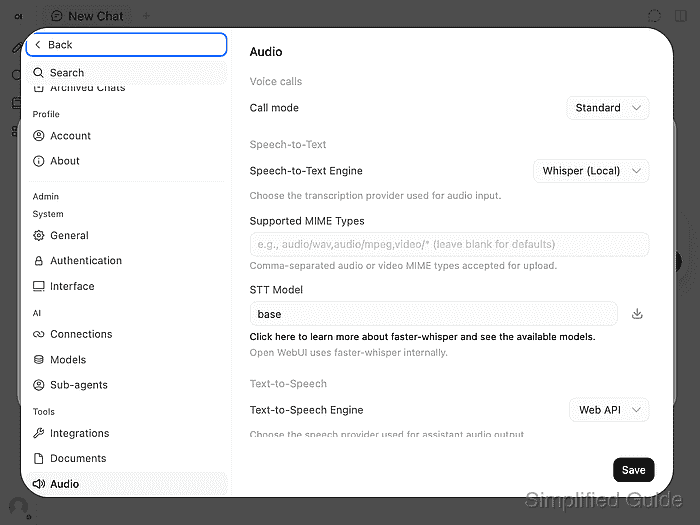
The local engine uses faster-whisper and CTranslate2 to load a speech-recognition model. The standard Docker image supports local recognition, while slim images require an external provider. The multilingual base model is the default starting point; larger models require more memory, disk space, and processing time.
Administrator audio settings select the server's transcription engine. A user's personal Web API selection instead uses browser speech recognition, so it can bypass the local engine. An upload to the server's transcription endpoint tests local recognition without depending on microphone permissions or a connected chat model.
Steps to configure speech-to-text in Open WebUI:
The starting point is an existing full Open WebUI installation and an administrator session in Settings. The transcription check needs Bash, curl 7.76 or newer, and a standard-user API key with speech-to-text permission. If API-key endpoint restrictions are enabled, the allowed paths must include /api/v1/audio/transcriptions; a key limited to /api/models cannot upload audio. Key creation and permission setup belong to How to enable API keys in Open WebUI.
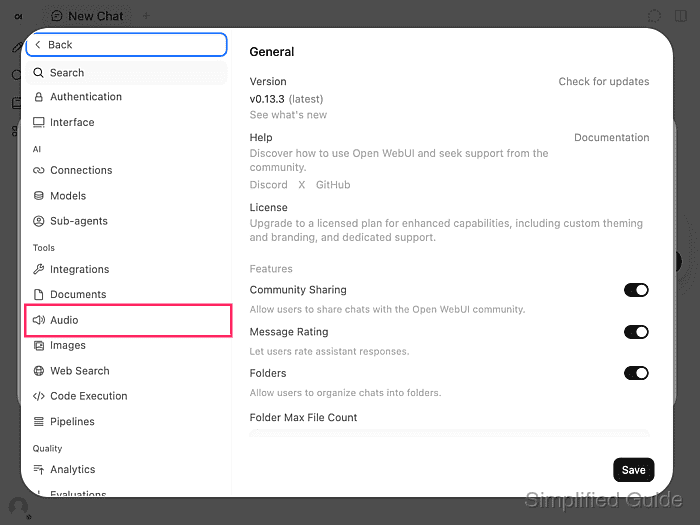
- Open Audio under Admin → Tools in Settings.
- Select Whisper (Local) as the Speech-to-Text Engine.
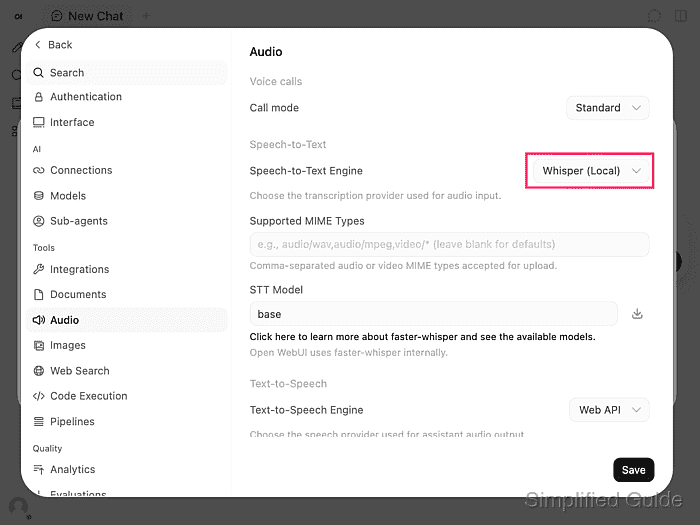
This is the server setting, rather than the Audio page under personal preferences.
- Enter base in STT Model.
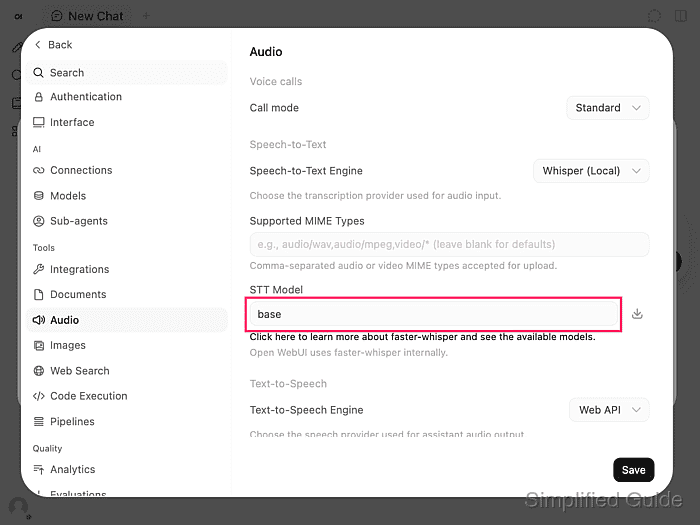
The local model selector corresponds to WHISPER_MODEL, not AUDIO_STT_MODEL. The standard Docker deployment keeps model files under /app/backend/data/cache/whisper/models. The full image can already contain the base model; a different model or an empty cache requires a download from Hugging Face.
Loading an uncached model consumes server bandwidth and disk space. The server needs access to the model download service before offline use. Settings saved in the admin panel survive container recreation while ENABLE_PERSISTENT_CONFIG stays at its default, enabled; when it is disabled, environment values take precedence on recreation.
- Click Save to apply the local Whisper settings.
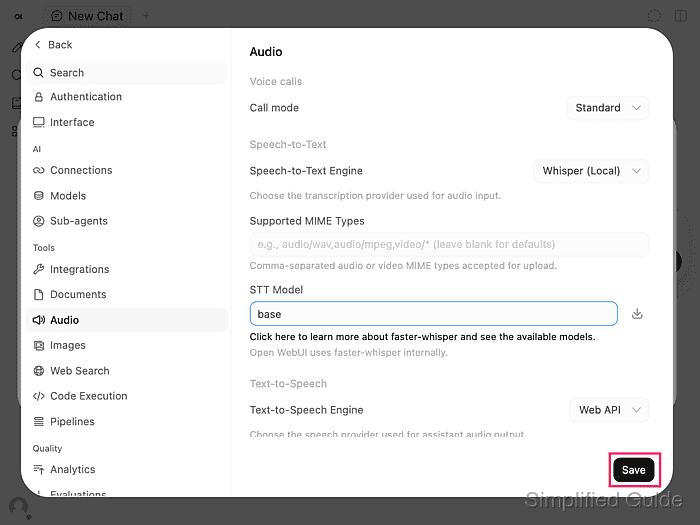
Saving loads the selected local model and can take longer when weights need downloading. A download or cache error means the model is not ready; restoring the server's Hugging Face access or its complete model cache allows another Save attempt. A completed save followed by matching transcription needs no further model download.
- Download the known speech sample to your Downloads folder. Download speech-sample.wav
The WAV says “The blue lantern is on the wooden table.” It contains synthetic speech, so no private recording is needed.
- Disable Bash tracing before handling the API key.
$ set +x
- Set the base URL of your Open WebUI instance.
$ OPEN_WEBUI_URL="https://openwebui.example.com"
The URL is a replaceable value. A local Docker installation can use its existing loopback address, such as http://localhost:3000; remote connections need HTTPS to protect the key and uploaded audio.
An API key grants its owner's permitted access. It must stay out of screenshots, shared logs, shell history, and repositories. The hidden prompt below keeps it out of the command text, and the request passes it to curl through standard input rather than process arguments.
- Read the API key into a temporary shell variable without echoing it.
$ IFS= read -r -s -p 'Open WebUI API key: ' OPEN_WEBUI_API_KEY
- Set the path to the downloaded WAV.
$ AUDIO_FILE="$HOME/Downloads/speech-sample.wav"
A different download location requires its actual file path.
The upload sends audio to your Open WebUI server, which stores a transcription copy in its audio cache. Local Whisper processes it there without a hosted speech provider; recordings can still remain on the server under its storage and retention policy.
- Upload the WAV to the transcription endpoint.
$ printf 'Authorization: Bearer %s\n' \
  "$OPEN_WEBUI_API_KEY" |
  curl -q --fail-with-body --silent --show-error \
    --header @- \
    --form "file=@$AUDIO_FILE;type=audio/wav" \
    "$OPEN_WEBUI_URL/api/v1/audio/transcriptions"
{"text":"The blue lantern is on the wooden table.","filename":"bc73249f-1cd4-4f9e-bd24-08286f310252.wav"}
file is the multipart upload field, and type=audio/wav supplies the audio MIME type. The returned filename varies. HTTP 401 or 403 requires checking the key, account permissions, endpoint allowance, and proxy forwarding of Authorization. HTTP 400 with an extension or format error requires a supported audio file and MIME type; a successful request returns a JSON text value.
- Compare the returned text value with the sample's spoken sentence.
“The blue lantern is on the wooden table.” confirms that the saved local engine transcribed the known audio. An empty or mismatched result is a failed transcription check; a clear recording in a supported format is the next input to try. Model-load errors require resolving the cache or download failure before retrying the same upload.
- Clear the API key from the shell variable.
$ unset OPEN_WEBUI_API_KEY