Open WebUI RAG settings control how uploaded files and knowledge bases are split, embedded, retrieved, and reranked before a model answers. Tuning them helps when answers miss known text, quote too little context, or spend too much of the model window on unrelated chunks.
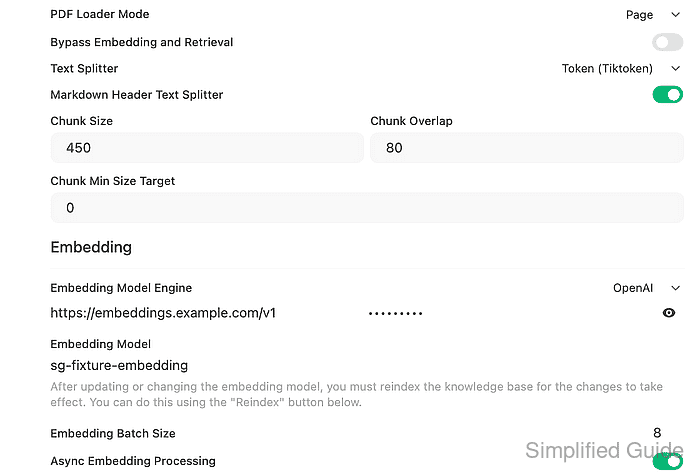
The main controls live under Admin Panel → Settings → Documents. Chunk size and overlap affect how new content is indexed, Top K controls how many retrieved chunks are considered, and hybrid search combines keyword matching with vector retrieval when it is enabled.
Start with a small validation knowledge base that contains one answer the model should retrieve exactly. Change one group of settings, reindex when existing knowledge must use the new indexing behavior, then rerun the same known-answer query before changing another setting.
Steps to tune Open WebUI RAG settings:
- Sign in as an admin and open Admin Panel → Settings → Documents.
- Record the current RAG settings before editing.
$ curl --fail-with-body --silent --show-error "https://openwebui.example.com/api/v1/retrieval/config" \
  -H "Authorization: Bearer <open-webui-token>"
{
  "TEXT_SPLITTER": "token",
  "CHUNK_SIZE": 400,
  "CHUNK_OVERLAP": 40,
  "TOP_K": 3,
  "TOP_K_RERANKER": 3,
  "ENABLE_RAG_HYBRID_SEARCH": false,
  "RELEVANCE_THRESHOLD": 0
}
Use the visible values from the Documents page if admin API access is disabled. The saved baseline gives a rollback target if retrieval gets worse.
- Apply a small validation profile for the first tuning pass.
$ curl --fail-with-body --silent --show-error "https://openwebui.example.com/api/v1/retrieval/config/update" \
  -H "Authorization: Bearer <open-webui-token>" \
  -H "Content-Type: application/json" \
  --data '{"TEXT_SPLITTER":"token","CHUNK_SIZE":450,"CHUNK_OVERLAP":80,"TOP_K":4,"TOP_K_RERANKER":3,"ENABLE_RAG_HYBRID_SEARCH":true,"HYBRID_BM25_WEIGHT":0.5,"RELEVANCE_THRESHOLD":0}'
{
  "TEXT_SPLITTER": "token",
  "CHUNK_SIZE": 450,
  "CHUNK_OVERLAP": 80,
  "TOP_K": 4,
  "TOP_K_RERANKER": 3,
  "ENABLE_RAG_HYBRID_SEARCH": true,
  "HYBRID_BM25_WEIGHT": 0.5,
  "RELEVANCE_THRESHOLD": 0
}
In the UI, set the matching Text Splitter, Chunk Size, Chunk Overlap, Top K, Top K Reranker, Hybrid Search, and BM25 Weight fields, then click Save.
- Reindex knowledge bases that should use the changed chunking or embedding behavior.
$ curl --fail-with-body --silent --show-error "https://openwebui.example.com/api/v1/knowledge/reindex" \
  -H "Authorization: Bearer <open-webui-token>" \
  -H "Content-Type: application/json" \
  --data '{}'
true
Changing the embedding model requires a reindex for existing knowledge bases. Existing chat-only file uploads are not covered by the knowledge reindex path and should be reuploaded if they need new embeddings.
- Add a known-answer file to a validation knowledge base.
- rag-settings-tune-support-note.txt
RAG settings tuning support note

Escalation window: weekdays 09:00-17:00 UTC.
Escalation owner: Platform Support Team.
Verification phrase: redwood-router-742.
Wait until file processing reports completed before testing retrieval. API uploads can return before extraction and embedding finish.
Related: How to create a knowledge base in Open WebUI - Attach the processed file to the validation knowledge base when using the API.
$ curl --fail-with-body --silent --show-error "https://openwebui.example.com/api/v1/knowledge/<knowledge-id>/file/add" \
  -H "Authorization: Bearer <open-webui-token>" \
  -H "Content-Type: application/json" \
  --data '{"file_id":"<file-id>"}'
{
  "name": "RAG Settings Tune Support Notes",
  "files": [
    {
      "filename": "rag-settings-tune-support-note.txt",
      "status": "completed"
    }
  ]
}
- Query the validation knowledge collection with the same known-answer prompt.
$ curl --fail-with-body --silent --show-error "https://openwebui.example.com/api/v1/retrieval/query/collection" \
  -H "Authorization: Bearer <open-webui-token>" \
  -H "Content-Type: application/json" \
  --data '{"collection_names":["<knowledge-id>"],"query":"What is the redwood router escalation window and owner?","k":4,"k_reranker":3,"hybrid":true}'
{
  "documents": [
    "RAG settings tuning support note\nEscalation window: weekdays 09:00-17:00 UTC.\nEscalation owner: Platform Support Team.\nVerification phrase: redwood-router-742."
  ],
  "metadatas": [
    {
      "filename": "rag-settings-tune-support-note.txt",
      "source": "rag-settings-tune-support-note.txt"
    }
  ]
}
The expected chunk should contain the owner, time window, and unique phrase. If it disappears after a setting change, restore the previous value and retest before changing another field.

Mohd Shakir Zakaria is a cloud architect with deep roots in software development and open-source advocacy. Certified in AWS, Red Hat, VMware, ITIL, and Linux, he specializes in designing and managing robust cloud and on-premises infrastructures.


