Open WebUI can store some runtime settings in its database after the first startup. When an operator changes a Docker or Compose environment variable and restarts the container, the browser can still show the old behavior because the persisted config value is still active.
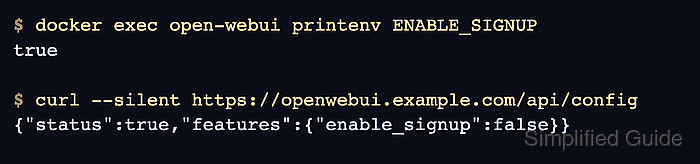
The environment reference marks these settings as PersistentConfig or ConfigVar entries. Feature and authentication switches such as ENABLE_SIGNUP are good troubleshooting examples because the running process can show the new environment value while the public config API still serves the older saved value.
A safe troubleshooting path starts at the runtime and moves outward before any saved config is changed. The active container should contain the intended environment value, and the Open WebUI API or admin screen should show whether the persisted setting still disagrees. The repair choice depends on whether the admin UI or the env file should own the setting.
Related: How to run Open WebUI with Docker
Related: How to run Open WebUI with Docker Compose
Related: How to set WEBUI_SECRET_KEY in Open WebUI
Steps to troubleshoot ignored Open WebUI environment variables:
- Confirm that the running container sees the environment value you expected.
$ docker exec open-webui printenv ENABLE_SIGNUP
true
Replace ENABLE_SIGNUP with the variable that changed in your Docker run command, Compose file, or env file. Compare the deployed inventory before blaming persistent config.
Tool: Environment Variable Inventory Checker - Compare the setting exposed by Open WebUI.
$ curl --silent https://openwebui.example.com/api/config
{"onboarding":true,"status":true,"name":"Open WebUI","version":"0.10.2","default_locale":"",
##### snipped #####
"features":{"auth":true,"enable_signup":false,"enable_login_form":true,"enable_websocket":true}}
A mismatch between printenv and the served setting means the environment reached the process, but a saved PersistentConfig value is still controlling runtime behavior. For settings not exposed by /api/config, check the matching admin setting or application API surface.
- Check whether the variable is documented as a PersistentConfig or ConfigVar entry.
https://docs.openwebui.com/reference/env-configuration/
Plain environment-only variables should change after a normal restart. PersistentConfig values can remain in the database until changed through the UI, bypassed, or reset from the environment.
- Back up the Open WebUI data volume before forcing a saved-config reset.
$ docker run --rm \
  --mount source=open-webui,target=/data,readonly \
  --mount type=bind,source="$PWD",target=/backup \
  busybox tar -czf /backup/open-webui-data-backup.tgz -C /data .
Replace source=open-webui with the volume name used by your deployment. The volume under /app/backend/data contains users, chats, settings, uploads, and database state. Do not run a reset or database repair without a backup that can be restored.
Related: How to back up and restore Open WebUI data - Temporarily disable persistent config to prove that the environment value produces the intended behavior.
ENABLE_SIGNUP=true
ENABLE_PERSISTENT_CONFIG=false
For Docker Compose, apply the env file change with docker compose up -d. For a one-off container, recreate it with the same data volume and the same environment values.
Related: How to run Open WebUI with Docker Compose - Restart Open WebUI with the temporary env change.
- Confirm that persistent config is disabled for the test start.
$ docker exec open-webui printenv ENABLE_PERSISTENT_CONFIG
false
- Verify that Open WebUI now serves the environment-backed value.
$ curl --silent https://openwebui.example.com/api/config
{"onboarding":true,"status":true,"name":"Open WebUI","version":"0.10.2","default_locale":"",
##### snipped #####
"features":{"auth":true,"enable_signup":true,"enable_login_form":true,"enable_websocket":true}}
If the setting still does not change with ENABLE_PERSISTENT_CONFIG=false, the issue is likely a misspelled variable, an env file not loaded by the container, a stale container recreation, or a different runtime source.
- Reset the saved config from the environment when the env file should become the source of truth again.
ENABLE_SIGNUP=true
RESET_CONFIG_ON_START=true
Use RESET_CONFIG_ON_START as a one-time repair switch. It can overwrite saved admin UI changes with values from the current environment, so keep only the intended environment values in place before restarting.
- Restart Open WebUI with the reset flag.
- Confirm that the one-time reset flag reached the container.
$ docker exec open-webui printenv RESET_CONFIG_ON_START
true
- Confirm that the reset value is served.
$ curl --silent https://openwebui.example.com/api/config
{"onboarding":true,"status":true,"name":"Open WebUI","version":"0.10.2","default_locale":"",
##### snipped #####
"features":{"auth":true,"enable_signup":true,"enable_login_form":true,"enable_websocket":true}}
- Remove RESET_CONFIG_ON_START after one successful start.
ENABLE_SIGNUP=true
Leaving RESET_CONFIG_ON_START=true in a production env file can undo later admin UI changes every time the instance starts.
- Restart Open WebUI normally.
- Retest the original symptom.
$ curl --silent https://openwebui.example.com/api/config
{"onboarding":true,"status":true,"name":"Open WebUI","version":"0.10.2","default_locale":"",
##### snipped #####
"features":{"auth":true,"enable_signup":true,"enable_login_form":true,"enable_websocket":true}}
The environment value and the saved Open WebUI setting are aligned when the served config stays changed after the reset flag is removed.

Mohd Shakir Zakaria is a cloud architect with deep roots in software development and open-source advocacy. Certified in AWS, Red Hat, VMware, ITIL, and Linux, he specializes in designing and managing robust cloud and on-premises infrastructures.


