Document search needs somewhere to store embeddings independently of the web process. Open WebUI can use pgvector in PostgreSQL for those vectors, allowing application instances to query the same document index.
The application database and vector database have separate connection settings. Keeping the existing DATABASE_URL preserves accounts and chats, while PGVECTOR_DB_URL can point to a new database on a private pgvector service. Neither database replaces shared storage for uploaded files when more instances are added.
Switching from the embedded Chroma store does not copy its existing vectors. New uploads can be indexed immediately, but existing documents need a planned reindex with the same embedding model. Retaining the old configuration, files, and backups provides a way back before new writes depend on the replacement store.
Steps to configure pgvector as the vector database for Open WebUI:
- Select the Compose project from the existing PostgreSQL setup.
$ cd ~/open-webui-postgres
The starting point is a working PostgreSQL-backed installation with an administrator account. The service names are postgres for its application database and open-webui for the application. Docker Compose and OpenSSL are already available. Other project paths or service names need their corresponding substitutions.
Related: How to configure PostgreSQL for Open WebUI - Record the application's current image.
$ docker compose images open-webui
The existing image, ports, volumes, DATABASE_URL, and WEBUI_SECRET_KEY stay in the application service. Adding vector storage does not require an Open WebUI upgrade.
- Restrict new backup and credential files to their owner.
$ umask 077
- Back up the application database to a private archive.
Changing the backend temporarily interrupts document search and does not migrate old vectors. Protected backups must also cover the application's data volume, uploads, existing vector store, .env, and compose.yaml before the change. Restoring the original Compose configuration selects the old vector store; writes made only to the new store will not appear there.
Related: How to back up and restore Open WebUI data$ docker compose exec -T postgres pg_dump -U openwebui -d openwebui -Fc > application-before-pgvector.dump
The archive contains private application records. A nonzero exit status means the backup failed; configuration changes must wait for a usable backup.
- Add generated vector-database passwords to the existing owner-only .env file.
$ printf '\nPGVECTOR_ADMIN_PASSWORD=%s\nPGVECTOR_PASSWORD=%s\n' "$(openssl rand -hex 32)" "$(openssl rand -hex 32)" >> .env
These are new credentials for a new database service. They must stay outside version control and shared output. Existing keys and passwords in .env remain unchanged. Repeating this command creates duplicate settings and does not change passwords inside an initialized database.
- Open compose.yaml in your text editor.
- Add the pgvector service under the existing top-level services mapping.
  pgvector:
    image: pgvector/pgvector:0.8.2-pg16-bookworm
    restart: unless-stopped
    environment:
      POSTGRES_PASSWORD: "${PGVECTOR_ADMIN_PASSWORD:?set PGVECTOR_ADMIN_PASSWORD}"
      PGVECTOR_PASSWORD: "${PGVECTOR_PASSWORD:?set PGVECTOR_PASSWORD}"
    healthcheck:
      test: ["CMD-SHELL", "pg_isready -U postgres"]
      interval: 5s
      timeout: 5s
      retries: 10
    volumes:
      - pgvector-data:/var/lib/postgresql/data
This adds a separate PostgreSQL 16 server with pgvector 0.8.2 installed. Its new volume must not be the existing application's PostgreSQL volume. With no ports entry, the database is reachable only from its Docker networks. The service and application must share the project's private network.
- Declare pgvector-data under the existing top-level volumes mapping.
pgvector-data:
The existing volume declarations remain in place.
- Add the vector settings to the existing open-webui service's environment mapping.
      VECTOR_DB: pgvector
      PGVECTOR_DB_URL: "postgresql://openwebui_vectors:${PGVECTOR_PASSWORD:?set PGVECTOR_PASSWORD}@pgvector:5432/openwebui_vectors"
      PGVECTOR_CREATE_EXTENSION: "false"
Replace an existing entry for any of these keys instead of duplicating it. DATABASE_URL continues to select the application database. The generated hexadecimal password needs no URL encoding. PGVECTOR_CREATE_EXTENSION=false lets the application use a database owner without granting it PostgreSQL superuser privileges.
- Save compose.yaml.
- Validate the Compose configuration without displaying resolved secrets.
$ docker compose config --quiet
No output with exit status zero means the file parsed. A parser or missing-variable error needs correction before startup; plain docker compose config would print resolved credentials.
- Start only the new vector database.
$ docker compose up -d --wait pgvector
A timeout or exited container means the server is not ready. docker compose logs pgvector identifies startup errors; a healthy server permits database initialization.
- Initialize the vector database with a dedicated application login.
$ docker compose exec -T pgvector psql -U postgres -v ON_ERROR_STOP=1 <<'SQL'
\getenv vector_password PGVECTOR_PASSWORD
CREATE ROLE openwebui_vectors LOGIN NOSUPERUSER NOCREATEDB NOCREATEROLE NOREPLICATION PASSWORD :'vector_password';
CREATE DATABASE openwebui_vectors OWNER openwebui_vectors;
\connect openwebui_vectors
CREATE EXTENSION vector;
SQL
CREATE ROLE
CREATE DATABASE
You are now connected to database "openwebui_vectors" as user "postgres".
CREATE EXTENSION
The cluster administrator installs the extension once in the new database. The application uses the restricted openwebui_vectors login for its tables and indexes. These creation statements intentionally fail if their role or database already exists; they are not a reset procedure.
- Recreate the application with its updated environment.
This interrupts active requests. The existing image and application mounts must remain unchanged. A restart alone does not load edited Compose environment values.
$ docker compose up -d --no-deps --wait open-webui
- Sign in through the local API for the document check.
$ docker compose exec open-webui python -c '
import getpass, json, os, requests
email = input("Administrator email: ")
password = getpass.getpass("Administrator password: ")
r = requests.post("http://127.0.0.1:8080/api/v1/auths/signin",
                  json={"email": email, "password": password}, timeout=30)
r.raise_for_status()
os.umask(0o077)
with open("/tmp/pgvector-check.json", "x") as state:
    json.dump({"token": r.json()["token"]}, state)
print("Account role:", r.json()["role"])
'
The password is hidden at the prompt. The session token stays in an owner-only temporary file inside the application container. A sign-in error stops the command; the token must not be printed or pasted into a command.
- Create warehouse.txt in your text editor with the following passage.
- warehouse.txt
The north warehouse stores the cobalt lantern in cabinet 47. The delivery day is Thursday.
- Copy warehouse.txt into the application container.
$ docker compose cp warehouse.txt open-webui:/tmp/warehouse.txt
- Upload the file through Open WebUI's indexing API.
$ docker compose exec -T open-webui python -c '
import json, requests
with open("/tmp/pgvector-check.json") as state:
    check = json.load(state)
headers = {"Authorization": "Bearer " + check["token"]}
with open("/tmp/warehouse.txt", "rb") as document:
    r = requests.post("http://127.0.0.1:8080/api/v1/files/",
        params={"process": "true", "process_in_background": "false"},
        headers=headers, files={"file": ("warehouse.txt", document, "text/plain")},
        timeout=180)
r.raise_for_status()
file = r.json()
check["collection_name"] = "file-" + file["id"]
with open("/tmp/pgvector-check.json", "w") as state:
    json.dump(check, state)
print("Uploaded file:", file["filename"])
'
Uploaded file: warehouse.txt
The server needs an available embedding model. The standard image uses sentence-transformers/all-MiniLM-L6-v2 by default; its first load may download model files when they are not cached. A download error, HTTP error, timeout, or failed assertion needs resolution before querying. No chat model is needed.
- Confirm that the uploaded file finished indexing.
$ docker compose exec -T open-webui python -c '
import json, requests
with open("/tmp/pgvector-check.json") as state:
    check = json.load(state)
file_id = check["collection_name"][5:]
r = requests.get("http://127.0.0.1:8080/api/v1/files/" + file_id,
    headers={"Authorization": "Bearer " + check["token"]}, timeout=30)
r.raise_for_status()
file = r.json()
assert file["data"]["status"] == "completed", "File indexing did not complete"
print("Indexed file:", file["filename"])
print("Indexing status:", file["data"]["status"])
'
Indexed file: warehouse.txt
Indexing status: completed
The saved file record reports the indexing result; the initial upload response can still contain pending after synchronous processing. If indexing fails, docker compose logs open-webui gives the underlying error. A pgvector insertion appears under open_webui.retrieval.vector.dbs.pgvector, while a database connection or extension error needs correction before querying.
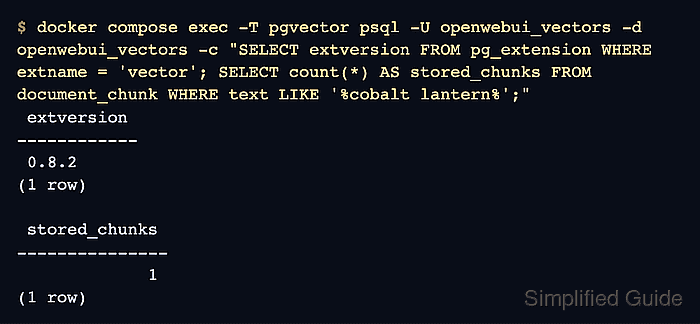
- Confirm the extension and stored document chunks in the vector database.
$ docker compose exec -T pgvector psql -U openwebui_vectors -d openwebui_vectors -c "SELECT extversion FROM pg_extension WHERE extname = 'vector'; SELECT count(*) AS stored_chunks FROM document_chunk WHERE text LIKE '%cobalt lantern%';"
 extversion
------------
 0.8.2
(1 row)

 stored_chunks
---------------
             1
(1 row)
The chunk count must be greater than zero. A missing table or zero matching rows means the upload has not reached this vector database. A connection failure points to the service, login, or database name. The stored vector width can include padding and does not identify the embedding model; changing the model or vector dimensions on an existing store needs a planned reindex.
- Retrieve the known passage from the uploaded file's vector collection.
$ docker compose exec -T open-webui python -c '
import json, requests
with open("/tmp/pgvector-check.json") as state:
    check = json.load(state)
r = requests.post("http://127.0.0.1:8080/api/v1/retrieval/query/doc",
    headers={"Authorization": "Bearer " + check["token"]},
    json={"collection_name": check["collection_name"],
          "query": "Where is the cobalt lantern stored?", "k": 1, "hybrid": False},
    timeout=180)
r.raise_for_status()
documents = r.json()["documents"]
assert documents and documents[0], "No matching document returned"
passage = documents[0][0]
assert "cobalt lantern in cabinet 47" in passage, "Unexpected passage returned"
print(passage)
'
The north warehouse stores the cobalt lantern in cabinet 47. The delivery day is Thursday.
This calls vector retrieval directly, avoiding the full-text attachment shortcut that a small chat attachment can take. An empty result or a different passage means the collection, indexing, or embedding settings need attention. A matching passage plus the database rows confirms that the uploaded file is searchable through pgvector.
- Remove the temporary check files from the application container.
$ docker compose exec -T open-webui rm /tmp/pgvector-check.json /tmp/warehouse.txt
The uploaded document, indexed vectors, application records, and persistent volumes remain available. Existing documents still need their planned reindex before old search content is available through pgvector. Shared uploads and coordination are additional requirements before adding application replicas.