Measurements often need more than a single average before their pattern becomes clear. A median limits the influence of extreme values, standard deviation describes spread, and percentiles show how observations are distributed through a range.
A two-dimensional NumPy array can be reduced as one flattened dataset or along a selected axis. Using axis=0 summarizes each column across all rows, while axis=1 summarizes the values within each row.
Missing values and degrees of freedom change the meaning of a summary. np.nanmean() excludes NaN entries from each mean, while std() uses ddof=0 for a population calculation and ddof=1 for the common sample calculation.
Related: Calculate a histogram
Related: Filter NaN values
Related: Sort an array
Steps to calculate statistics with NumPy:
- Create statistics-calculate.py with the score matrix and one missing-value copy.
- statistics-calculate.py
import numpy as np

np.set_printoptions(precision=2, suppress=True)

scores = np.array(
    [
        [72.0, 75.0, 79.0],
        [80.0, 82.0, 88.0],
        [68.0, 74.0, 77.0],
        [88.0, 93.0, 96.0],
    ]
)

scores_with_missing = scores.copy()
scores_with_missing[1, 2] = np.nan
The scores rows represent records and the columns represent three comparable measurements. The copied array keeps the complete data available for ordinary reductions.
- Append whole-array center and spread calculations to statistics-calculate.py.
- statistics-calculate.py
print("overall mean:", scores.mean())
print("overall median:", np.median(scores))
print("population std:", round(float(scores.std()), 2))
print("sample std:", round(float(scores.std(ddof=1)), 2))
scores.std() divides by N through its default ddof=0. For sample data, ddof=1 changes the divisor to N - 1.
- Append column, percentile, and NaN-aware calculations to statistics-calculate.py.
- statistics-calculate.py
print("column means:", scores.mean(axis=0))
print("column quartiles:")
print(np.percentile(scores, [25, 50, 75], axis=0))
print("row means with NaN ignored:", np.nanmean(scores_with_missing, axis=1))
print("ordinary mean with NaN:", np.mean(scores_with_missing))
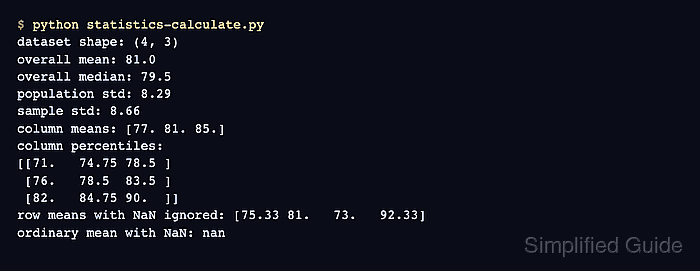
The percentile rows represent the 25th, 50th, and 75th percentiles for each column. An ordinary mean propagates NaN, whereas np.nanmean() calculates from the remaining values in each row.
- Run statistics-calculate.py to confirm that NumPy returns each summary from the score matrix.
$ python3 statistics-calculate.py
overall mean: 81.0
overall median: 79.5
population std: 8.29
sample std: 8.66
column means: [77. 81. 85.]
column quartiles:
[[71.   74.75 78.5 ]
 [76.   78.5  83.5 ]
 [82.   84.75 90.  ]]
row means with NaN ignored: [75.33 81.   73.   92.33]
ordinary mean with NaN: nan
The scalar values summarize all 12 scores, the three-element rows retain the selected axis, and the final nan confirms that the ordinary reduction does not ignore the missing entry.

Mohd Shakir Zakaria is a cloud architect with deep roots in software development and open-source advocacy. Certified in AWS, Red Hat, VMware, ITIL, and Linux, he specializes in designing and managing robust cloud and on-premises infrastructures.


