Missing observations in floating-point arrays often arrive as NaN values from imports, sensors, or calculations. Because NaN propagates through ordinary arithmetic, downstream code may need a smaller array containing only observed values.
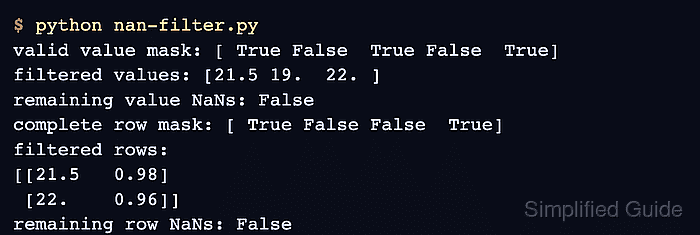
The np.isnan() function returns True at each NaN position. Inverting that result with ~ creates a mask for valid positions, and boolean indexing copies the selected values into a new array.
A mask with the same dimensions as its input selects individual elements and returns them in one dimension. To preserve table rows, reduce the NaN mask across columns with any(axis=1) and use the resulting one-dimensional mask to select complete records.
Related: Replace NaN and infinity
Related: Filter with a boolean mask
Related: Calculate statistics
Steps to filter NaN values from a NumPy array:
- Create nan-filter.py with the one-dimensional readings and their valid-value mask.
- nan-filter.py
import numpy as np

readings = np.array([21.5, np.nan, 19.0, np.nan, 22.0])
valid_values = ~np.isnan(readings)
np.isnan() marks only NaN values. A np.isfinite() mask also excludes positive and negative infinity.
- Add the one-dimensional selection and verification below the valid-value mask.
filtered_values = readings[valid_values]

assert np.array_equal(filtered_values, np.array([21.5, 19.0, 22.0]))

print("valid value mask:", valid_values)
print("filtered values:", filtered_values)
print("remaining value NaNs:", np.isnan(filtered_values).any())
- Run the partial script to confirm the value mask excludes both NaN entries.
$ python3 nan-filter.py
valid value mask: [ True False  True False  True]
filtered values: [21.5 19.  22. ]
remaining value NaNs: False
- Complete nan-filter.py with row filtering and assertions for both results.
- nan-filter.py
import numpy as np

readings = np.array([21.5, np.nan, 19.0, np.nan, 22.0])
valid_values = ~np.isnan(readings)
filtered_values = readings[valid_values]

samples = np.array(
    [
        [21.5, 0.98],
        [np.nan, 0.95],
        [19.0, np.nan],
        [22.0, 0.96],
    ]
)
complete_rows = ~np.isnan(samples).any(axis=1)
filtered_rows = samples[complete_rows]

assert np.array_equal(filtered_values, np.array([21.5, 19.0, 22.0]))
assert np.array_equal(filtered_rows, np.array([[21.5, 0.98], [22.0, 0.96]]))

print("valid value mask:", valid_values)
print("filtered values:", filtered_values)
print("remaining value NaNs:", np.isnan(filtered_values).any())
print("complete row mask:", complete_rows)
print("filtered rows:")
print(filtered_rows)
print("remaining row NaNs:", np.isnan(filtered_rows).any())
- Run the completed script to confirm the selected values and rows contain no NaN values.
$ python3 nan-filter.py
valid value mask: [ True False  True False  True]
filtered values: [21.5 19.  22. ]
remaining value NaNs: False
complete row mask: [ True False False  True]
filtered rows:
[[21.5   0.98]
 [22.    0.96]]
remaining row NaNs: False

Mohd Shakir Zakaria is a cloud architect with deep roots in software development and open-source advocacy. Certified in AWS, Red Hat, VMware, ITIL, and Linux, he specializes in designing and managing robust cloud and on-premises infrastructures.


